
Record what each student did today
Attendance tells you who came. Daily progress tells you how much each one did — with the columns you choose yourself, to match whatever your institution teaches.
The screenshots show the app in Bangla, its main language. The buttons sit in the same places in English.
-
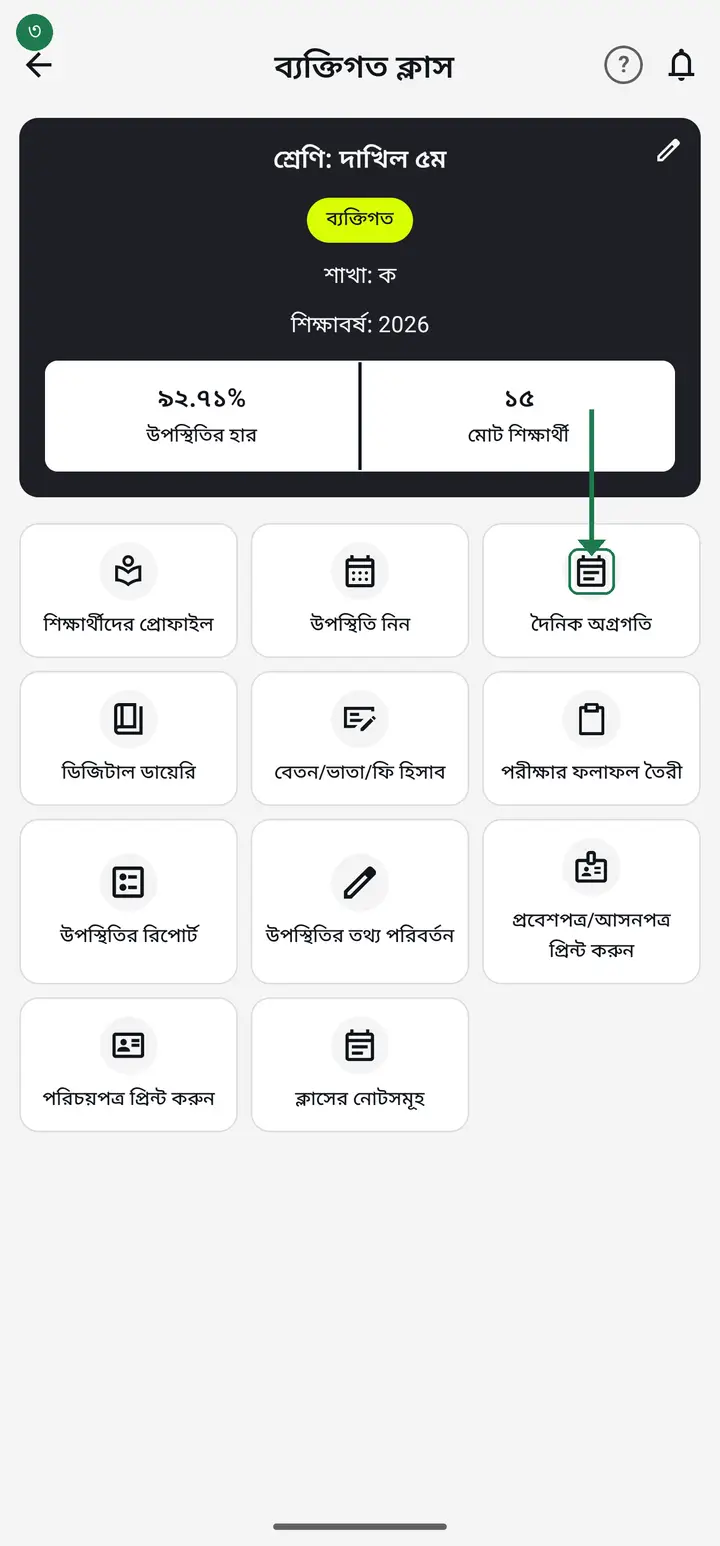
Tap "দেখুন" (View) on the class card. Just after "উপস্থিতি নিন" (Take attendance) you will find "দৈনিক অগ্রগতি" (Daily progress). Tap it.
-
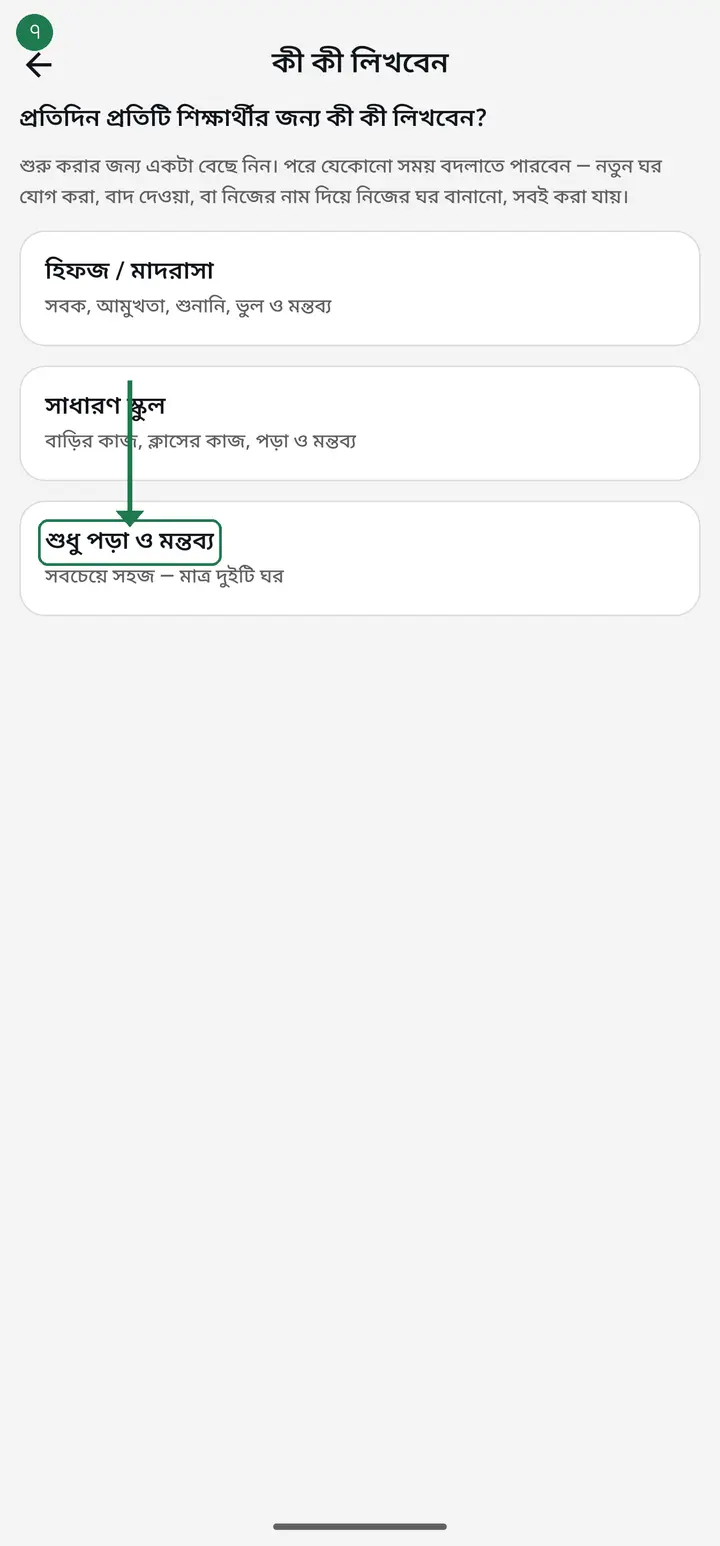
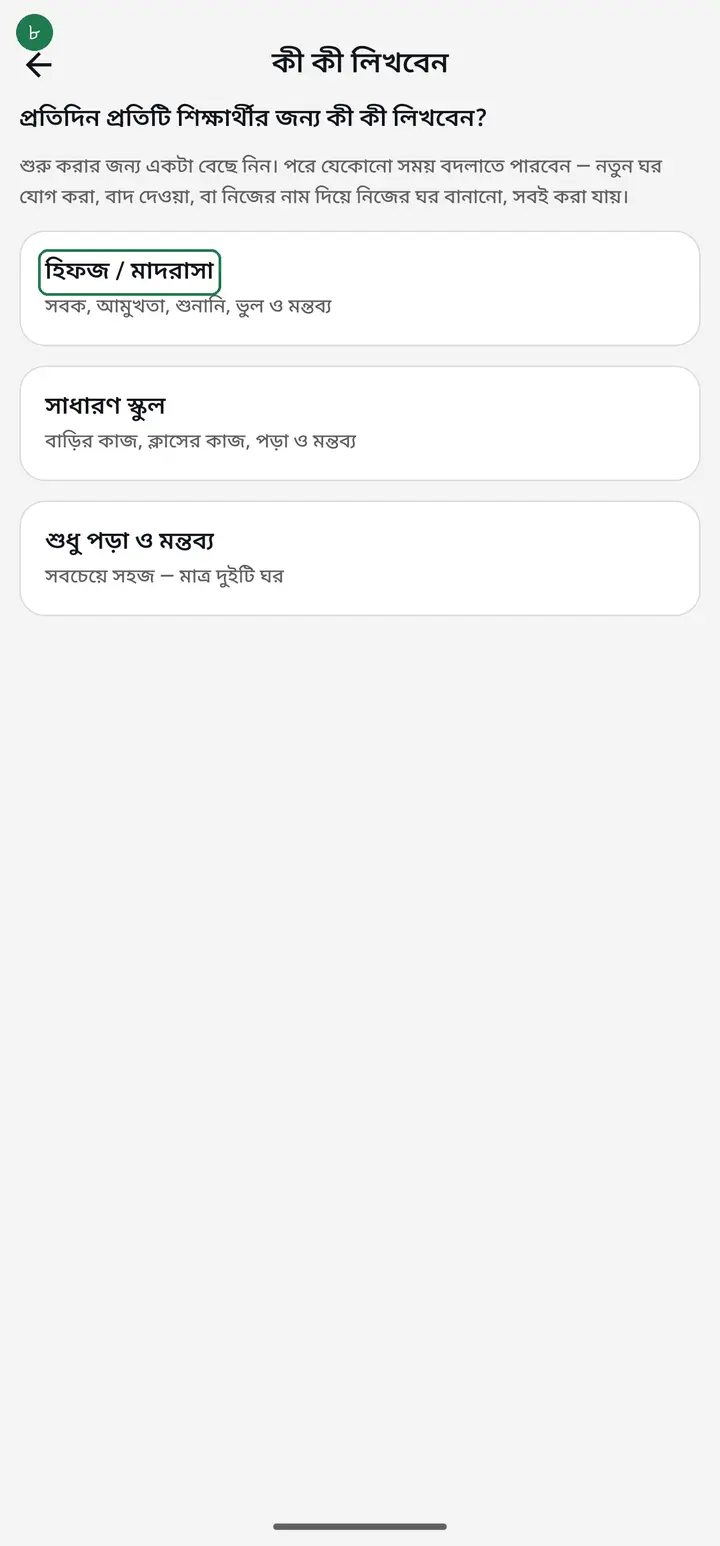
The first time, the app asks "প্রতিদিন প্রতিটি শিক্ষার্থীর জন্য কী কী লিখবেন?" (What should be recorded for each student every day?) and offers three ready-made lists. Pick whichever matches your institution. You do this once, for the whole class.
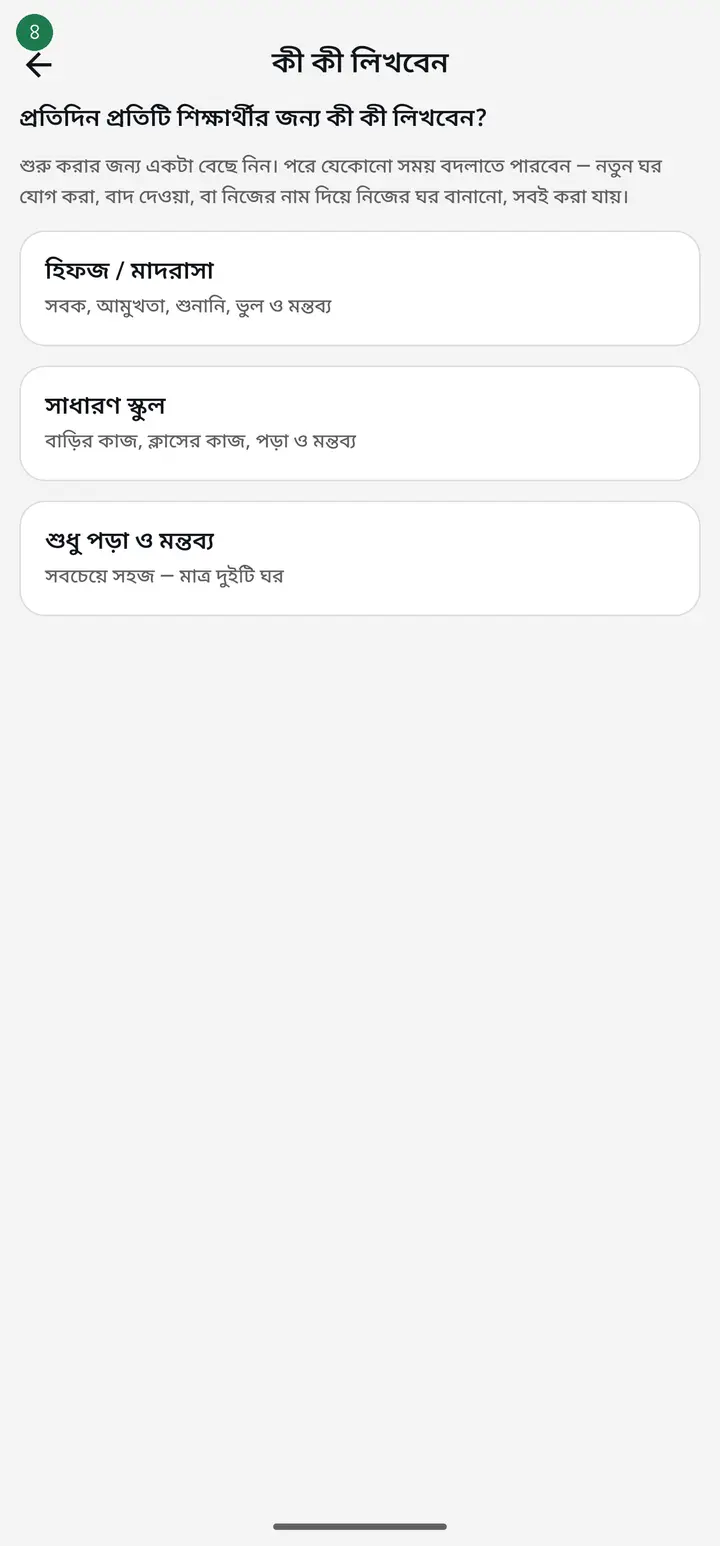
There is no wrong choice here. Whatever you pick can be changed any day — remove a column, add one, or create your own with your own name. Nothing you already recorded is lost.
-
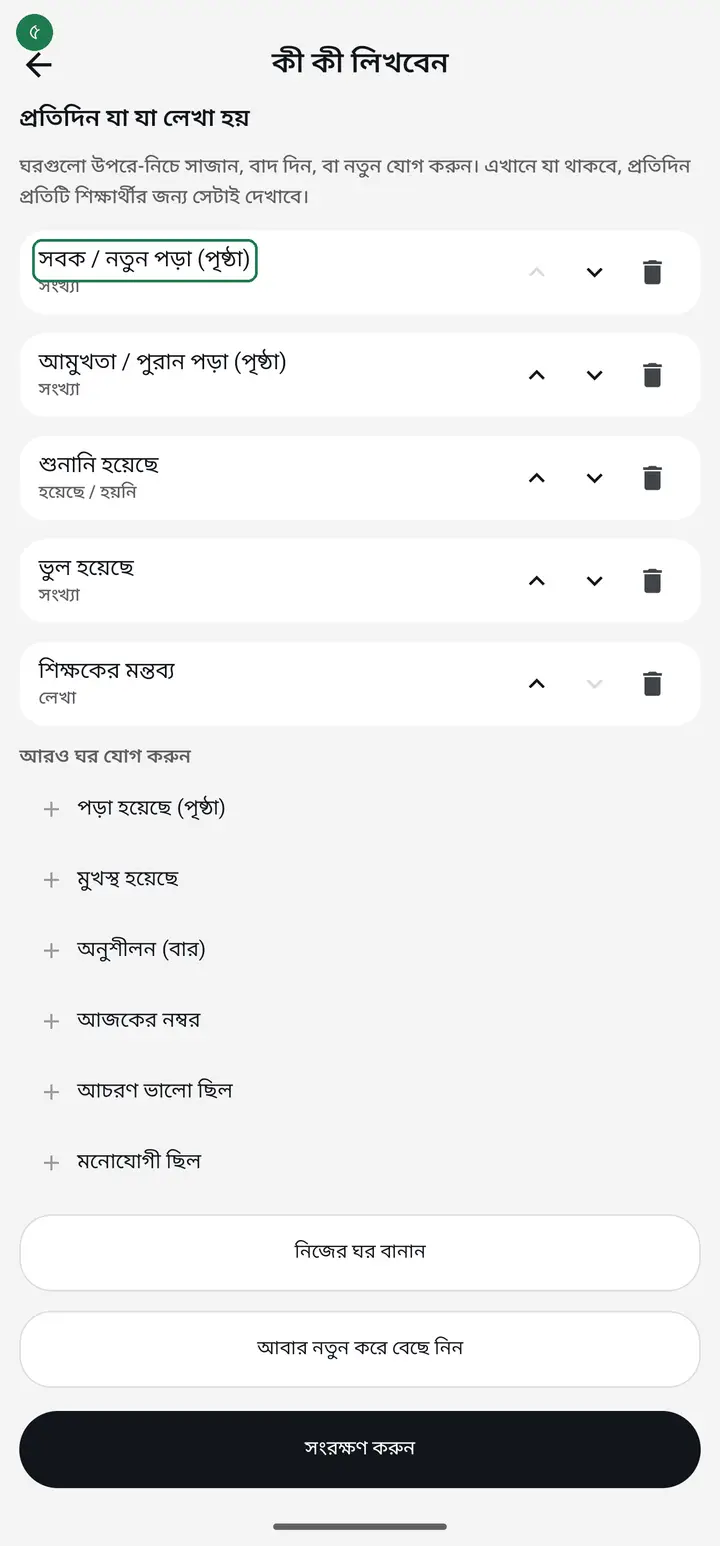
Choosing "হিফজ / মাদরাসা" (Hifz / madrasah) gives you — new lesson in pages, revision in pages, recited to teacher, mistakes, and a teacher's comment.
-
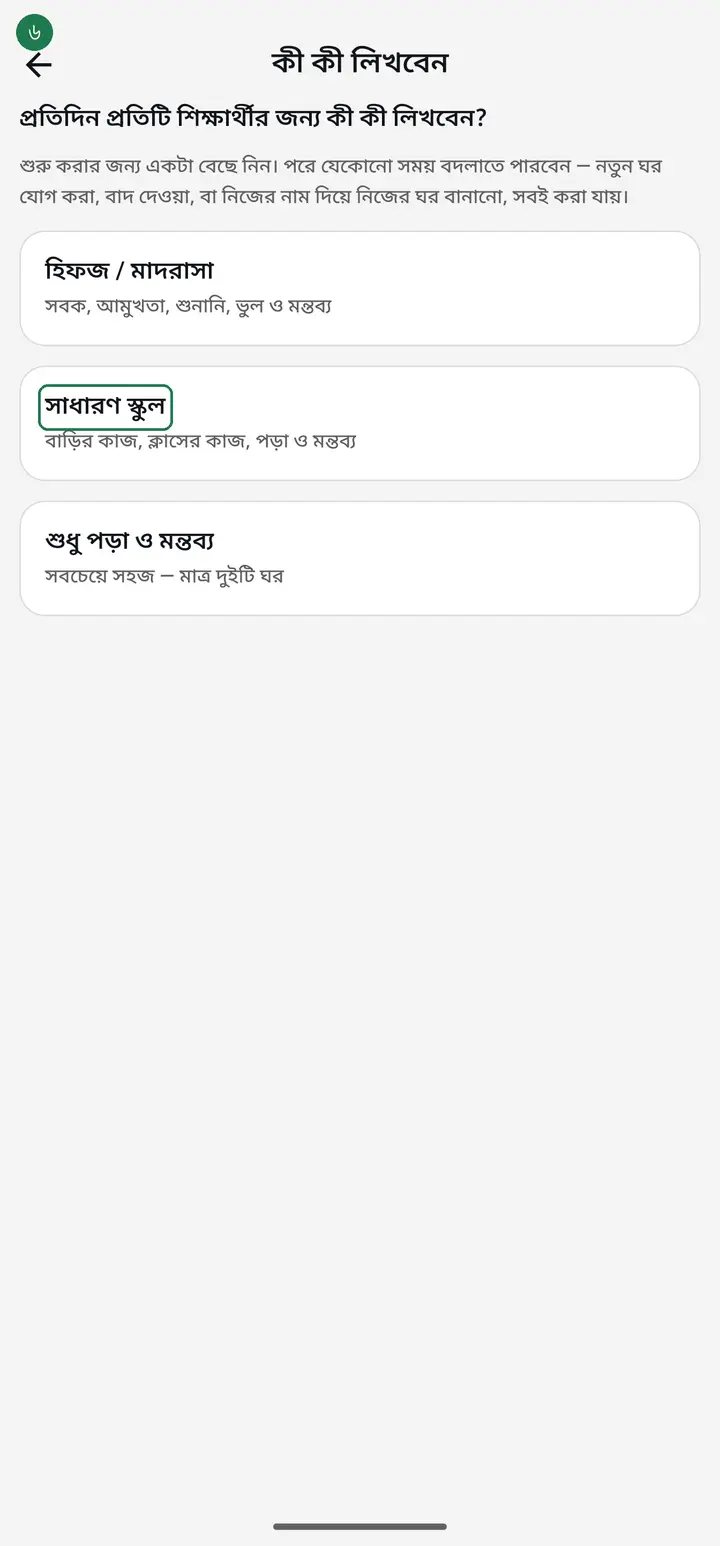
Choosing "সাধারণ স্কুল" (General school) gives you — homework done, classwork done, knew the lesson, and a teacher's comment. No madrasah vocabulary appears anywhere.
-
Just starting and want it simple? Take "শুধু পড়া ও মন্তব্য" (Lesson and comment only) — just two columns. It is the easiest start; add more once you are used to it.
-
Next opens "প্রতিদিন যা যা লেখা হয়" (What gets recorded daily). Reorder the columns, or tap "বাদ দিন" (Remove) on any you do not want. When it looks right, tap "সংরক্ষণ করুন" (Save).
-
For something specific to your institution, tap "নিজের ঘর বানান" (Create your own column). Type a name — handwriting, recitation, prayer, anything. Then pick the type — "হয়েছে / হয়নি" (Yes/No), "সংখ্যা" (a number), or "লেখা" (free text).
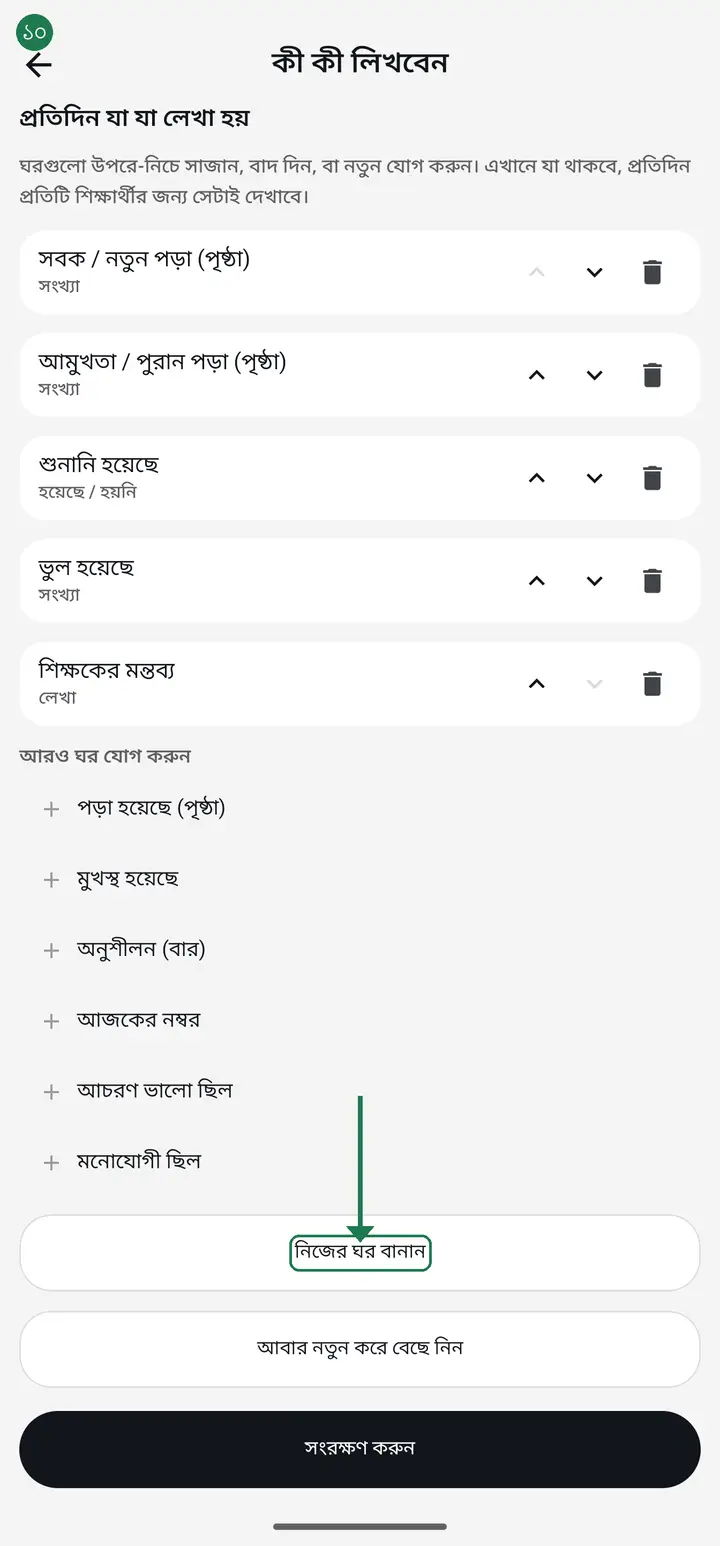
Choose the type thoughtfully. "হয়েছে / হয়নি" is one tap of two buttons — the fastest. "সংখ্যা" (a number) gets added up into a monthly total. "লেখা" (free text) is written in the teacher's own words and is never added up.
-
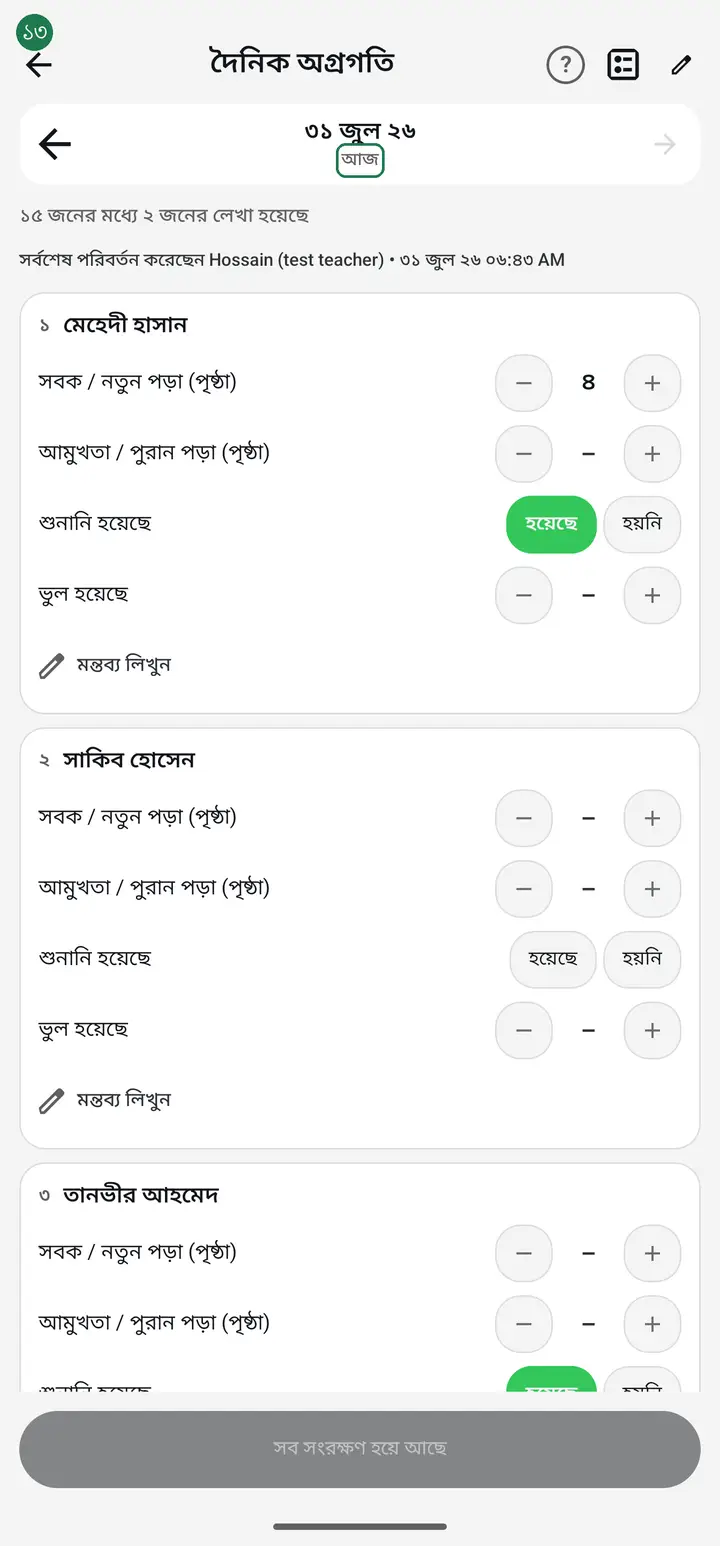
Now the daily job. Opening "দৈনিক অগ্রগতি" shows the date at the top — marked "আজ" (Today). Below it every student in your class, each with the columns you chose.
-
A number column has minus (−) and plus (+) buttons to raise or lower the figure. A yes/no column has two buttons — tap one. To write a note, tap "মন্তব্য লিখুন" (Write a comment).
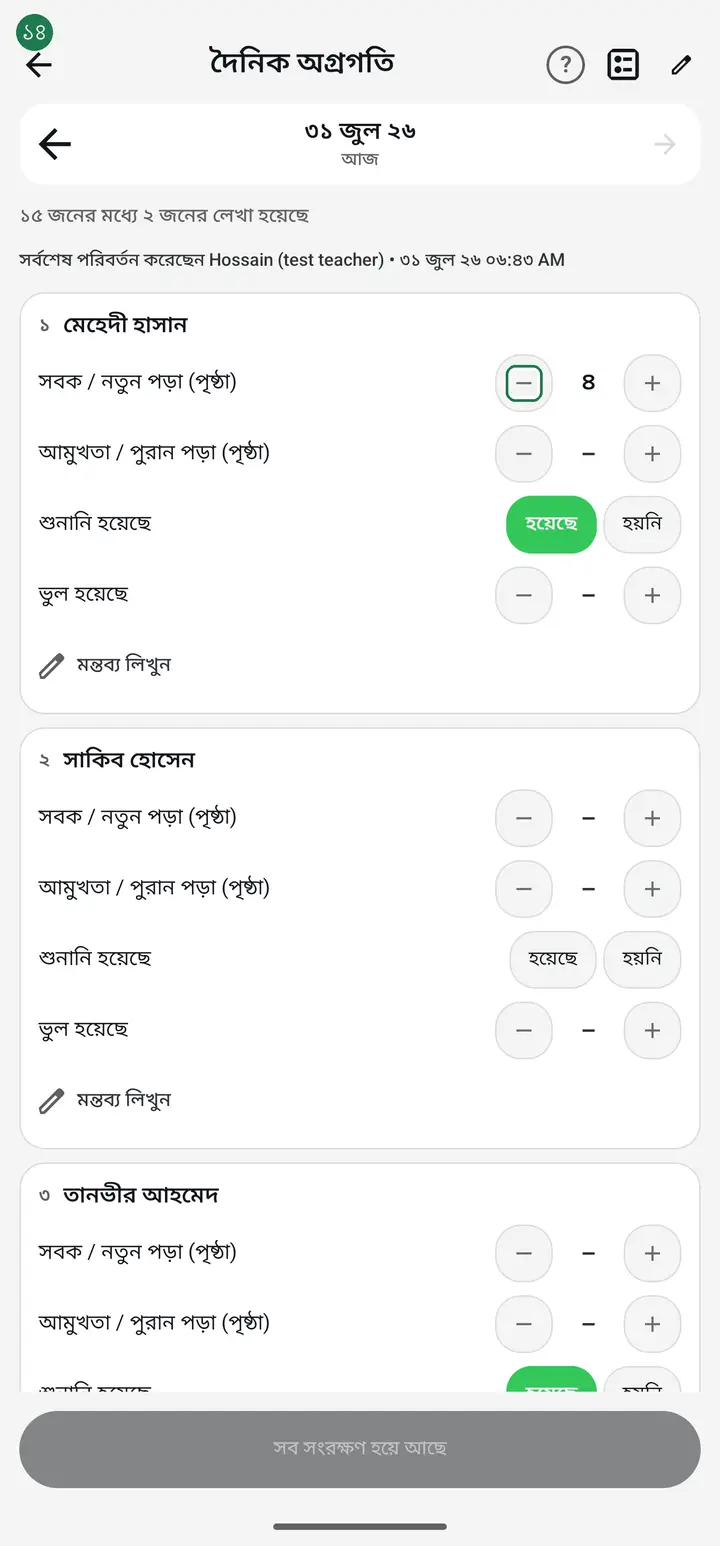
-
A line at the top always shows how many are done — for example "৪০ জনের মধ্যে ১২ জনের লেখা হয়েছে" (12 of 40 recorded). That is how you spot who you missed.
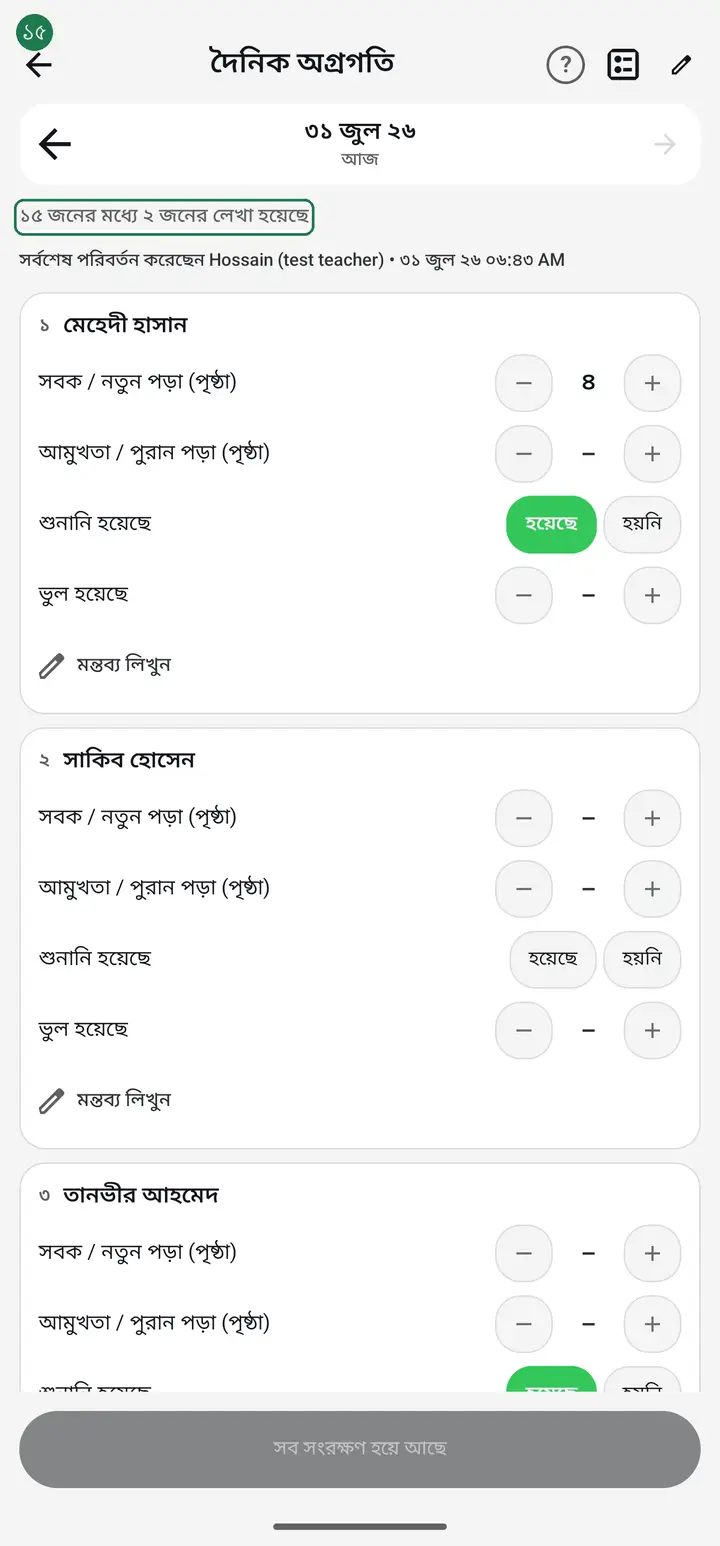
-
When you are done, tap "আজকের অগ্রগতি সংরক্ষণ করুন" (Save today's progress) at the bottom. "আজকের অগ্রগতি সংরক্ষণ হয়েছে" confirms it. If the button reads "সব সংরক্ষণ হয়ে আছে" (Everything is saved) there is nothing left to press.
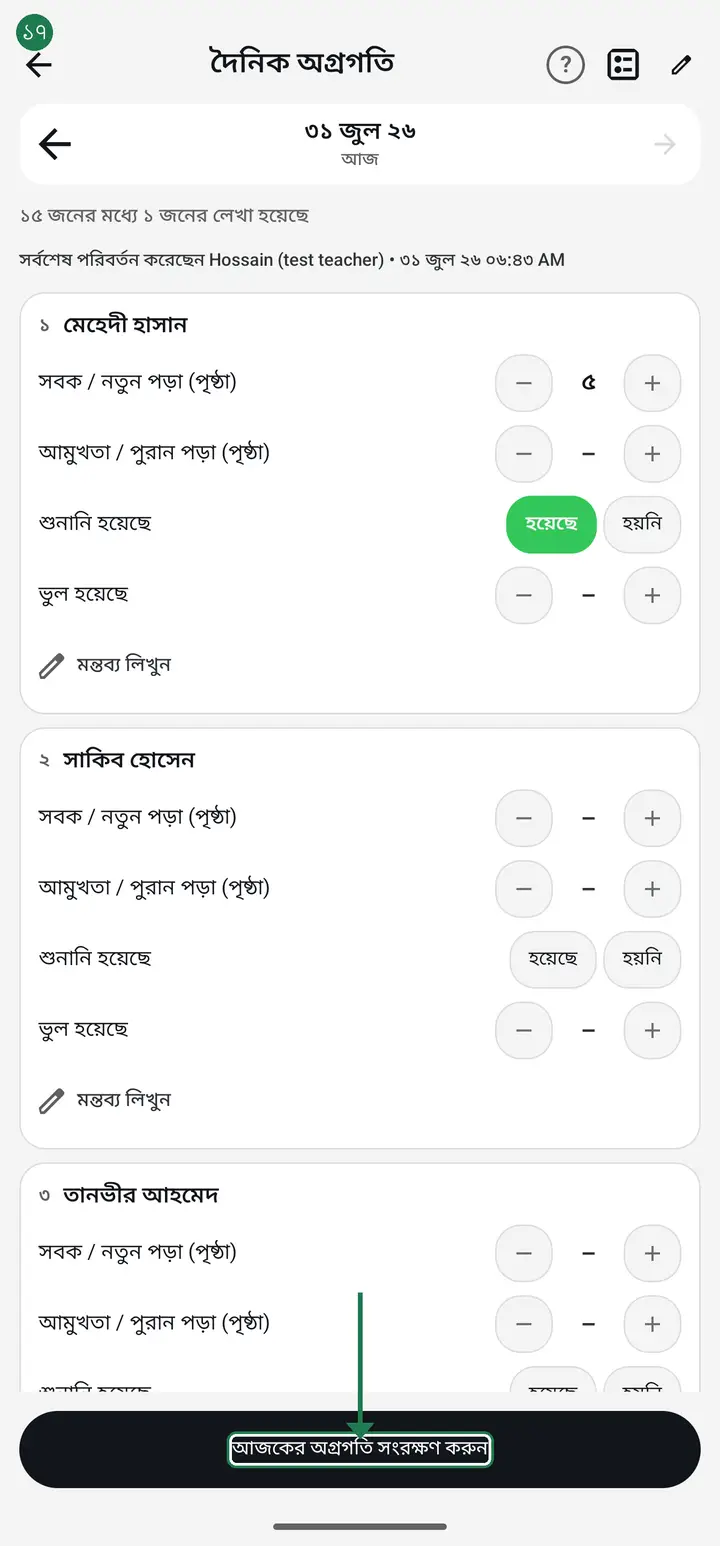
Save even with no internet. The entry stays on your phone and uploads itself when the connection returns. No need to tap repeatedly or wait.
-
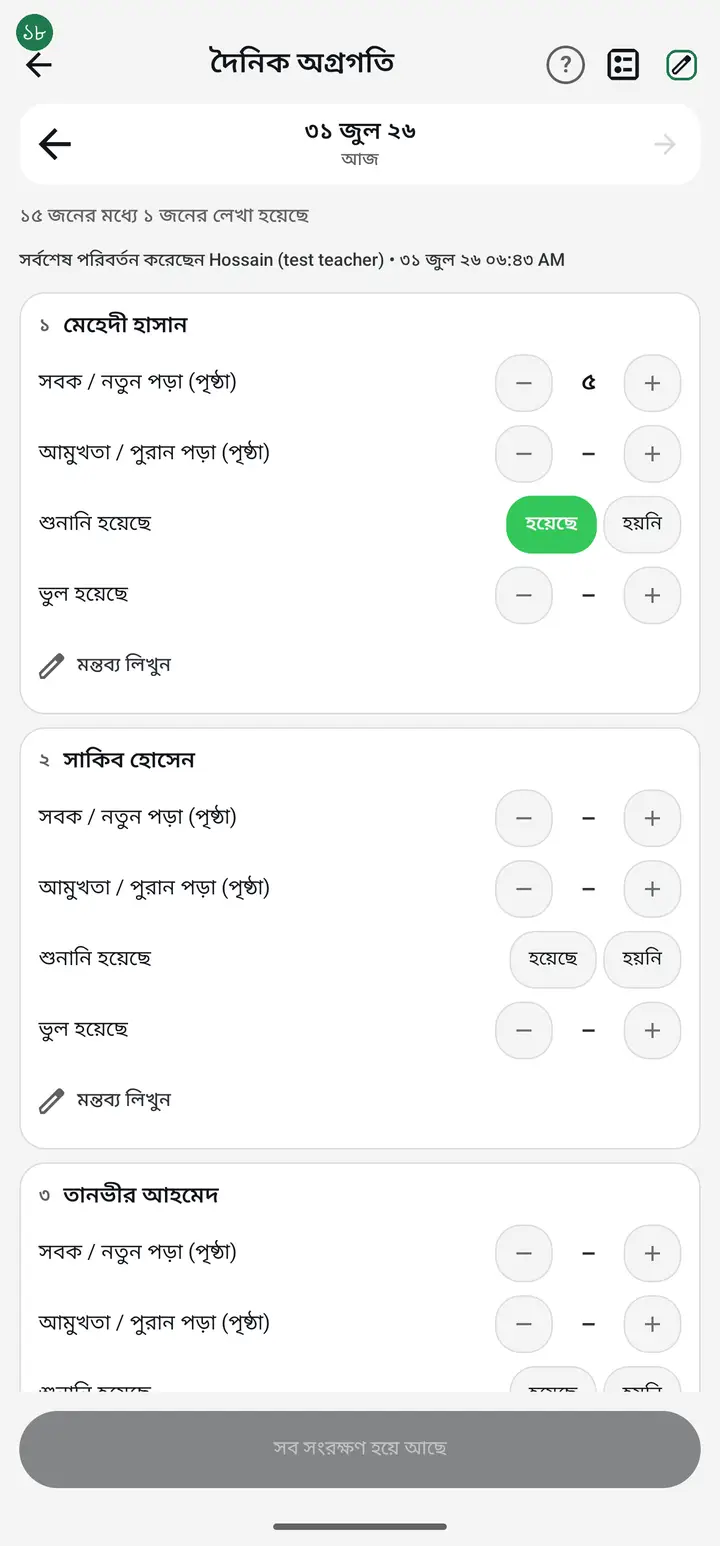
To change the columns later, tap the settings icon at the top ("কী কী লিখবেন ঠিক করুন" — Choose what to record). You can change them any day without harming what you already recorded.
Common questions
We are a madrasah. Can we track sobok and amukhta here?
Yes. Pick the "হিফজ / মাদরাসা" list and you get new lesson, revision, recitation and mistakes as ready columns. Page counts add themselves up into a monthly total — you never add them by hand.
We are an ordinary school and do not need any of that.
You will not see it. "সাধারণ স্কুল" gives you homework, classwork and lesson — no madrasah words appear anywhere. Columns are per class, so one institution can run different kinds of class side by side.
Am I stuck with what I picked?
Not at all. Tap the settings icon any day to remove, add or reorder columns, or tap "আবার নতুন করে বেছে নিন" (Start over) to change the whole list. Nothing already recorded is deleted.
Do I have to fill all this in for 40 students every day?
Keep only the columns you need — fewer columns, less time. Starting with "শুধু পড়া ও মন্তব্য" is one tap per student, so a class of 40 takes about two minutes. And you do not have to record everyone: a student left blank stays blank and is never counted as a zero in the report.
What if a student is absent that day?
Leave their columns blank — nothing to press. The app tells blank and zero apart: blank means "not recorded", zero means "recorded, and it was none". So absences and holidays are never counted against the student in the report.
Does this replace attendance?
No, it is a separate job. Attendance records who came; daily progress records how much they did. They are stored separately and neither affects the other.
Can guardians see this?
Not by themselves. They only see it when you build and send the monthly report. Teacher comments do go into that report, so write them as something a guardian can read.
A page has 15 lines but some students read only 10. How do I record that?
Count lines instead of pages. Tap the settings icon at the top → "নিজের ঘর বানান" (Create your own column) → name it, e.g. "সবক (লাইন)" → pick "সংখ্যা" (a number) → "যোগ করুন" (Add) → "সংরক্ষণ করুন" (Save). Then a student who read 10 lines gets 10, a full page gets 15, and the month adds the lines up for you. If you no longer need the pages column, tap "বাদ দিন" (Remove) — nothing already recorded is deleted.
I saved my own column, but when I open it again it is gone. Was it deleted?
No — it was saved. Up to version 3.2.284 there is a problem: going back into "দৈনিক অগ্রগতি" while the class page is still open shows the old list. Close the app completely, open it again and go into the class — your columns will be back. Careful: do not press "সংরক্ষণ করুন" (Save) while the old list is showing — that really would delete your columns. This is fixed in version 3.2.285.
Ask AI about this page
Ask an AI app to explain this page in simple language.
Copied — now paste it
Get Hazira Khata free on Google Play
More tutorials
- How to sign in Signing in for the first time with your phone number. No email or password needed.
- Add a second way to sign in to one account Add Gmail to an account created with a phone number. It stays one account and nothing inside it changes.
- How to mark your own attendance As a teacher you can record your own daily attendance — it takes one tap.
- Check your salary and sign "received" When your school records your salary, the app tells you. Check the receipt and tap "বেতন বুঝে পেয়েছি" (Salary received) to leave your own digital signature — proof for both sides.
- How to create a class Before you can take attendance you create the class once. A one-time job.
- Putting your classes in your own order — press, hold and drag KG Two showing before KG One? Classes appear in the order you created them. On the "শ্রেণী কার্যক্রম" page, press and hold a card and drag it where you want — no need to rename anything.
- Make receipts and results look right — font and size Documents printing in an ugly font? Change it in one place and the receipt, result slip and certificate all change together.
- How to add students Enter each student's name and roll once. After that, daily attendance is just ticking boxes.