
How to mark your own attendance
As a teacher you can record your own daily attendance — it takes one tap.
The screenshots show the app in Bangla, its main language. The buttons sit in the same places in English.
-
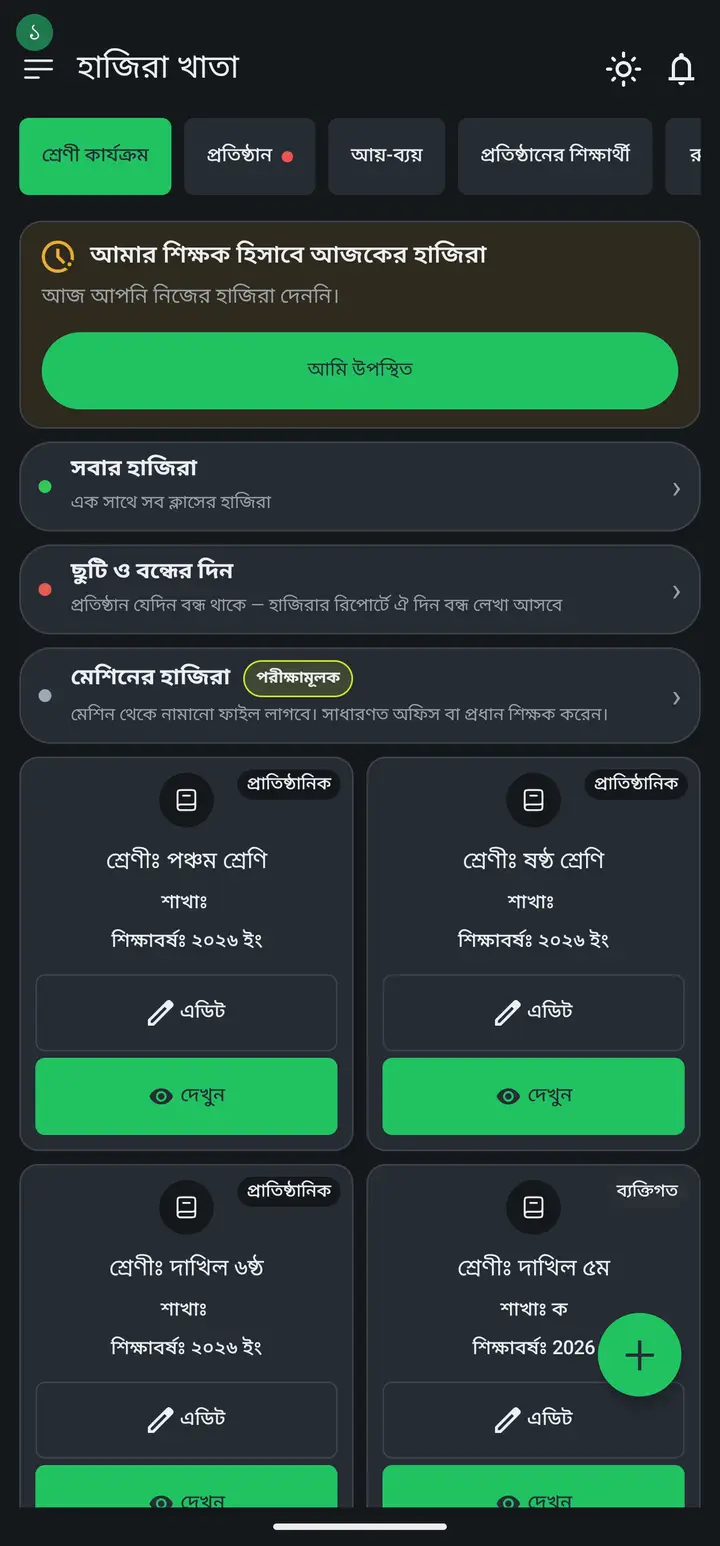
Open the app. At the top you see a card titled "আমার শিক্ষক হিসাবে আজকের হাজিরা" (My attendance as a teacher today).
-
Tap "আমি উপস্থিত" (I am present). Your attendance for today is recorded.
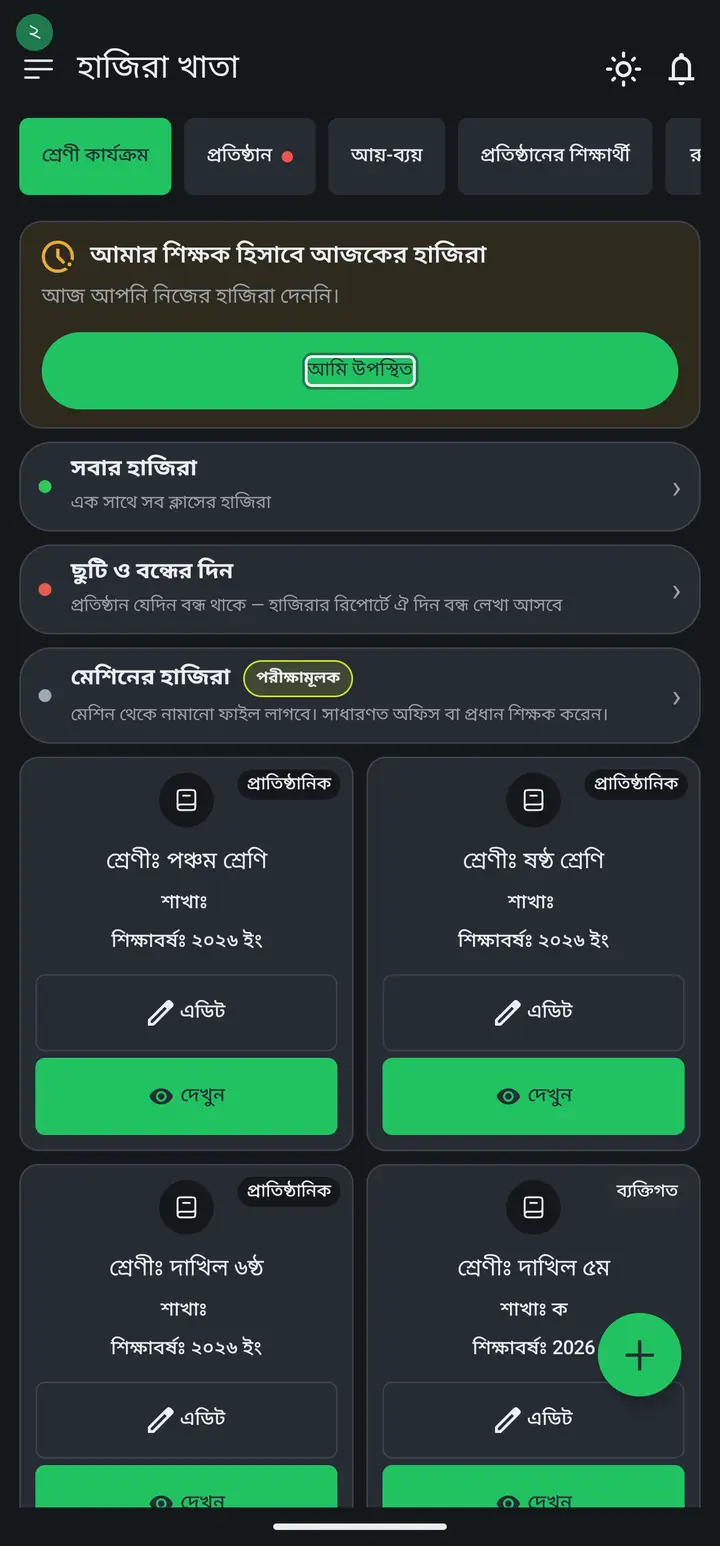
It can only be recorded once a day. If it is wrong, ask your institution admin to correct it.
-
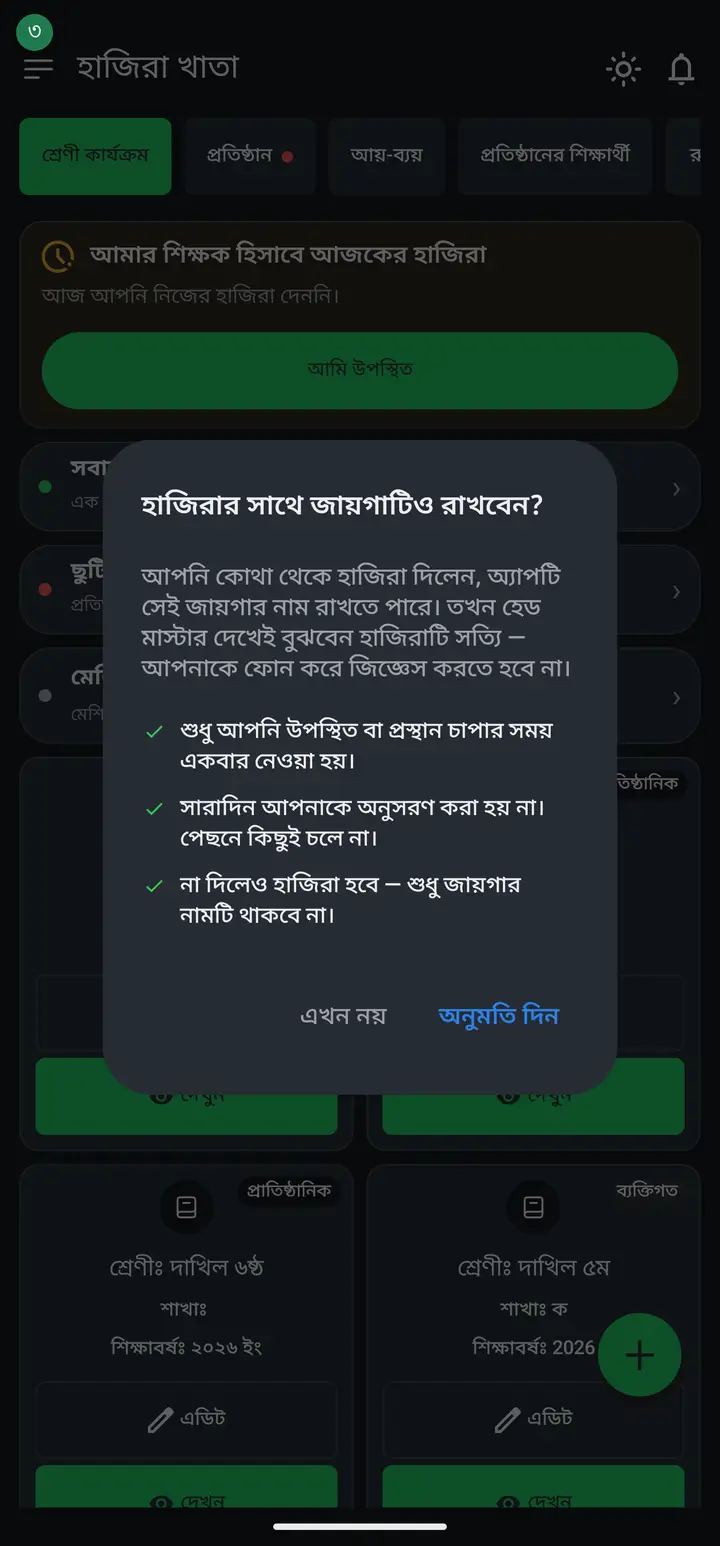
The first time you tap it, the app asks "হাজিরার সাথে জায়গাটিও রাখবেন?" (Save the place along with your attendance?) — our own dialog, shown before the phone's system prompt, so you know in Bangla what is being taken. Tap "অনুমতি দিন" (Allow) and the place you marked attendance from is saved along with it.
-
If you would rather not, tap "এখন নয়" (Not now) — attendance still works, only the place is missing. What is taken: one reading at the moment you tap present or leave. You are not followed through the day and nothing runs in the background.
Your head master or admin will later be able to see that place on a map — where you marked attendance from. Decide knowing that. If you do not share it, the log simply says "অবস্থান দেননি" (Location not shared), which is not held against you.
-
If your institution has put up a QR poster at the gate or office, scanning it with your phone camera marks you present — you do not have to open the app and find the card. A scan does exactly the same things as the tap: it asks for your fingerprint, tries to take the place, then records the attendance.
If there is no poster you are not missing anything. The poster and the button write the same attendance; only the route differs. Where there is no poster, the button does the job.
-
Once done, the card shows today's status.
Common questions
Does the app watch my location all day?
No. It is read once, at the moment you tap "আমি উপস্থিত" or leave. Nothing runs in the background outside that, and certainly not while the app is closed.
If I do not share my location, does attendance fail?
No. Sharing is optional — attendance is recorded either way, only the place name is missing. On many phones GPS is weak or does not lock indoors, so you may sometimes see "অবস্থান পাওয়া যায়নি" (Location not found) — that is fine too.
I tapped "Not now" once — how do I turn it on?
The attendance card shows a small line saying location is off, and you can enable it from there. If you blocked it outright earlier, grant this app location permission in the phone's Settings. It applies from your next check-in onward — it cannot fill in past days.
What is the difference between scanning the gate poster and tapping "আমি উপস্থিত"?
For your attendance, none. Both write the same record in the same place, both ask for your fingerprint, both try to take the place. The only difference is one extra note in the log — whether that mark came from scanning the poster. For the admin it is one more piece of information, nothing more.
If I do not scan the poster, does my attendance fail?
No. The poster is not required — the "আমি উপস্থিত" button records it. If your camera is broken, the poster is torn, or you arrive before it goes up, use the button.
Is this the students' attendance?
No. This is your own — whether you, the teacher, came in today. Student attendance is taken inside a class from "উপস্থিতি নিন".
Why do I not see this card?
It is for institution members. If you are not attached to an institution, the card does not appear.
Ask AI about this page
Ask an AI app to explain this page in simple language.
Copied — now paste it
Get Hazira Khata free on Google Play
More tutorials
- How to sign in Signing in for the first time with your phone number. No email or password needed.
- Add a second way to sign in to one account Add Gmail to an account created with a phone number. It stays one account and nothing inside it changes.
- Check your salary and sign "received" When your school records your salary, the app tells you. Check the receipt and tap "বেতন বুঝে পেয়েছি" (Salary received) to leave your own digital signature — proof for both sides.
- How to create a class Before you can take attendance you create the class once. A one-time job.
- Putting your classes in your own order — press, hold and drag KG Two showing before KG One? Classes appear in the order you created them. On the "শ্রেণী কার্যক্রম" page, press and hold a card and drag it where you want — no need to rename anything.
- Make receipts and results look right — font and size Documents printing in an ugly font? Change it in one place and the receipt, result slip and certificate all change together.
- How to add students Enter each student's name and roll once. After that, daily attendance is just ticking boxes.
- How to add a whole class at once You do not have to type 40 names one by one. Type or paste the list and add everyone at once — no computer needed.