
How to sign in
Signing in for the first time with your phone number. No email or password needed.
The screenshots show the app in Bangla, its main language. The buttons sit in the same places in English.
-
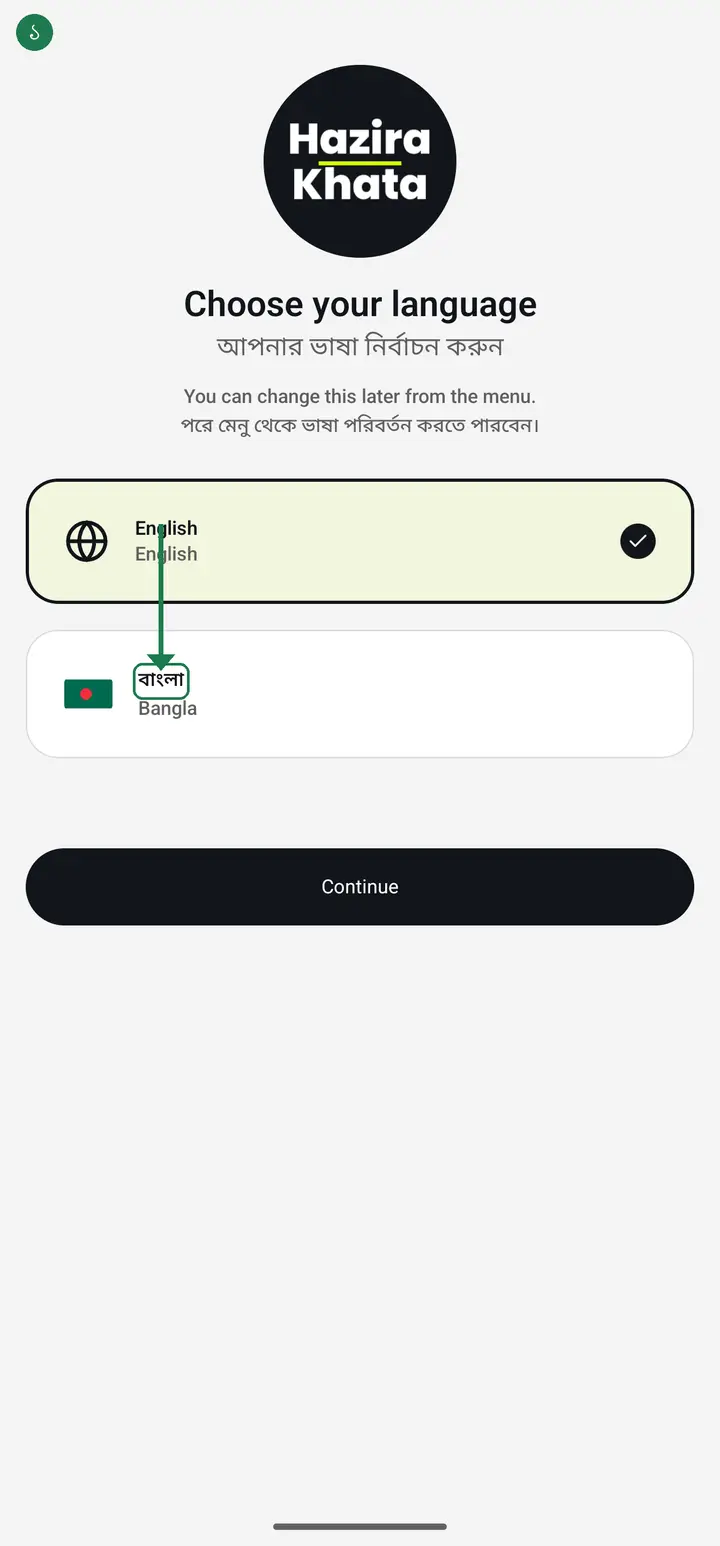
Open the app. It asks for a language first — tap "বাংলা" (Bangla), then tap "Continue" at the bottom.
-
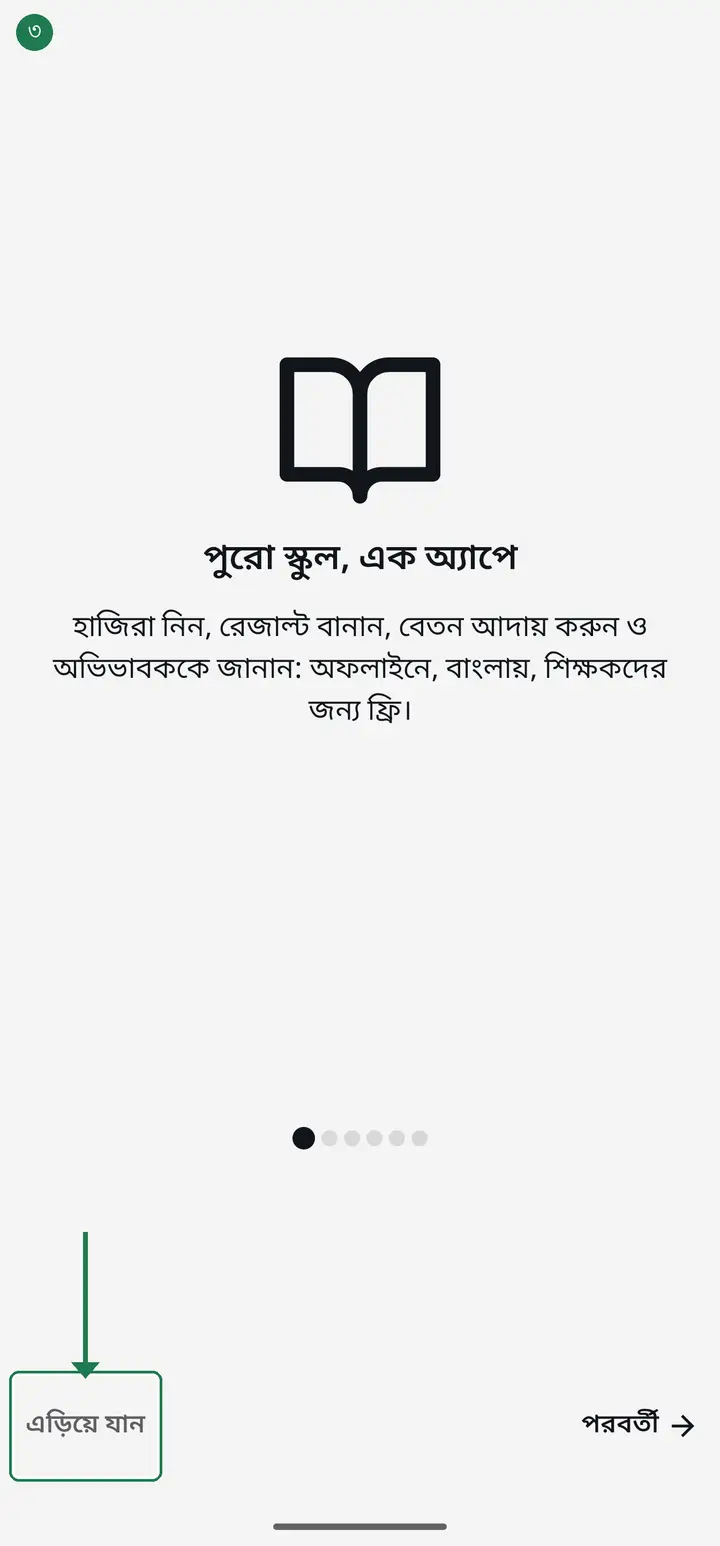
A few intro pages appear. Tap "এড়িয়ে যান" (Skip) to go straight past them.
-
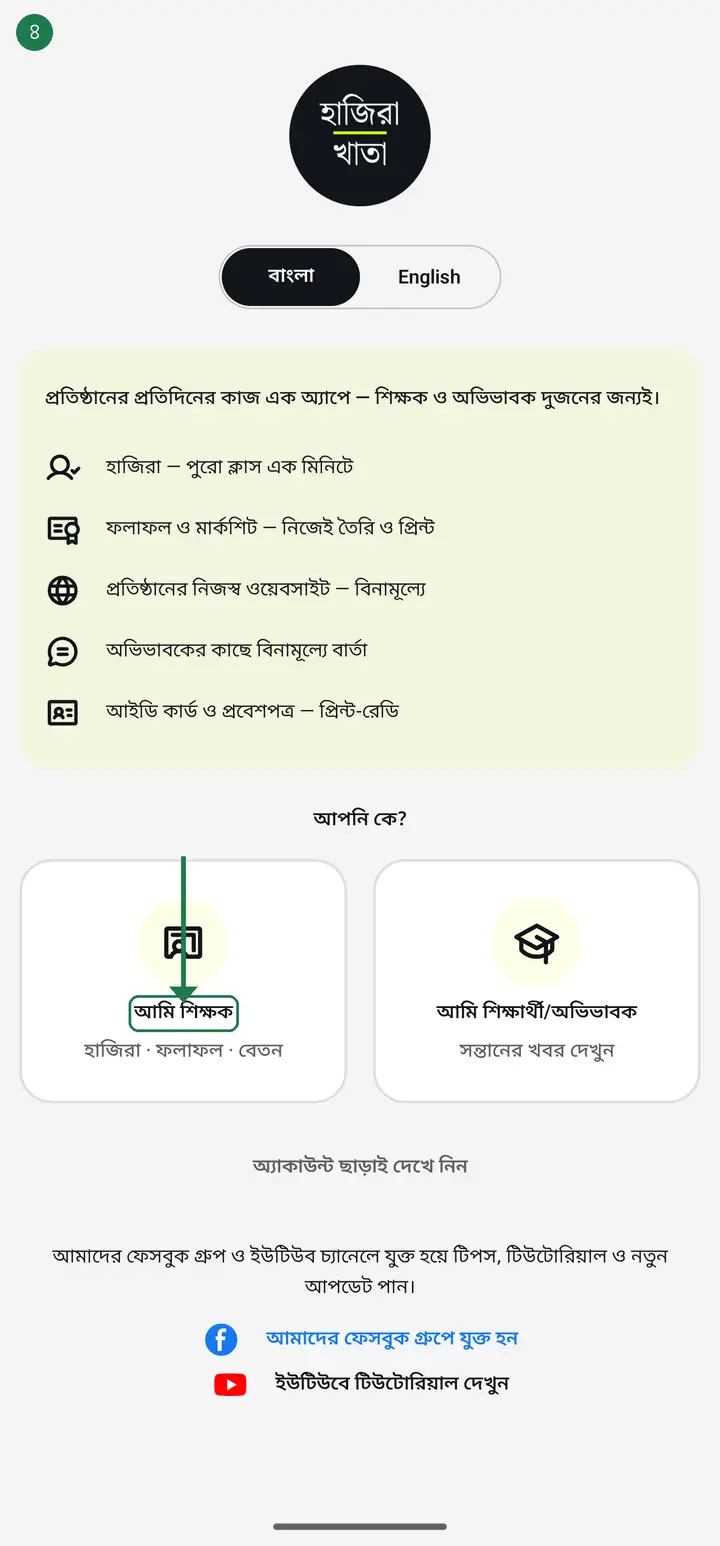
On "আপনি কে?" (Who are you?), tap "আমি শিক্ষক" (I am a teacher).
-
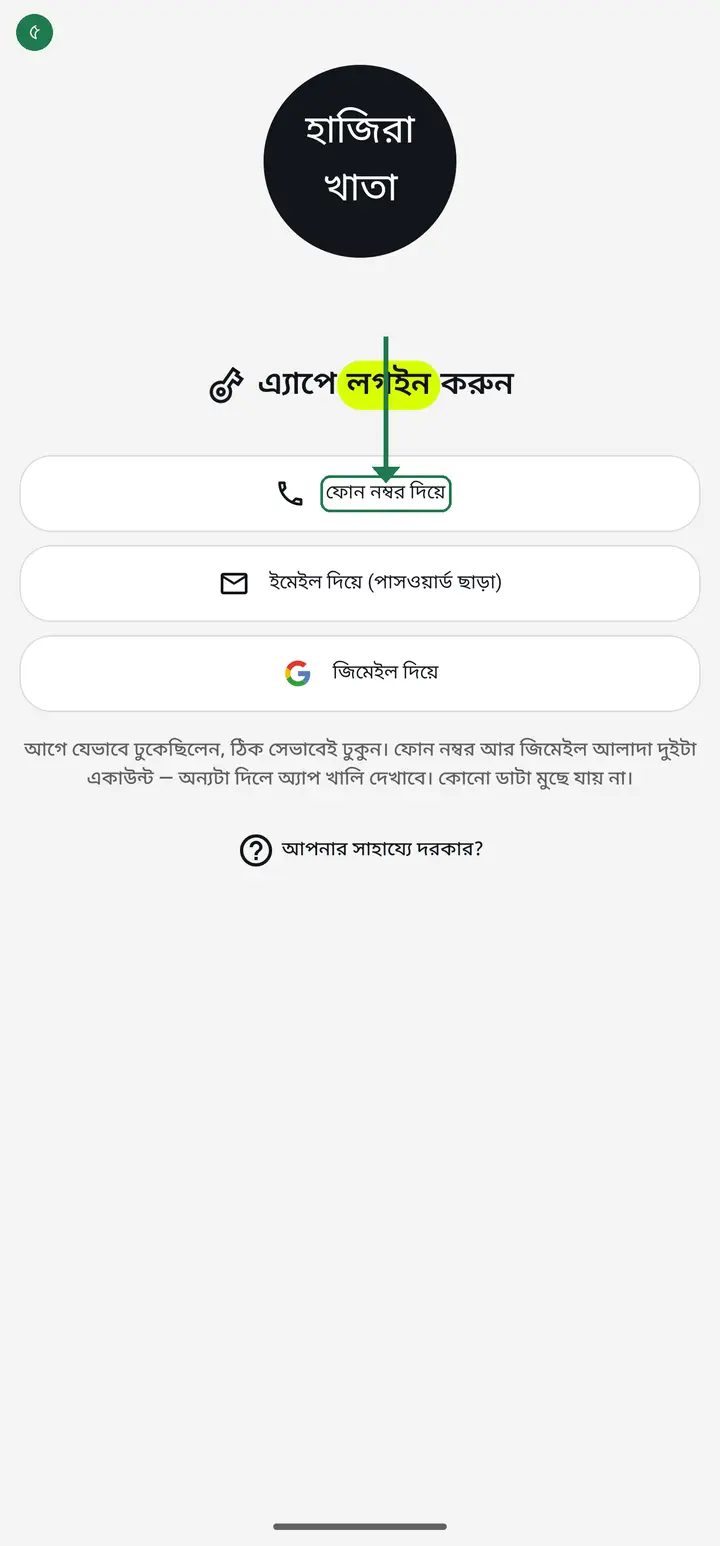
Tap "ফোন নম্বর দিয়ে" (With a phone number).
-
Tap the country code next to the flag and pick "বাংলাদেশ" (Bangladesh) from the list. The code becomes +880.
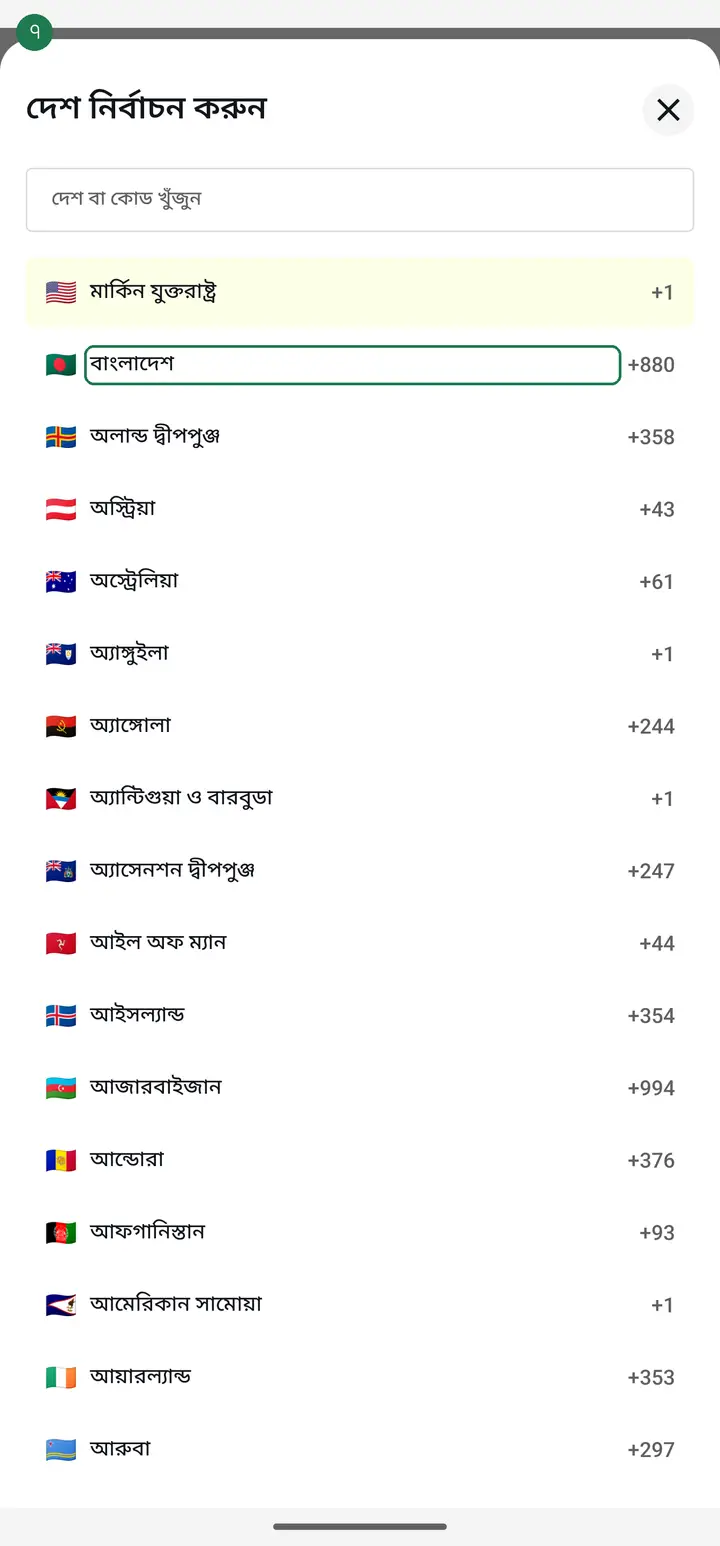
Skipping this sends your number to the wrong country and the code never arrives. Check that it shows +880.
-
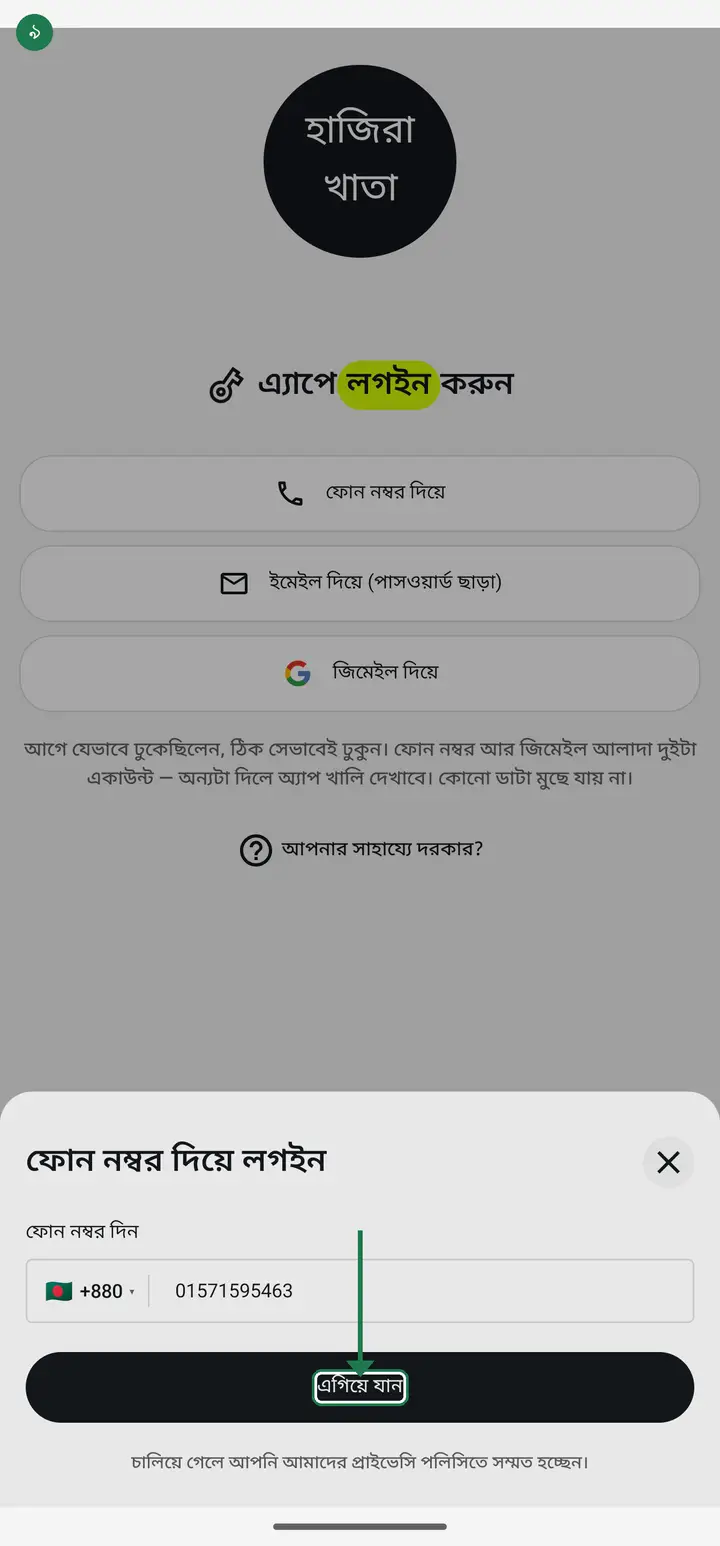
Type your own mobile number starting with 0, for example 017xxxxxxxx. Then tap "এগিয়ে যান" (Continue).
-
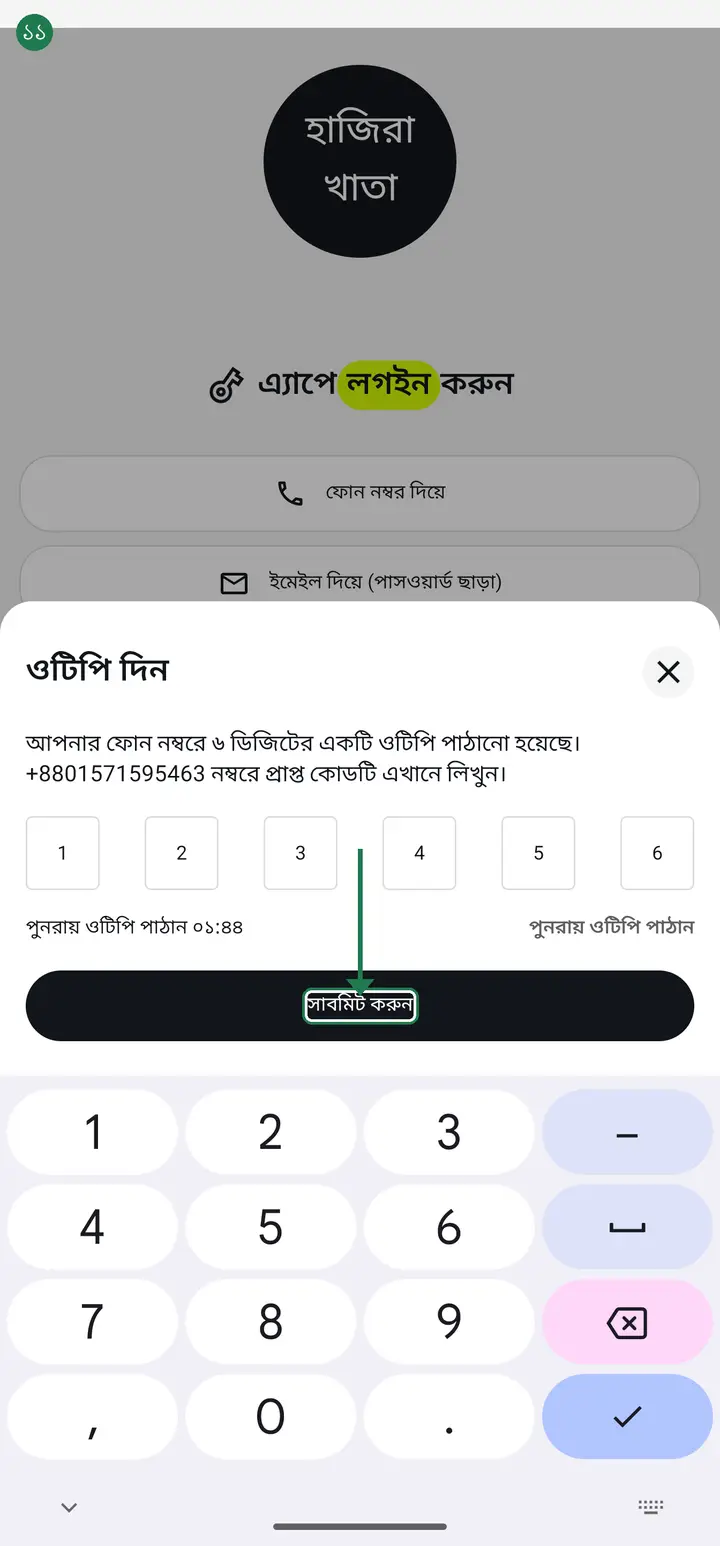
A 6-digit code comes to your phone. Type it into the boxes and tap "সাবমিট করুন" (Submit).
-
It asks how you want dates shown, and asks permission for notifications. Choose what you prefer on both — and you are in.
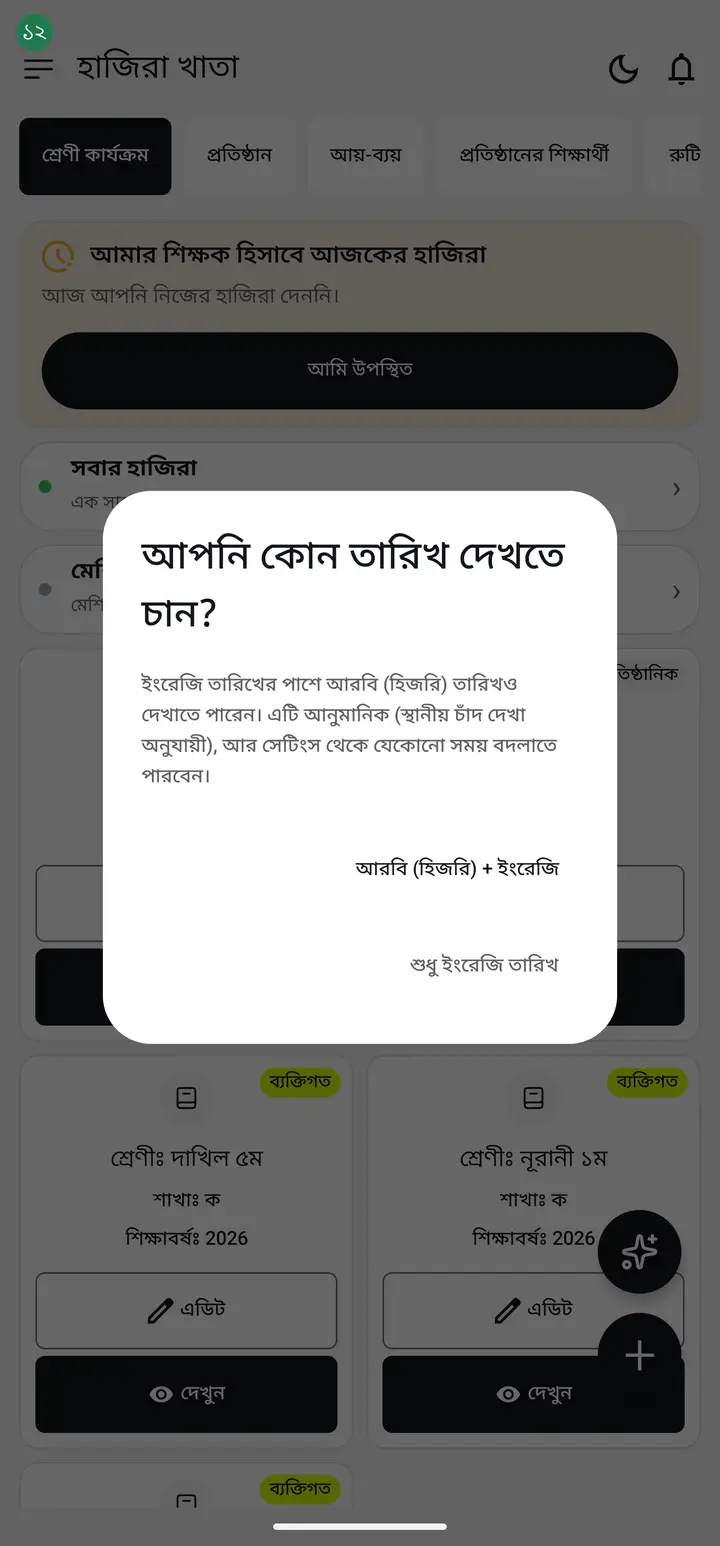
Allowing notifications lets the app remind you at attendance time. The app works fully without it too.
Common questions
If I log out, will I be able to get back in? I am nervous.
Yes. Logging out is just walking out of the door — you come back in through the same one. Sign in again with the same phone number, a fresh OTP arrives, and you are in. Nothing has to be set up again. Do one thing first: before you log out, open the menu (the three lines at the top left) — your number is written at the top of it. Note it down. Sign back in with exactly that number. This is where most people get stuck — they started with a phone number but come back through Gmail. Everything then looks empty and it feels like the data is gone. It is not; it is a different door. Use exactly what the menu showed you.
If I log out, will my attendance, student names and fee records be deleted?
No, nothing is deleted. Your data is stored on the server against your account, not on the phone. Even if you lose the phone, signing in with that number on a new phone brings it all back. Logging out only signs you out of this phone; it does not touch the data. One thing to watch — be online when you log out. Attendance taken offline sits on the phone until the network returns. Logging out before it has gone up can lose those few entries. Stay online, wait a moment, then log out.
Where is the log out button?
Tap the three lines at the top left (menu). A panel slides in from the left. "লগ আউট" (Log out) is at the bottom of it. The app asks once — "আপনি কি লগ আউট করতে চান? আবার লগইন করতে হবে।" (Do you want to log out? You will have to sign in again) — so an accidental tap costs nothing.
All my data is gone! I opened the app and everything is empty.
Stay calm — nothing is gone. 99% of the time the cause is one thing: you signed in as a different identity this time. To Hazira Khata, your phone number and your Gmail are two completely separate people. Work done under the number does not appear under the Gmail, and the reverse. The fix: sign out, then sign back in with whichever one you originally started with. Everything will be there. Nothing was deleted — you just came in through a different door.
Should I sign in with my phone number or my Gmail?
Both work, but one rule holds — always use the one you started with. Use exactly the number or email your school added you under. Sign in with the other and the app treats you as a new person and everything looks empty.
The OTP is not arriving. What should I do?
First check that the code shows +880 and the number is right. On a weak network it can be slow; after a minute tap "পুনরায় ওটিপি পাঠান" (Resend OTP).
Do I need internet to sign in?
Yes, but only for signing in. Once you are in, taking attendance works without internet.
Do I need an email or a password?
A password is never needed — there is nothing to remember. Signing in by phone is just the number and the OTP. But there are in fact three doors: "ফোন নম্বর দিয়ে" (by phone), "জিমেইল দিয়ে" (with Gmail) and "ইমেইল দিয়ে (পাসওয়ার্ড ছাড়া)" (by email, passwordless) — the last two are under "অথবা অন্যভাবে ঢুকুন" (Or sign in another way) on the login page. Starting fresh, the phone number is the simplest. But if you first signed up with Gmail or with email, come back through exactly that door. A phone number and an email address are two separate accounts — starting with the phone and returning by email (or the other way round) shows an empty app. Nothing is deleted; it is a different door.
Could you not add an option to set a password? That would be easier.
There is deliberately no password option, and adding one would not make this shorter — it would make it longer. A password means typing your email first and then typing the password, every time. "জিমেইল দিয়ে" (with Gmail) is far quicker: the Gmail accounts already on the phone appear in a list, and tapping one signs you in — nothing to type and no code to wait for. For moving between two accounts that is the fewest taps available. There is a second reason. A password can be forgotten, and it can also be handed to someone else. Once two people share one account, the money records can no longer show who did what. So every sign-in door here opens with something that stays in your own hand — your phone or your own mailbox. One thing to keep in mind: come back through the same door the account was created with.
Can an account created with a phone number be moved onto an email address?
The account cannot be MOVED onto an email — not yet. But from 3.2.252 there is a better route: instead of moving the account, you attach Gmail as a second way into the same one. It stays one account, nothing inside it changes, and the phone number keeps working exactly as before. The steps are here: https://hazirakhata.xyz/tutorials/add-signin-method/ — in the profile sheet, under "আপনি যেভাবে ঢুকতে পারেন" (How you can sign in), tap "যোগ করুন" (Add) beside "জিমেইল দিয়ে". 3.2.252 has now reached everyone, so if you cannot see that list your app is an old build — update from the Play Store. On an older build the old rule still holds, and it is still true: while signed in to a phone-number account, tapping a Gmail or an email link does not attach it — it signs you into a separate, brand-new account, and everything looks empty. Nothing is lost; the old account is still sitting under that phone number and signing in by phone brings all of it back. And if that Gmail already has an account of its own, the app refuses the attach in plain words — there is still no way to join two separate accounts, because each may hold its own records. Retrying will not help; tell us in the group.
I am trying to sign in with email but no code arrives — where is the code?
No code is sent; that door does not work with a code. After you type your address under "ইমেইল দিয়ে (পাসওয়ার্ড ছাড়া)" (by email, passwordless) and continue, a LINK goes to your inbox — you tap that link, and the app opens by itself and signs you in. Do not go looking for a code; codes belong to the phone-number OTP only. If the mail has not arrived, check two things: (1) the spam or junk folder, which is where it usually lands, and (2) that you typed exactly the address you first signed up with. Also open the link on the phone that has the app installed — opening it on a computer will not launch the app.
I have two accounts and switching between them means a fresh OTP every time. Is there no switch option like WhatsApp has?
Not yet — Hazira Khata has no one-tap account switch. Moving to the other account still means logging out and signing back in. You can avoid the OTP wait, though, because there are three sign-in doors and only one of them sends a code. Under "অথবা অন্যভাবে ঢুকুন" (Or sign in another way) on the login page you will find "জিমেইল দিয়ে" (with Gmail) and "ইমেইল দিয়ে (পাসওয়ার্ড ছাড়া)" (by email, passwordless). Gmail just picks from the accounts already on the phone — no code at all; the email door sends a link to your inbox that you tap. So if your second account was created with Gmail, getting into it is already two or three taps. One thing to be careful about: use the door that account was created with. Signing into a phone-number account through Gmail makes the app treat you as a new person and everything looks empty. From 3.2.252 you can settle this once and for all — attach the Gmail to that account, and after that either door opens the same account: https://hazirakhata.xyz/tutorials/add-signin-method/
As an admin I want to see what my teachers see — is there a way other than signing into their account?
From 3.2.252 there is. On the institution page, directly under "অনুমতি" (Permissions) beside the teacher's name, there is now a line reading "এই শিক্ষক কী কী দেখবেন — দেখে নিন" (See what this teacher will see). Tap it and you get the whole list of what will and will not appear on their class page — blocked rows are struck through AND carry their own icon, never colour alone. No need to sign in as them. 3.2.252 has now reached everyone, so if the line is not there your app is an old build — update from the Play Store. On an older build, two things answer most of it. First, "অনুমতি" beside their name: whatever is switched off there is exactly what is closed for them. Second, their "পদবী" (designation), which is what decides whether they can see the money books at all.
Ask AI about this page
Ask an AI app to explain this page in simple language.
Copied — now paste it
Get Hazira Khata free on Google Play
More tutorials
- Add a second way to sign in to one account Add Gmail to an account created with a phone number. It stays one account and nothing inside it changes.
- How to mark your own attendance As a teacher you can record your own daily attendance — it takes one tap.
- Check your salary and sign "received" When your school records your salary, the app tells you. Check the receipt and tap "বেতন বুঝে পেয়েছি" (Salary received) to leave your own digital signature — proof for both sides.
- How to create a class Before you can take attendance you create the class once. A one-time job.
- Putting your classes in your own order — press, hold and drag KG Two showing before KG One? Classes appear in the order you created them. On the "শ্রেণী কার্যক্রম" page, press and hold a card and drag it where you want — no need to rename anything.
- Make receipts and results look right — font and size Documents printing in an ugly font? Change it in one place and the receipt, result slip and certificate all change together.
- How to add students Enter each student's name and roll once. After that, daily attendance is just ticking boxes.
- How to add a whole class at once You do not have to type 40 names one by one. Type or paste the list and add everyone at once — no computer needed.