
Tables, sums and formulas inside a question
Making a primary-school maths question used to stop teachers cold. Putting 35 under 125, ones column under ones column, the plus sign on the left and a rule underneath — the app simply could not draw it. Some wrote it by hand and inserted a photo; some built the paper in Word instead. Not any more.
Put a Word-like table inside a question, stack a column sum with 125 above 35, and write fractions or algebra — all inside the question paper itself.
The screenshots show the app in Bangla, its main language. The buttons sit in the same places in English.
-
Under the question you want a table or a sum inside, tap "লেখা সাজান" (Arrange text). A full page opens — the question text at the top, and a row of green buttons right at the bottom.

These buttons are in the app from version 3.2.284 — if you do not see them, update the app from the Play Store. And you will not find "টেবিল বসান" on the question list — it only exists inside this "লেখা সাজান" page. And these sit BELOW the question text, not inside it: write the question first, then add the table or the sum underneath.
-
At the bottom you will find five buttons — "টেবিল বসান" (Insert table), "অংক বসান" (Insert sum), "সূত্র বসান" (Insert formula), "উত্তরের জায়গা বসান" (Insert answer space) and "তালিকা/কোড বসান" (Insert list/code). Tap the one you need. One question can hold several — a table with a sum under it, for example.

The row is wider than a small phone screen — drag it sideways to reach the last button.
-
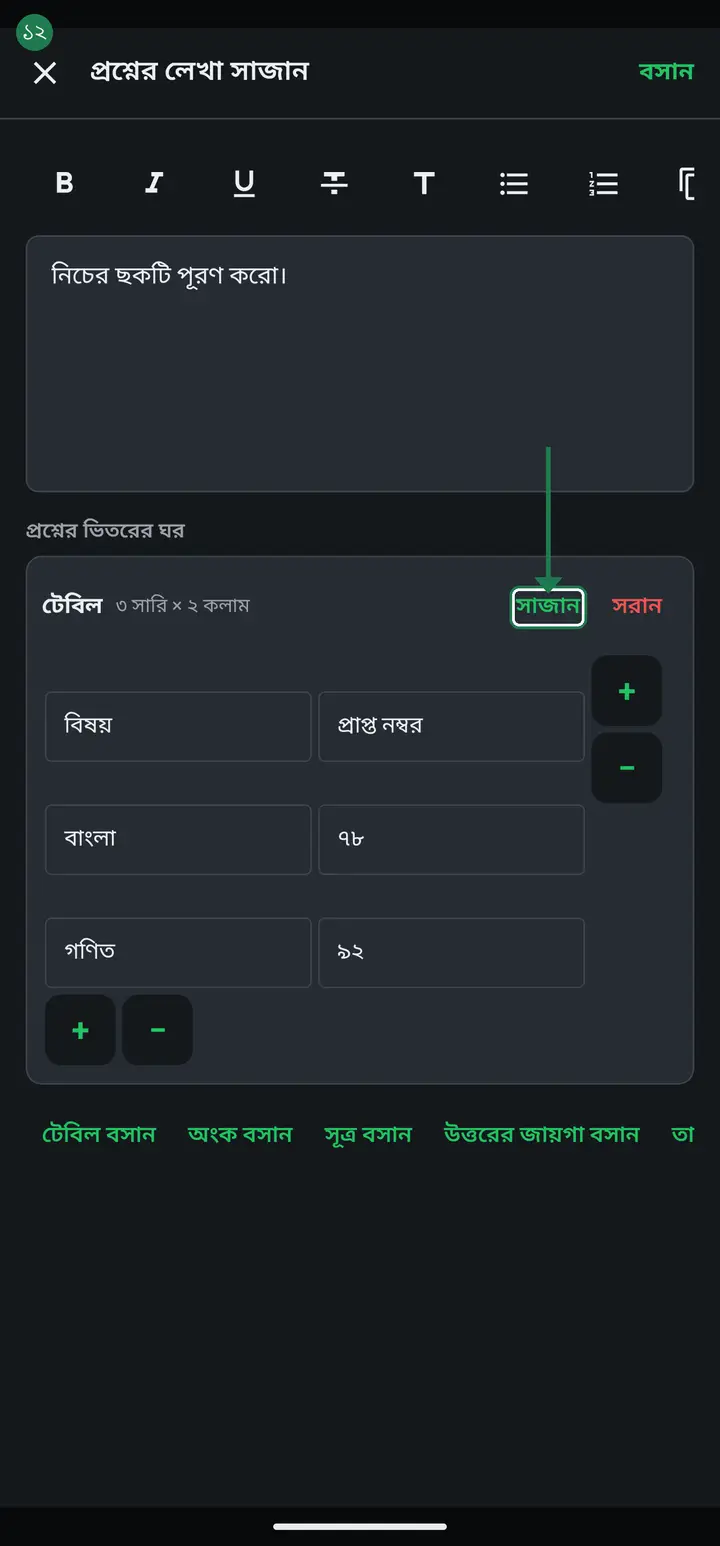
Tapping "টেবিল বসান" gives you a 2-row × 2-column grid to start. Each cell takes its own text — just tap the cell and type.

-
Grow or shrink the grid with the small + and − buttons on its edges: the pair on the RIGHT of the table adds or removes a column, the pair BELOW it adds or removes a row. Nothing to hunt for — the button sits where the new row or column will appear.
-
Cell borders, column widths, text alignment and Arabic direction are not needed on most papers, so they stay hidden. Tap "সাজান" (Options) at the top right of the block to reveal them. Under "কলামের চওড়া" (Column width), − and + move a column as a percentage — say 60% and 40%, a wide question on the left and a narrow answer box on the right.

The columns always add up to 100%. Widening one narrows the others by itself, so a table can never run off the paper.
-
Tapping "অংক বসান" gives you a column-sum box. Pick + − × ÷ beside "চিহ্ন" (Sign), then type the numbers into the "সংখ্যা লিখুন" (Type a number) boxes — 125 on top, 35 below.

-
On paper the numbers sit flush right, so the ones column lands under the ones column and the tens under the tens. The sign sits on the left, and the rule under the last number is drawn for you.
You never draw the rule yourself, and it stays locked to the digits even if you change the print text size — it cannot drift out of line.
-
For more than two numbers, tap "সংখ্যা যোগ করুন" (Add a number). Add as many lines as the sum needs.
-
Tapping "সূত্র বসান" gives four buttons — "ভগ্নাংশ" (Fraction), "বর্গমূল" (Square root), "ঘাত (উপরে)" (Power) and "সাবস্ক্রিপ্ট (নিচে)" (Subscript). Each part is its own box, so a fraction takes "লব" (numerator) and "হর" (denominator) separately. The "চিহ্ন" (Symbols) row below drops in √ π ∑ ∫ ≥ ≤ ≠ × ÷ ± ° ∞ → with one tap.

-
Under any box, the "লেখা সাজান" row (বাম / মাঝে / ডান) sets whether it sits left, centre or right on the page. For Arabic or Urdu turn on "ডান-থেকে-বাম লেখা" (Right-to-left) — only that box flips, the rest of the question stays as it is.
-
If you insert the wrong thing, "সরান" (Remove) on the right of that box deletes it. With several boxes, "উপরে তুলুন" (Move up) reorders them.
-
When done, tap "বসান" (Insert) at the top right. Then remember to tap "সংরক্ষণ করুন" (Save) at the bottom — "বসান" only puts it into the question, it does not save the paper.
Leaving without saving asks "সংরক্ষণ না করে বের হবেন? লেখাগুলো থাকবে না।" — tapping "বাদ" there throws the table or the sum away.
-
Lower down the paper, the "কাগজ ও লেখার ধরন" (Paper and text) section lets you choose the paper size — A4, Letter or Legal. Turning on "দুই কলামে ছাপান" (Print in two columns) lays the questions out in two columns on one sheet and saves paper.

-
In the same section, "সংখ্যার ধরন (প্রশ্ন নম্বর)" sets whether question numbers print in Bangla (০১২), Arabic (٠١٢) or English (012) digits. For an Arabic madrasa paper, turn on "পুরো প্রশ্নপত্র ডান-থেকে-বাম" (Whole paper right-to-left).

Common questions
Can I make the text inside a table cell bold or italic?
Cell text stays plain. If you need bold or italic, put it in the question text itself — the table is for laying out rows and columns, not for styling.
How many tables or sums can one question hold?
Up to 12 boxes per question, and a table can go to 30 rows and 10 columns. If you need more, split it into two questions — that much inside one question is hard for a student to read anyway.
Will a table get split in half across two pages?
No. A question and everything inside it always stay together on one page. If there is not enough room the whole question moves to the next page — half a table is never printed.
How do I make a match-the-column question?
Insert a table, keep it at 2 columns, then tap "সাজান" and turn "ঘরের দাগ" off. Left column for one side, right column for the other, and add rows with the + below the grid.
Can I do division (÷) in this box?
Choosing ÷ stacks a division the same way. But the long-division layout as it appears in Bangladeshi textbooks is not drawn yet — for that, attaching a picture is still the better answer.
I want the question and the space for a small child's answer on the same paper. How?
Write the question, tap "লেখা সাজান" under it, then "উত্তরের জায়গা বসান" (Insert answer space). Writing lines appear under the question — set how many with "লাইন বাড়ান" / "লাইন কমান". For fill-in-the-box or matching questions, build the boxes with "টেবিল বসান" and leave empty the cells the child fills. The lines and boxes stay clear on a photocopy. (From version 3.2.284.)
Ask AI about this page
Ask an AI app to explain this page in simple language.
Copied — now paste it
Get Hazira Khata free on Google Play
More tutorials
- How to sign in Signing in for the first time with your phone number. No email or password needed.
- Add a second way to sign in to one account Add Gmail to an account created with a phone number. It stays one account and nothing inside it changes.
- How to mark your own attendance As a teacher you can record your own daily attendance — it takes one tap.
- Check your salary and sign "received" When your school records your salary, the app tells you. Check the receipt and tap "বেতন বুঝে পেয়েছি" (Salary received) to leave your own digital signature — proof for both sides.
- How to create a class Before you can take attendance you create the class once. A one-time job.
- Putting your classes in your own order — press, hold and drag KG Two showing before KG One? Classes appear in the order you created them. On the "শ্রেণী কার্যক্রম" page, press and hold a card and drag it where you want — no need to rename anything.
- Make receipts and results look right — font and size Documents printing in an ugly font? Change it in one place and the receipt, result slip and certificate all change together.
- How to add students Enter each student's name and roll once. After that, daily attendance is just ticking boxes.