
How to take attendance
Daily attendance takes less than a minute. Follow the pictures.
The screenshots show the app in Bangla, its main language. The buttons sit in the same places in English.
Watch the video
Select a video to play. The picture guide continues below.
-
Open the app. You will see your list of classes.
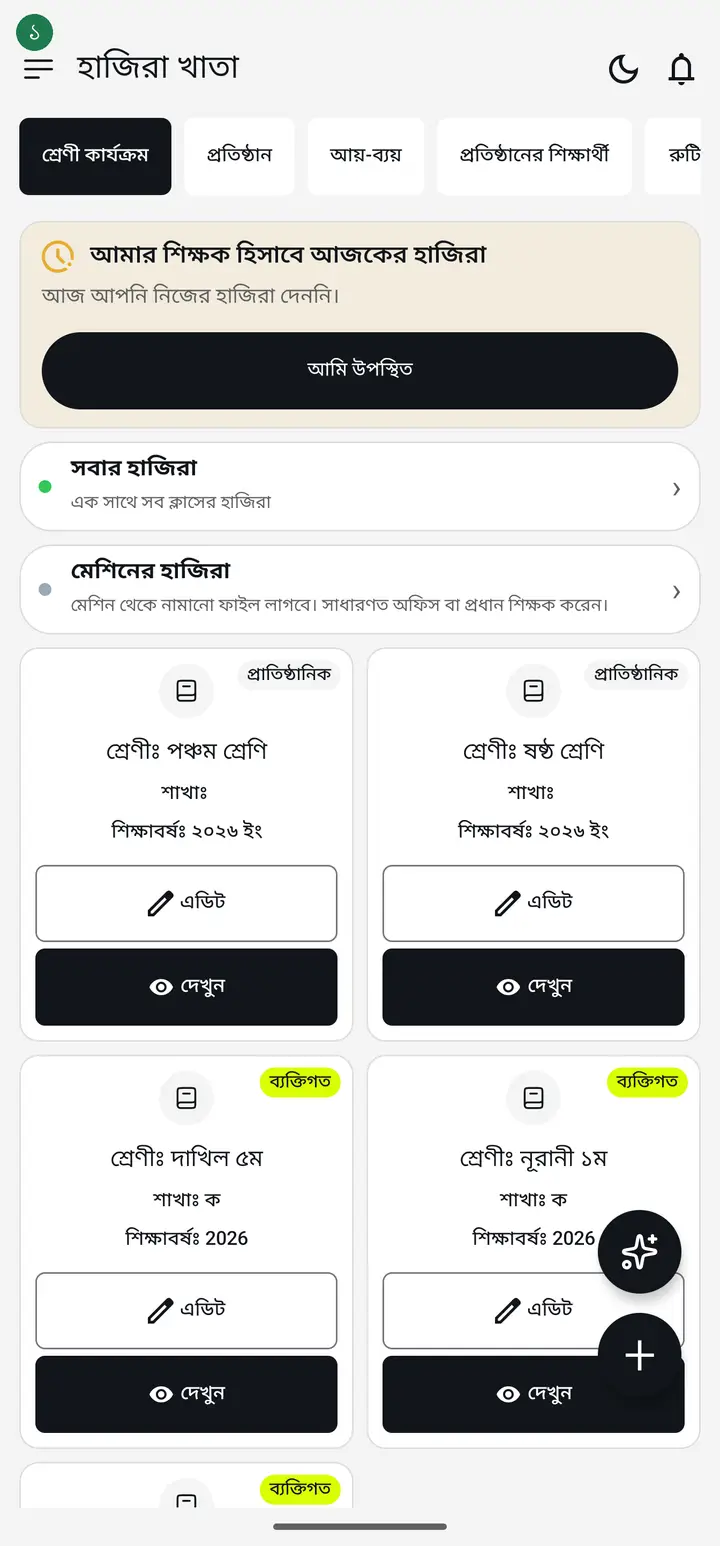
-
On the card for the class you want, tap "দেখুন" (View).
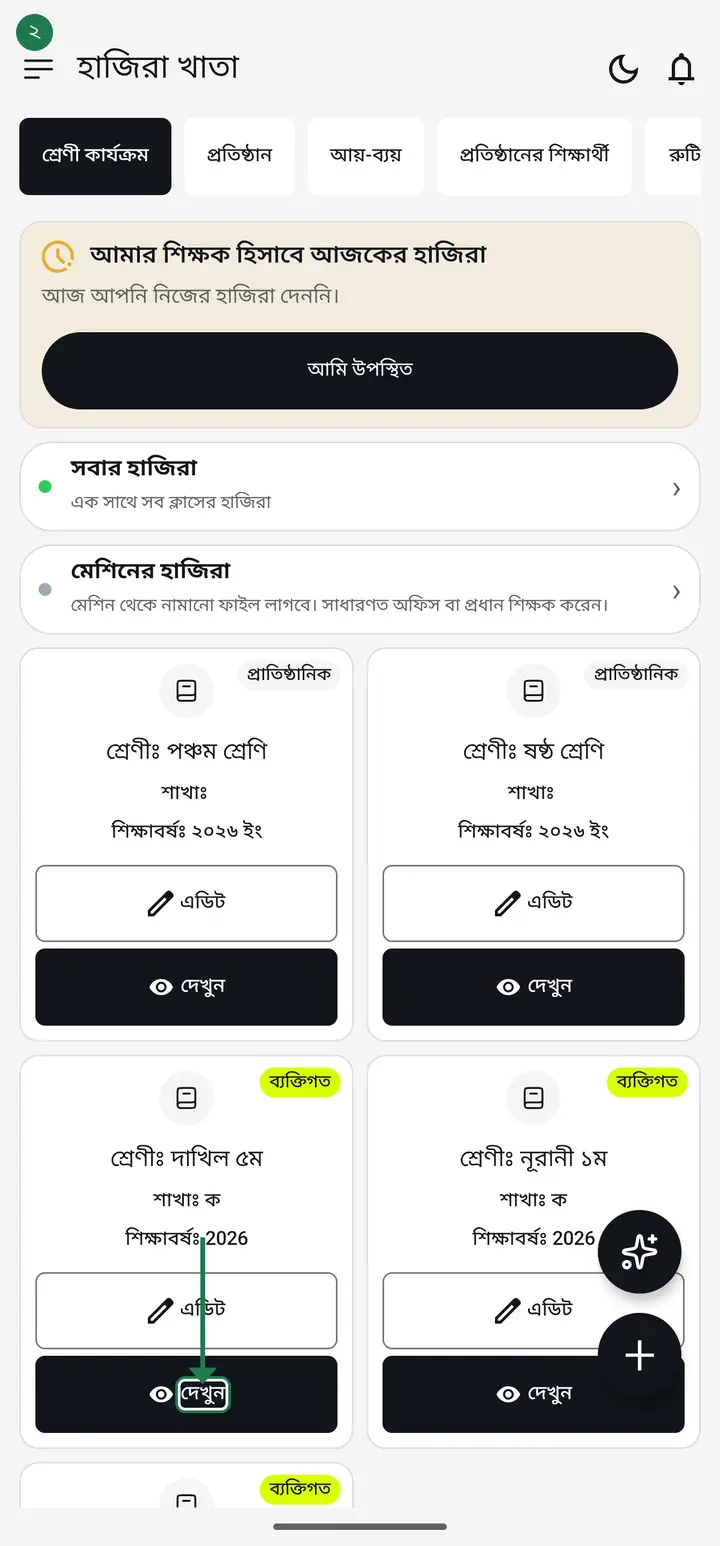
-
Tap the "উপস্থিতি নিন" (Take Attendance) button.
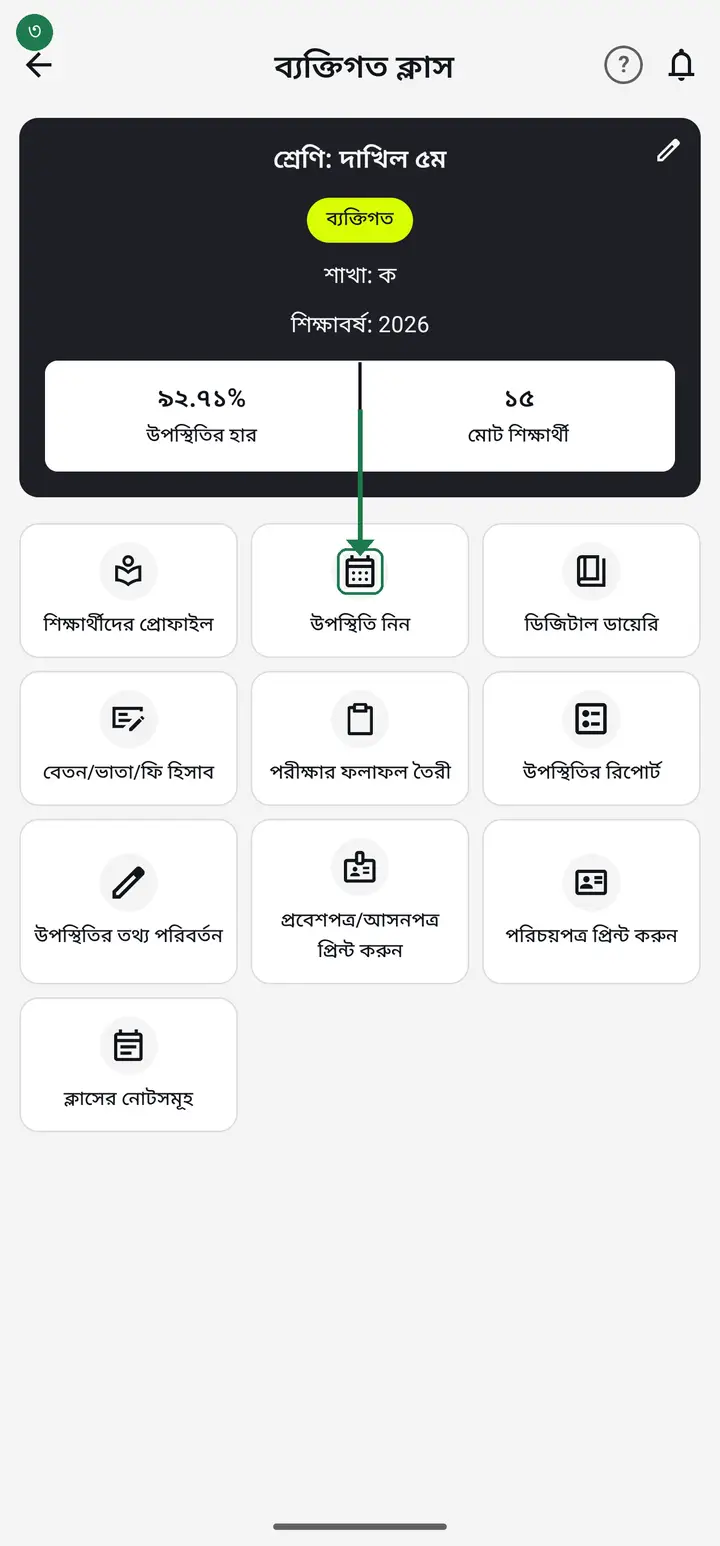
-
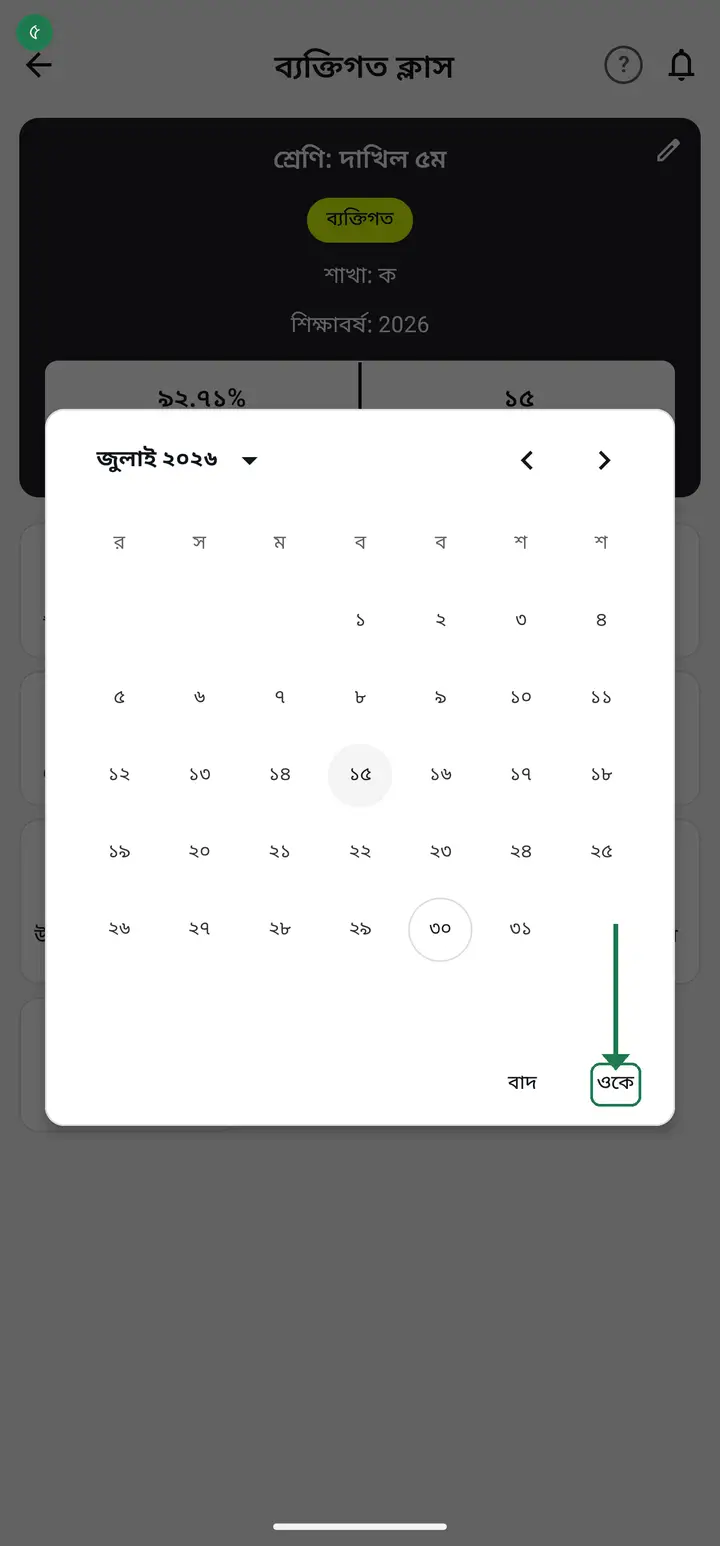
Tap the date you are taking attendance for. Today's date is already selected.
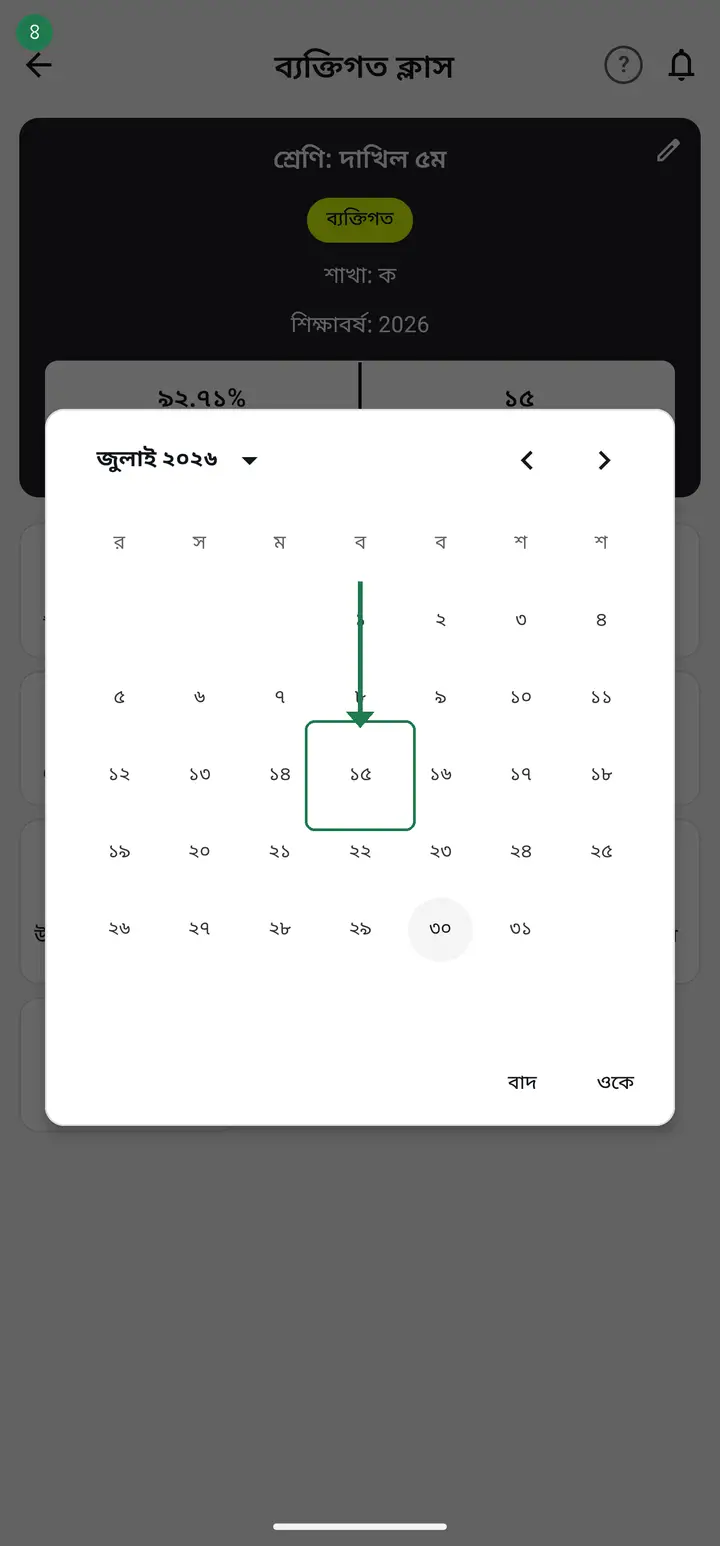
If you missed a previous day, you can pick that date here.
-
Tap "ওকে" (OK).
-
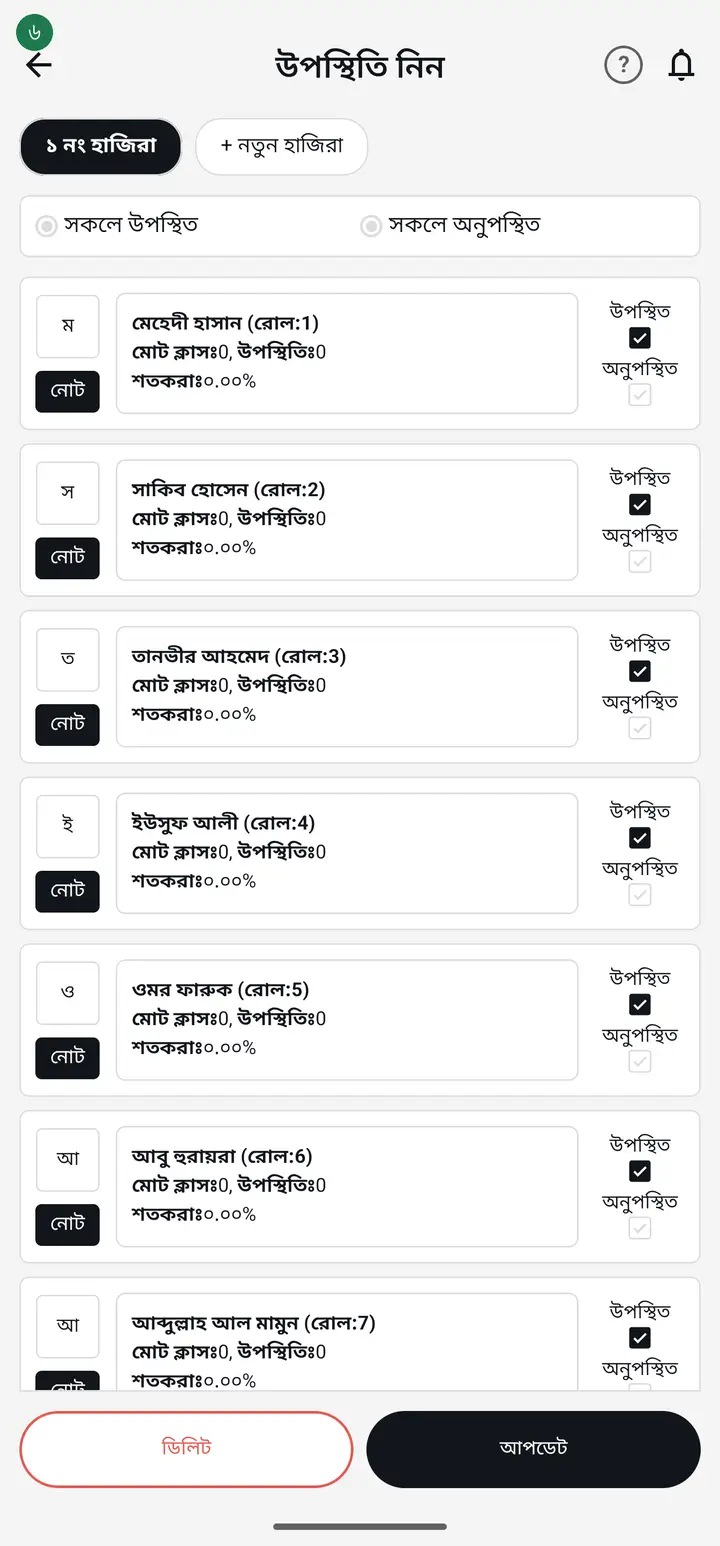
Tick the "উপস্থিত" (Present) box next to each student who came. A tick means present, blank means absent.
-
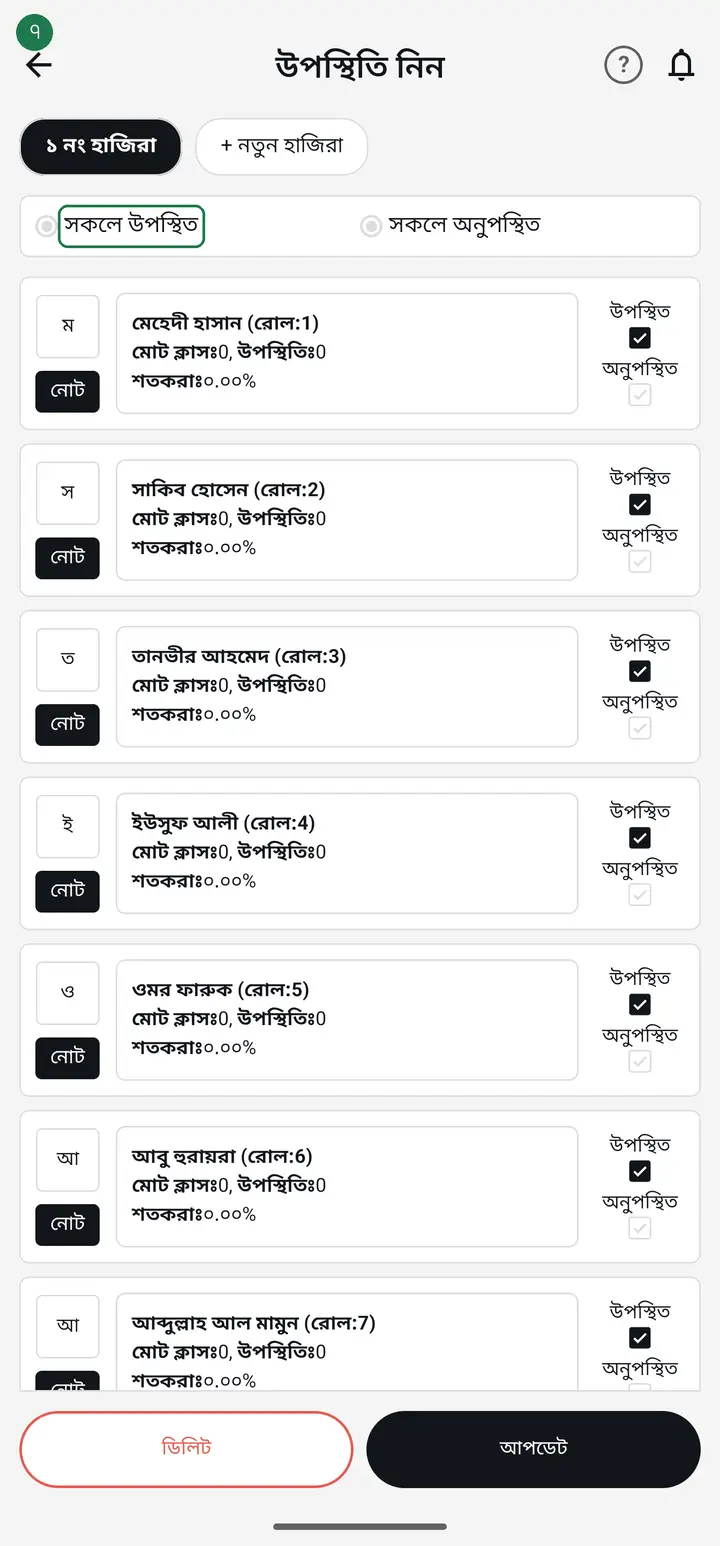
If almost everyone is present, tap "সকলে উপস্থিত" (All Present) — everyone gets ticked at once. Then untick only the absent ones.
-
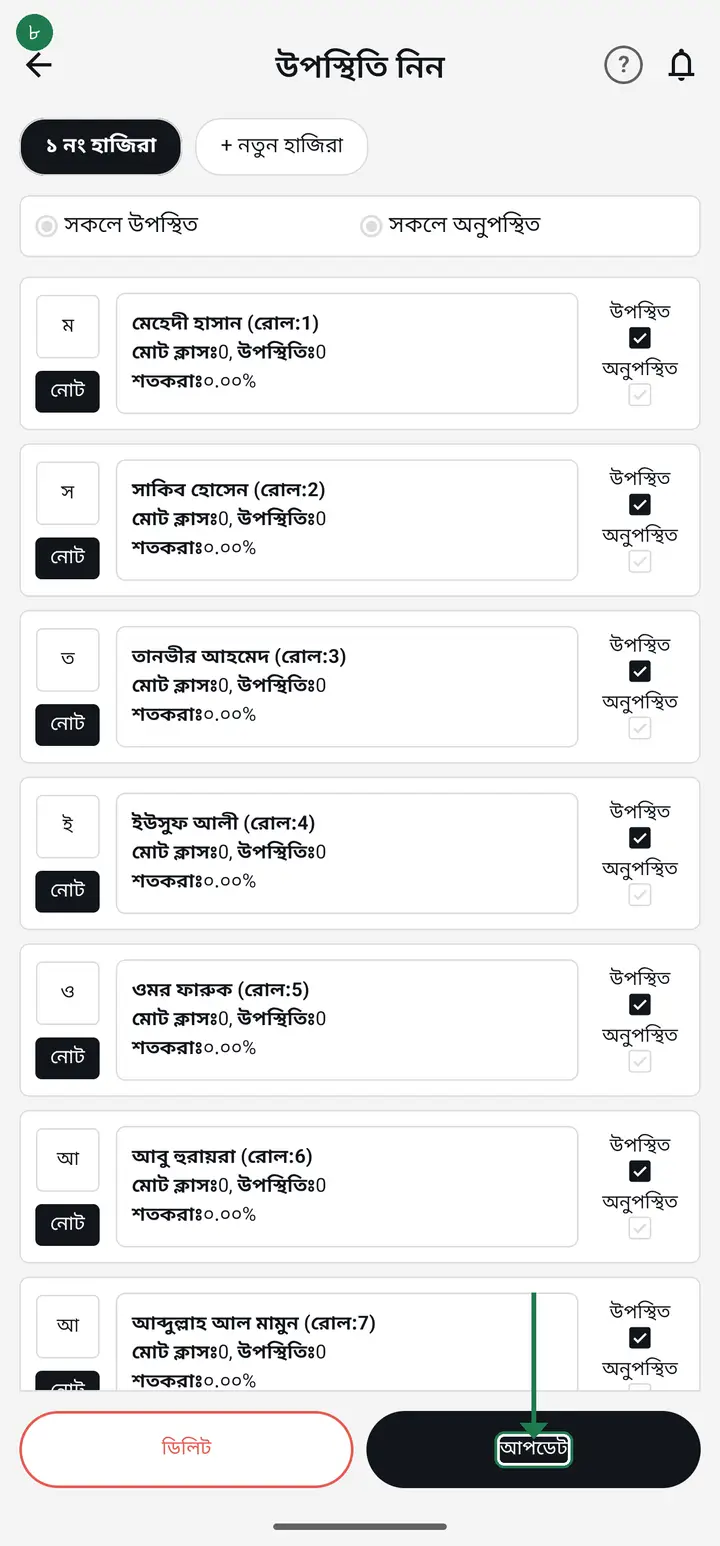
Tap the "আপডেট" (Update) button at the bottom. Done — today's attendance is saved.
No internet? No problem. Attendance is saved on your phone and syncs by itself when the internet comes back. You do not need to take it again.
-
To take attendance period by period on the same day: after tapping "আপডেট" (Update), look at the top — "১ নং হাজিরা" (Attendance 1) appears with "+ নতুন হাজিরা (পরের ঘন্টা)" (New attendance, next period) beside it. Tap that to open another attendance for the same day; the first one stays exactly as it was.
These two chips do not appear until the day's FIRST attendance is saved, so it can look like the feature is missing. It is there — tap "আপডেট" once and it shows. Up to 6 sittings per day.
Common questions
If I take attendance with no internet, will the data be lost?
No. Attendance is saved on your phone first, then syncs to the server by itself once you have internet. You do not need to do anything.
What if I tick the wrong student?
Tap the box again and the tick comes off. You can change as much as you like before saving, and even after saving you can fix it from "উপস্থিতির তথ্য পরিবর্তন" (Change attendance info).
What happens if I take attendance twice on the same day?
Re-taking the SAME sitting is not counted twice — it replaces the earlier entry and simply updates it. Keeping separate sittings per period is a different thing — see the next question.
Can I take separate attendance for each period (1st period, 2nd period)?
Yes — up to 6 separate sittings a day, each kept and reported separately. The same applies in a madrasa taking attendance after each waqt. How: take attendance normally and tap "আপডেট" (Update). Then "১ নং হাজিরা" (Attendance 1) and "+ নতুন হাজিরা (পরের ঘন্টা)" (New attendance, next period) appear at the top of the screen. Tap the second one to open that day's second sitting. Many teachers never find it because neither chip appears until the day's first attendance is saved. Tap "আপডেট" once and you will see them.
How do I tell a guardian that their child is present in class today?
After taking attendance and tapping "আপডেট" (Update), a box headed "হাজিরা সেভ হয়েছে" (Attendance saved) appears. It offers two scopes — "শুধু অনুপস্থিতদের" (absentees only) and "সকল শিক্ষার্থী" (all students). Whenever anyone is absent the app pre-selects absentees only, which is why many teachers never notice the second option. Choose "সকল শিক্ষার্থী", then tap "বার্তা লিখুন" (Write message). Each guardian gets their own child's line — present or absent — not one shared announcement. Guardians who never joined the app are then offered an SMS from your own SIM.
How do I SMS every absentee's guardian in one click?
From the same box, using the other scope. After "আপডেট", the "হাজিরা সেভ হয়েছে" box is already set to "শুধু অনুপস্থিতদের" whenever anyone is absent. Tap "বার্তা লিখুন" — the text is pre-filled — then "বার্তা পাঠান". For guardians not on the Digital Diary the "SMS-ও পাঠাবেন?" box appears; "SMS অ্যাপ খুলুন" opens your own Messages app with every number already filled in. The guardian does not need the app, only a saved number on the student. Cost, the SMS count and the batches of 30 are all here: hazirakhata.xyz/bn/tutorials/sms-cost/ From version 3.2.292 you can get the box back: open that day's attendance again and tap "অভিভাবকদের এসএমএস / বার্তা পাঠান" (SMS / message guardians) at the top — the same box opens again.
Ask AI about this page
Ask an AI app to explain this page in simple language.
Copied — now paste it
Get Hazira Khata free on Google Play
More tutorials
- How to sign in Signing in for the first time with your phone number. No email or password needed.
- Add a second way to sign in to one account Add Gmail to an account created with a phone number. It stays one account and nothing inside it changes.
- How to mark your own attendance As a teacher you can record your own daily attendance — it takes one tap.
- Check your salary and sign "received" When your school records your salary, the app tells you. Check the receipt and tap "বেতন বুঝে পেয়েছি" (Salary received) to leave your own digital signature — proof for both sides.
- How to create a class Before you can take attendance you create the class once. A one-time job.
- Putting your classes in your own order — press, hold and drag KG Two showing before KG One? Classes appear in the order you created them. On the "শ্রেণী কার্যক্রম" page, press and hold a card and drag it where you want — no need to rename anything.
- Make receipts and results look right — font and size Documents printing in an ugly font? Change it in one place and the receipt, result slip and certificate all change together.
- How to add students Enter each student's name and roll once. After that, daily attendance is just ticking boxes.