
Previous dues — recording old arrears and carrying them forward
You started recording fees in August, but many students still owe from January through July — where do those go? And when ৳500 stays unpaid this month, why doesn't it appear on next month's bill by itself? Both are two sides of one thing, and both are handled.
Enter the dues students carried in from before you started using the app, and let each month's unpaid balance carry into the next month by itself.
The screenshots show the app in Bangla, its main language. The buttons sit in the same places in English.
-
There are two separate jobs here. One: dues from before you started using the app — those you enter once. Two: whatever stays unpaid each month — that can carry into the next month by itself when you create it. They live in two different places, shown separately below.
-
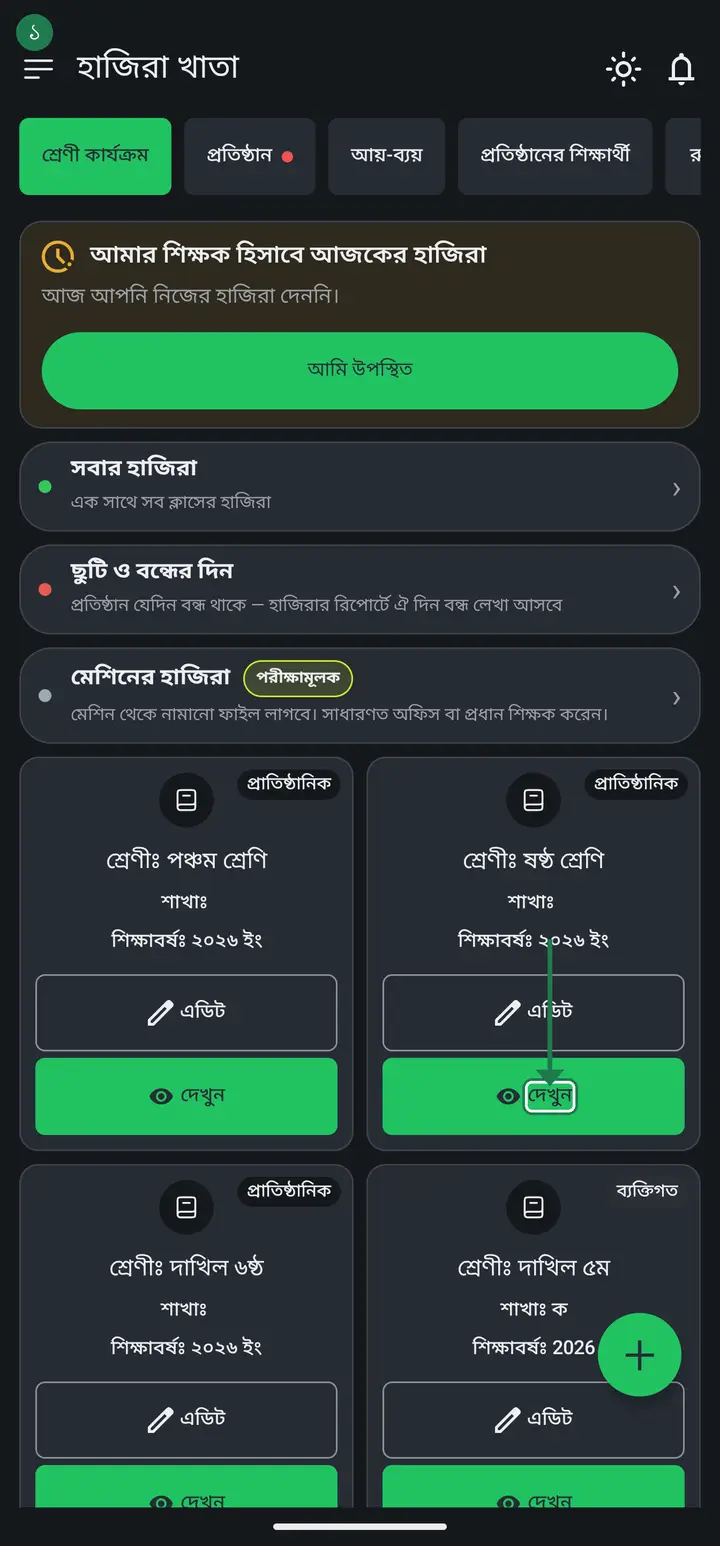
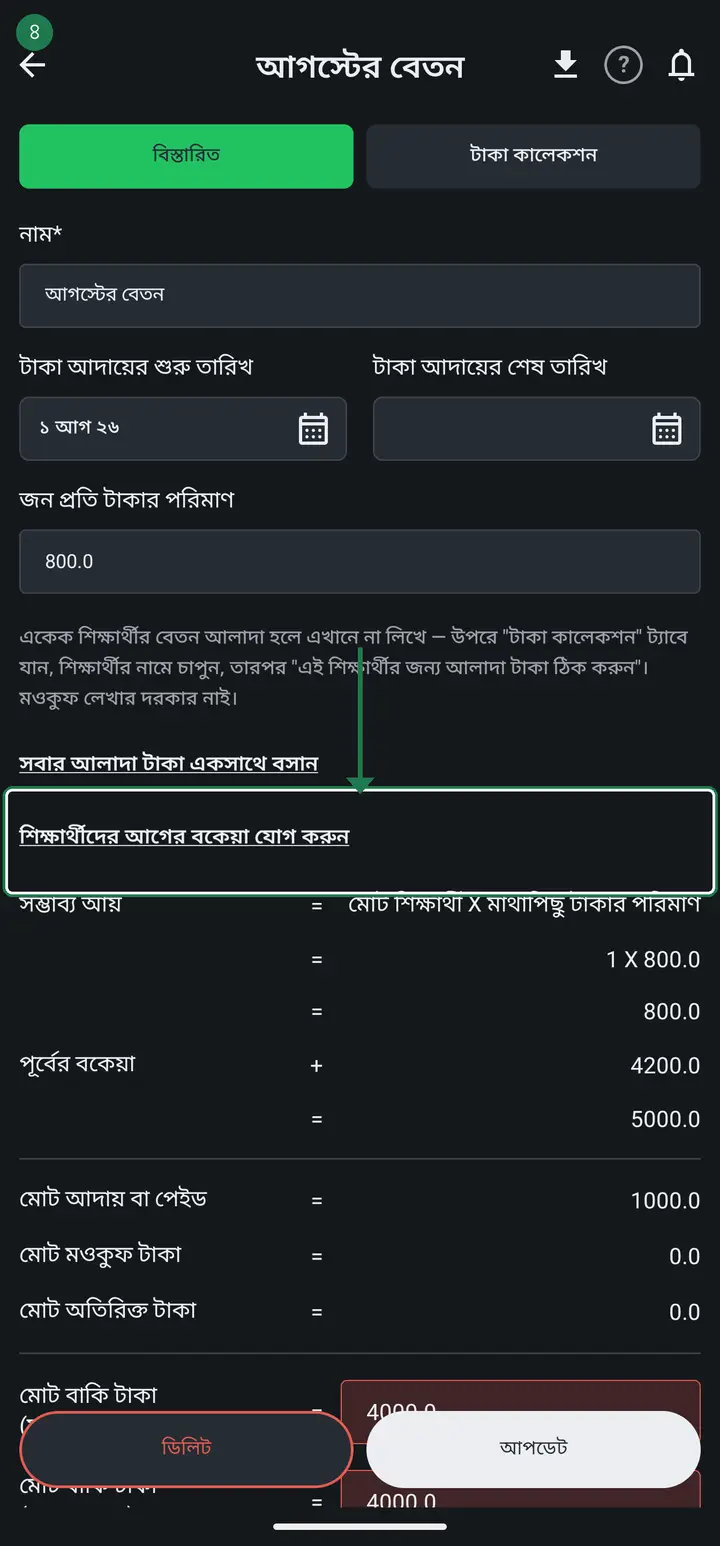
**Entering old dues in one pass:** open the fee you want to start from (শ্রেণী → দেখুন → "বেতন/ভাতা/ফি হিসাব" → tap that month). On the "বিস্তারিত" (Details) page, tap "শিক্ষার্থীদের আগের বকেয়া যোগ করুন" (Add students' earlier dues).
-
The whole class opens on one page, one box beside each name. At the top, fill "এই বকেয়া কোন সময়ের?" (Which period is this due from?) once — for example "জানুয়ারি–জুলাই" or "অ্যাপ ব্যবহারের আগের". That text is shown later beside the amount, so you can answer a guardian who asks.
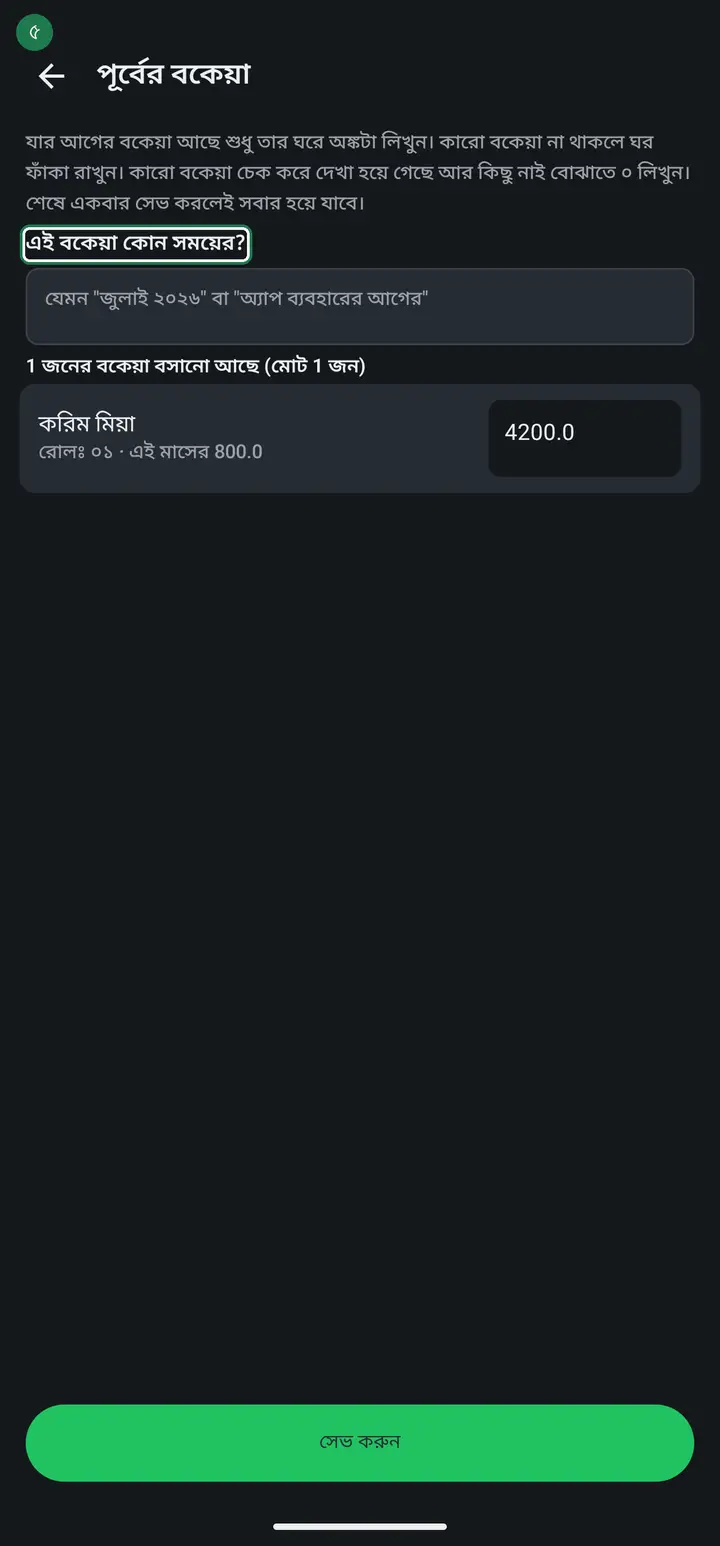
It will not save with that field empty. That is deliberate — six months later, when someone asks "what is this ৳4200 for?", the answer needs to be sitting next to the amount.
-
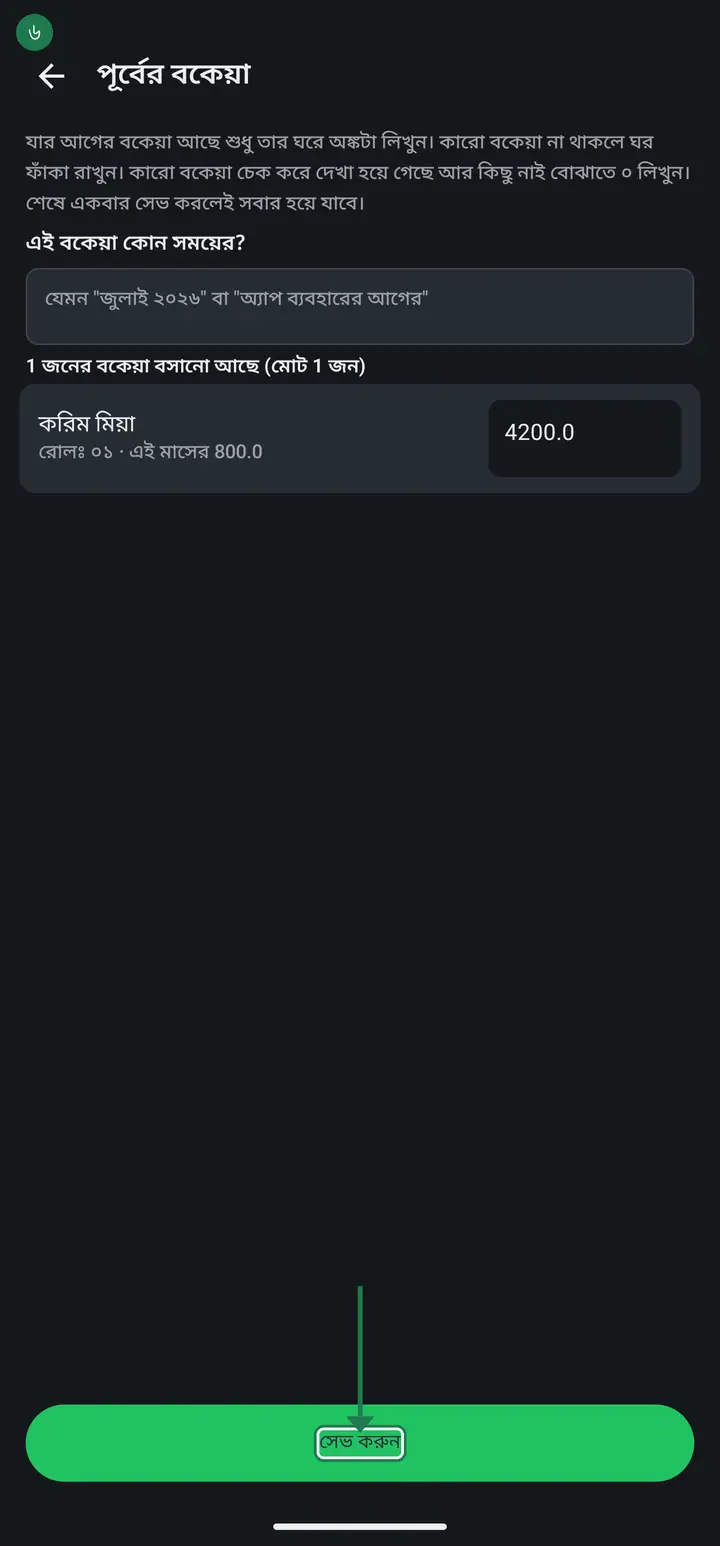
Now type each student's due in their box. Leave the box empty for anyone who owes nothing (it shows a faint "বকেয়া নাই"). Tap "সেভ করুন" once at the end and every entry saves together — no need to go student by student.
-
**Carrying it forward each month:** when you tap + to create next month's fee, a row appears near the bottom of the form — "… এর বাকি টাকা এখানে নিয়ে আসুন" (Bring the unpaid money from … into this one), naming the previous month — with how many students owe how much. It is ticked by default; tap once to untick it.
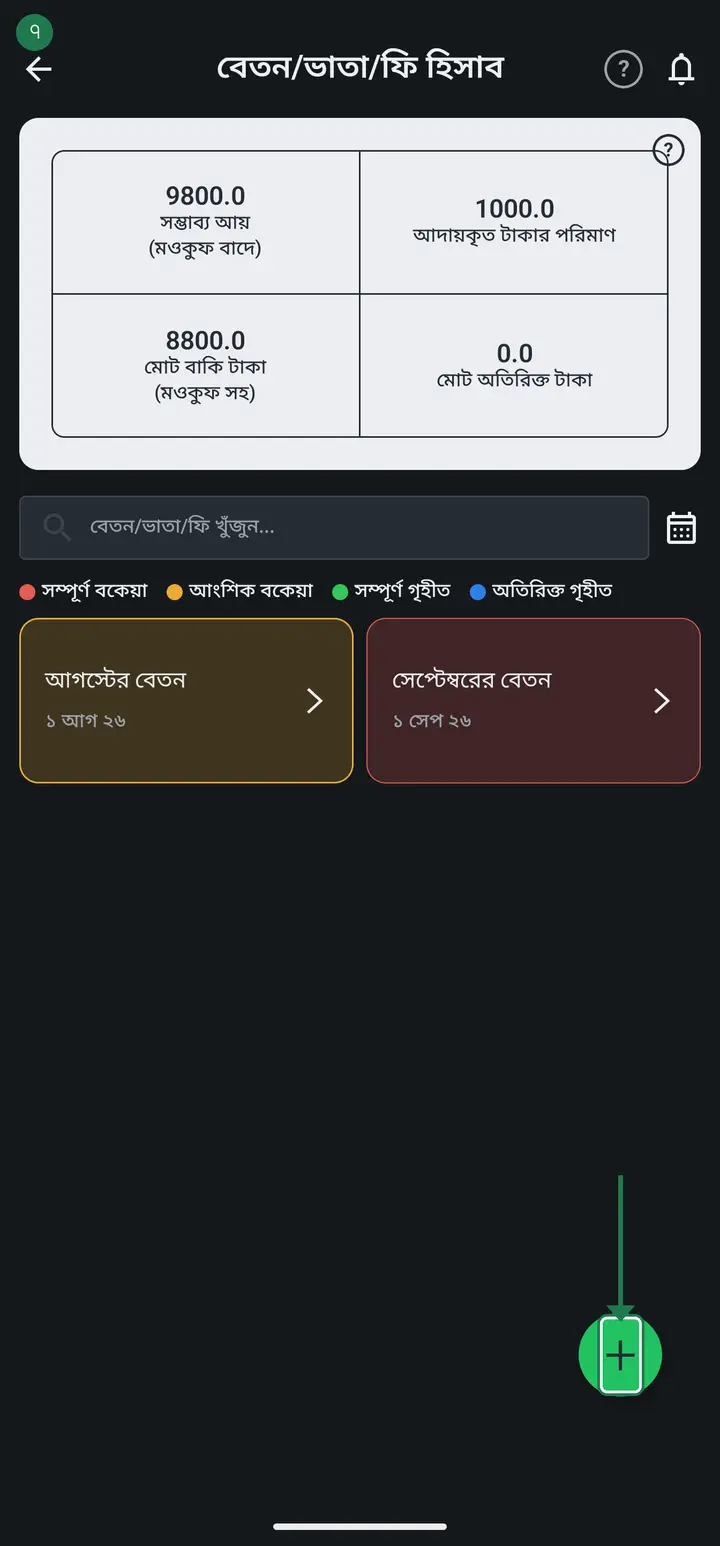
Read the figure before tapping "যুক্ত করুন". It states exactly how many students and how much money is being brought over — money should never land on a family's name silently.
-
Check it afterwards. Open that fee's "টাকা কালেকশন" (Collection) tab and tap **a student who actually carries a previous due** — three separate lines show at the top: "জনপ্রতি টাকার পরিমাণ" (this month's fee), "পূর্বের বকেয়া" (with the period it came from), and "মোট দিতে হবে" (total to pay). The receipt prints that same total. For a student with no old dues you get only that first line — the middle two do not appear at all rather than showing zero. That is correct.
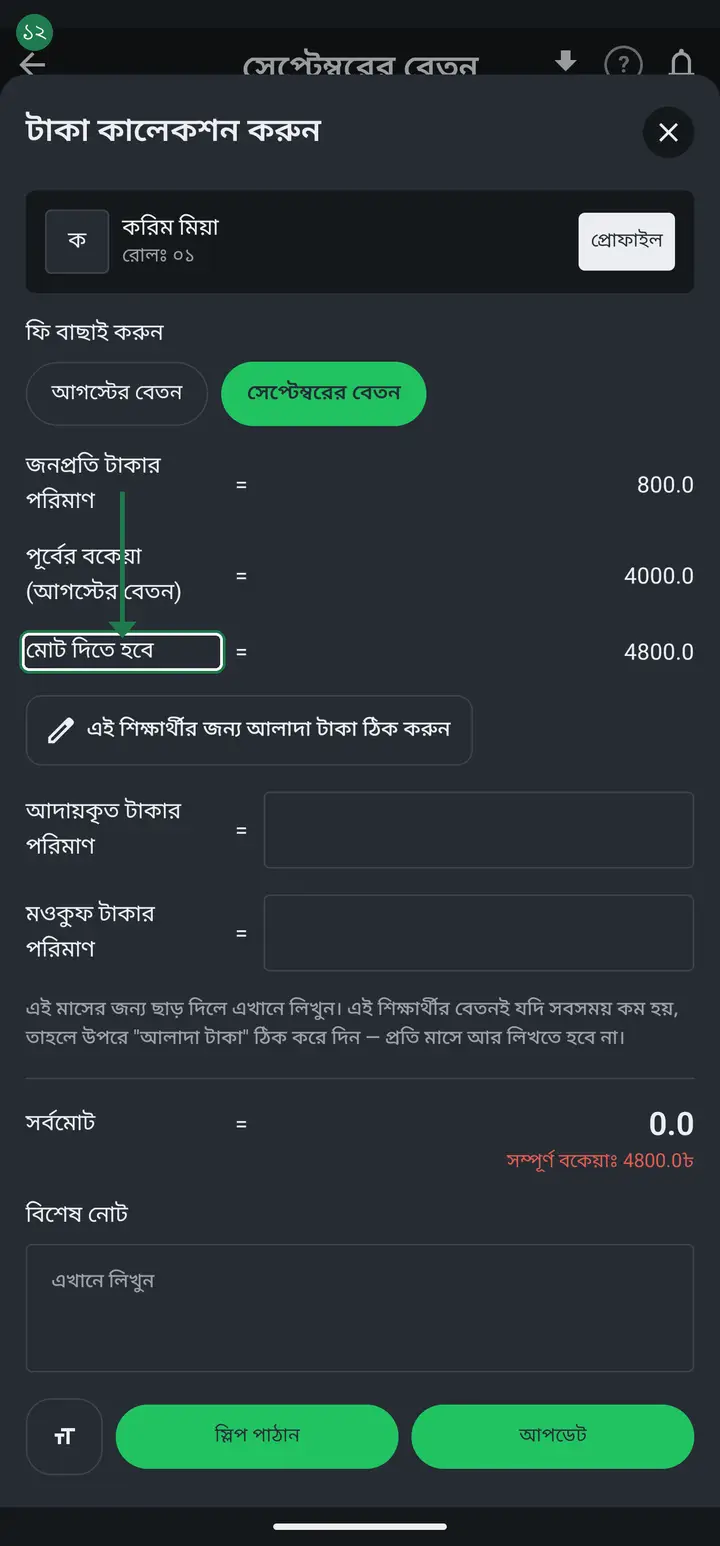
You will not find these three lines on a student whose arrears are zero. That is not a fault — the app hides them on purpose so the other 95% of students do not get three extra lines above the box you came to type in. Verify on a student who does carry a due.
Common questions
I did not tick the box when I created the fee. Can I still pull last month's arrears in?
Not in one tap, no — saying it plainly because people hunt for it. Last month's unpaid balance comes across by itself only while you are CREATING a new fee, from the switch near the bottom of that form. Once the fee exists, that switch is gone. The only route now is to open the fee and use "শিক্ষার্থীদের আগের বকেয়া যোগ করুন" and type each student's figure (steps 2–4 above). Nothing breaks, it is just manual. A one-tap version for an existing fee is on the list.
Will one class's arrears show up in another class's fee?
No. Arrears are carried from the previous fee OF THE SAME CLASS. So in a class where this is the very first fee sheet, there is nothing to carry — the switch will not appear, or will show zero. That is correct, not a fault. If that class does have old dues, enter them once by hand (steps 2–4) and every following month carries itself.
Can I just add the arrears on top of the monthly fee amount?
No — that is the biggest mistake here. Inflating the fee destroys the record of what that month's fee actually was, and the receipt prints the wrong figure. Because arrears is stored separately, the receipt can show two distinct lines: this month's fee, and what was owed from before.
If I tap it twice by mistake, does the amount double?
No. Bringing the same month's dues twice writes the same figure again rather than adding to it. A double tap cannot inflate anybody's debt.
Does a student who left the class still get carried?
No. Only students currently in the class are carried. Once someone leaves, their balance stops appearing on new months.
If I waive a student's fee, does that travel forward as arrears too?
No. A waiver means you have decided not to collect it — it counts as settled and is not carried. Only what is genuinely still owed moves forward.
Why did "সম্ভাব্য আয়" (expected income) go up after I entered arrears?
Because that money is money you are still owed. "সম্ভাব্য আয়" is the total this fee should bring in — this month's charge plus the carried dues. Collected plus outstanding will always add up to exactly that figure.
If I add arrears, does it get added to that month's "আয়-ব্যয়" (income-expense)?
No, not at the moment you add it — recording arrears only says "this family still owes this", it is not money in hand. It reaches আয়-ব্যয় only when a guardian actually pays, and only from the fee collection screen (not from where you set the arrears amount). Even then it books to the month the fee itself belongs to, not the month you happened to collect it. This is also separate from আয়-ব্যয়'s own "বেতন ব্যবস্থাপনা" (staff salaries).
Ask AI about this page
Ask an AI app to explain this page in simple language.
Copied — now paste it
Get Hazira Khata free on Google Play
More tutorials
- How to collect fees Create the month's fee once, then record what each student pays. The app works out who still owes what.
- When students pay different amounts One student pays 1000, another 2000, another nothing — each can have their own amount. Old dues are recorded the same way.
- How to make a marksheet Create a subject's mark form, enter the marks, then print the whole class's marksheet.
- Getting every student's result in one go The whole class's results in one PDF in one tap — one page per student, so you never export them one at a time. Print it, or keep it in your own Google Drive and find any student by name years later.
- How to make admit cards and seat cards Make and print exam admit cards and seat cards yourself — with the logo, signatures and dates. Both live on one screen, as two tabs at the top.
- How to make student ID cards Make and print student ID cards yourself — with your logo and their photos.
- How to make staff ID cards Print ID cards for teachers, office staff, guards and support staff — all on one sheet.
- Importing attendance from a machine Take the file off your fingerprint machine and load it into the app — the attendance fills itself in.