
Getting every student's result in one go
The whole class's results in one PDF in one tap — one page per student, so you never export them one at a time. Print it, or keep it in your own Google Drive and find any student by name years later.
The screenshots show the app in Bangla, its main language. The buttons sit in the same places in English.
-
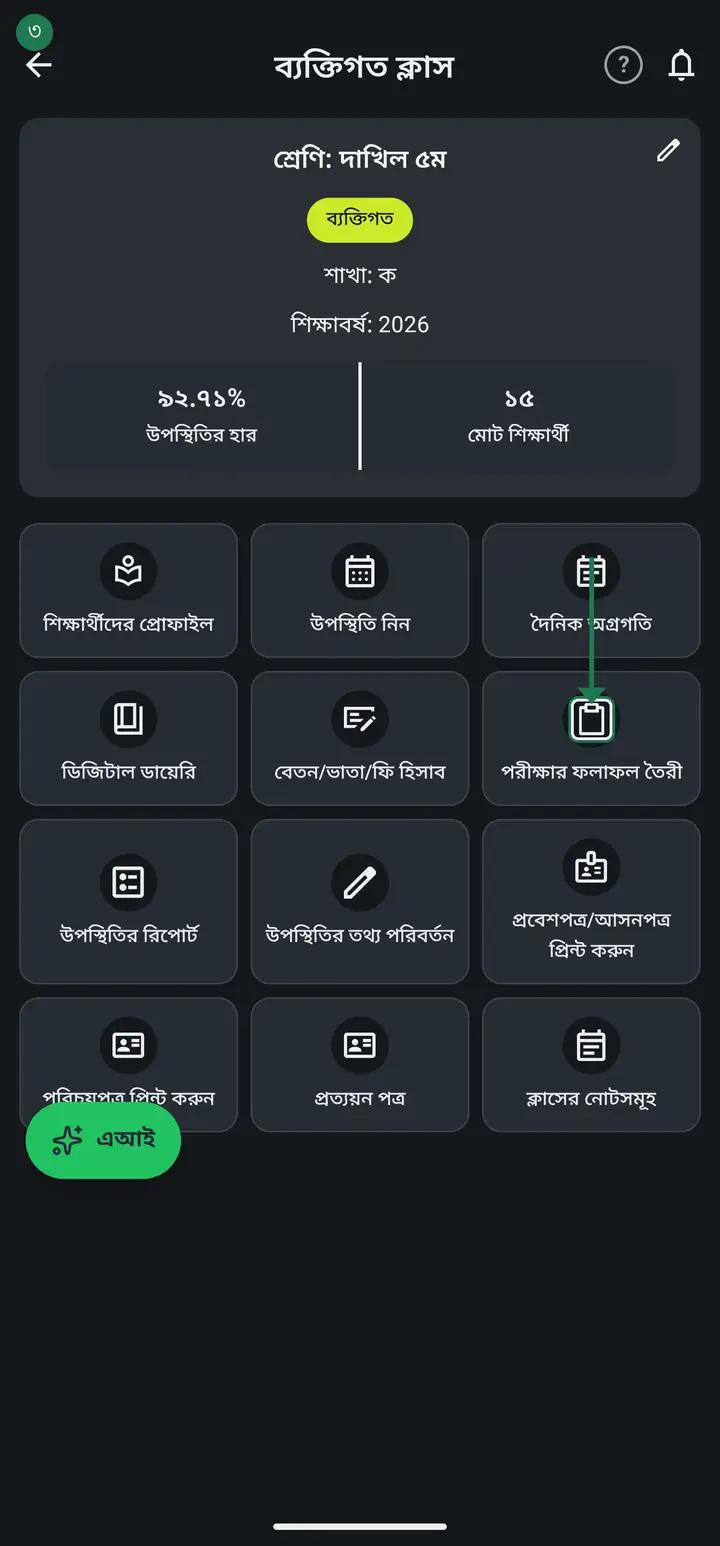
Tap "দেখুন" (View) on the class card, then tap "পরীক্ষার ফলাফল তৈরী" (Create exam results).
-
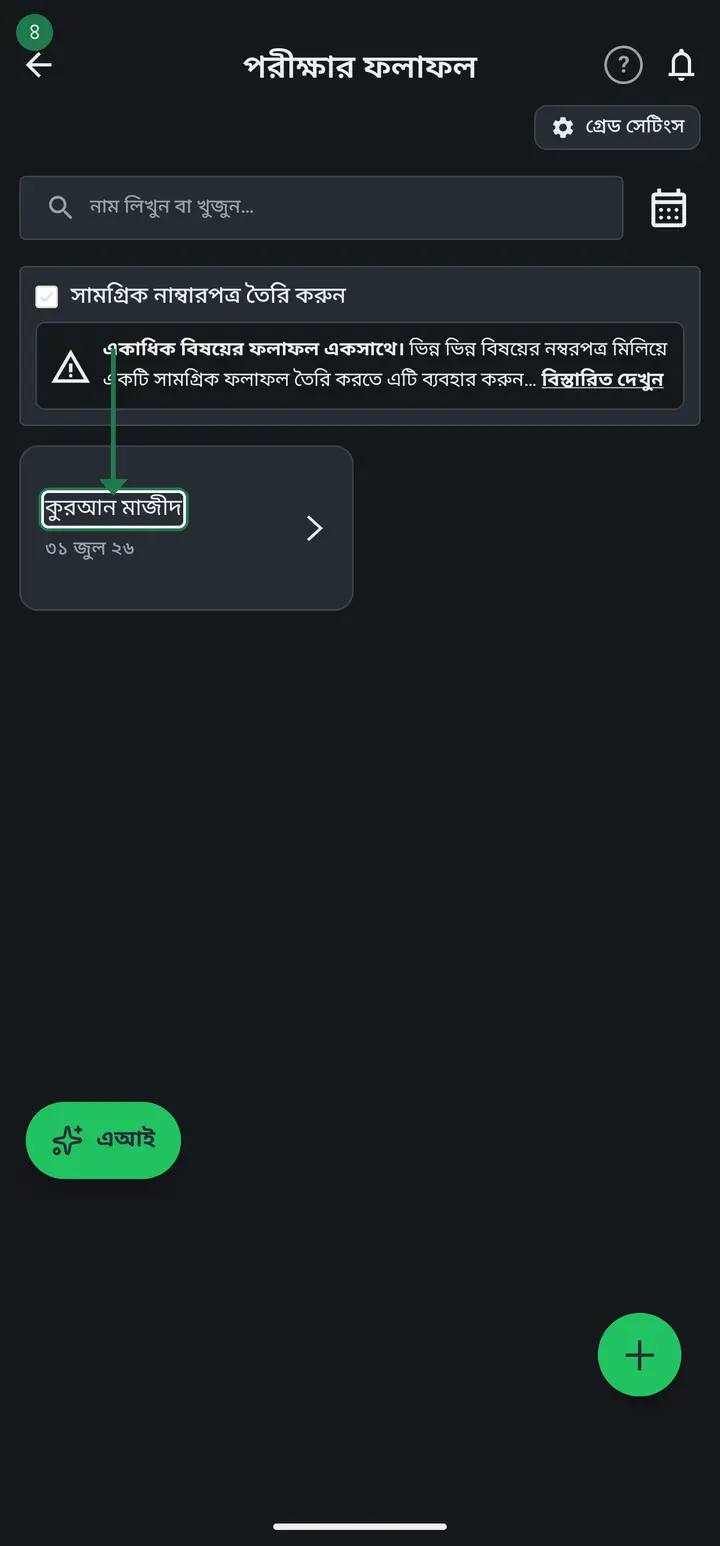
Open the mark form for the exam you want to keep. For all subjects together use "সামগ্রিক নাম্বারপত্র তৈরি করুন" (Create an overall marksheet) and pick the subjects.
-
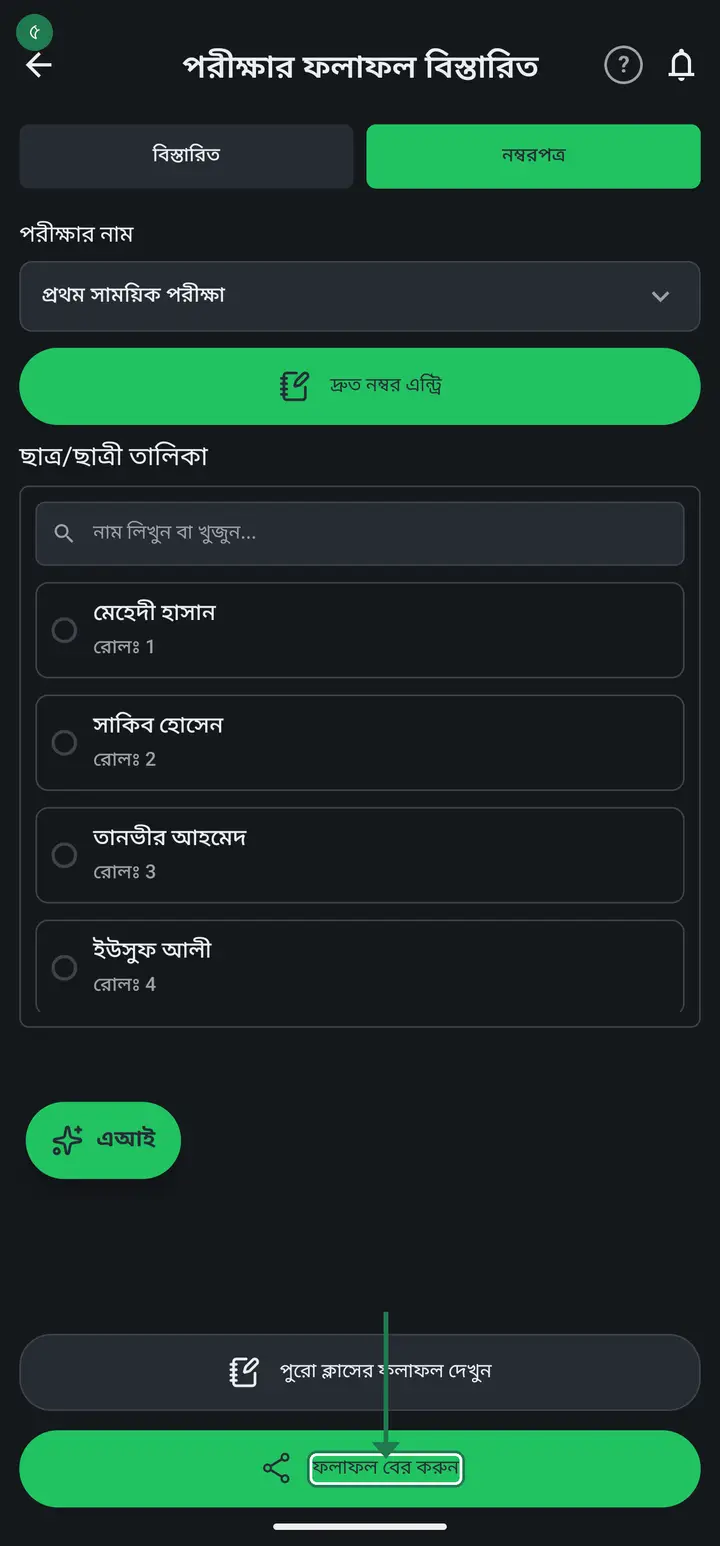
Go to the "নম্বরপত্র" tab at the top. Scroll down and tap the green "ফলাফল বের করুন" (Get the results out) button.
-
Tap "ফলাফল সংরক্ষণ (PDF)". This is the one that brings out every student together — the word "সংরক্ষণ" (save) makes people scroll past it.
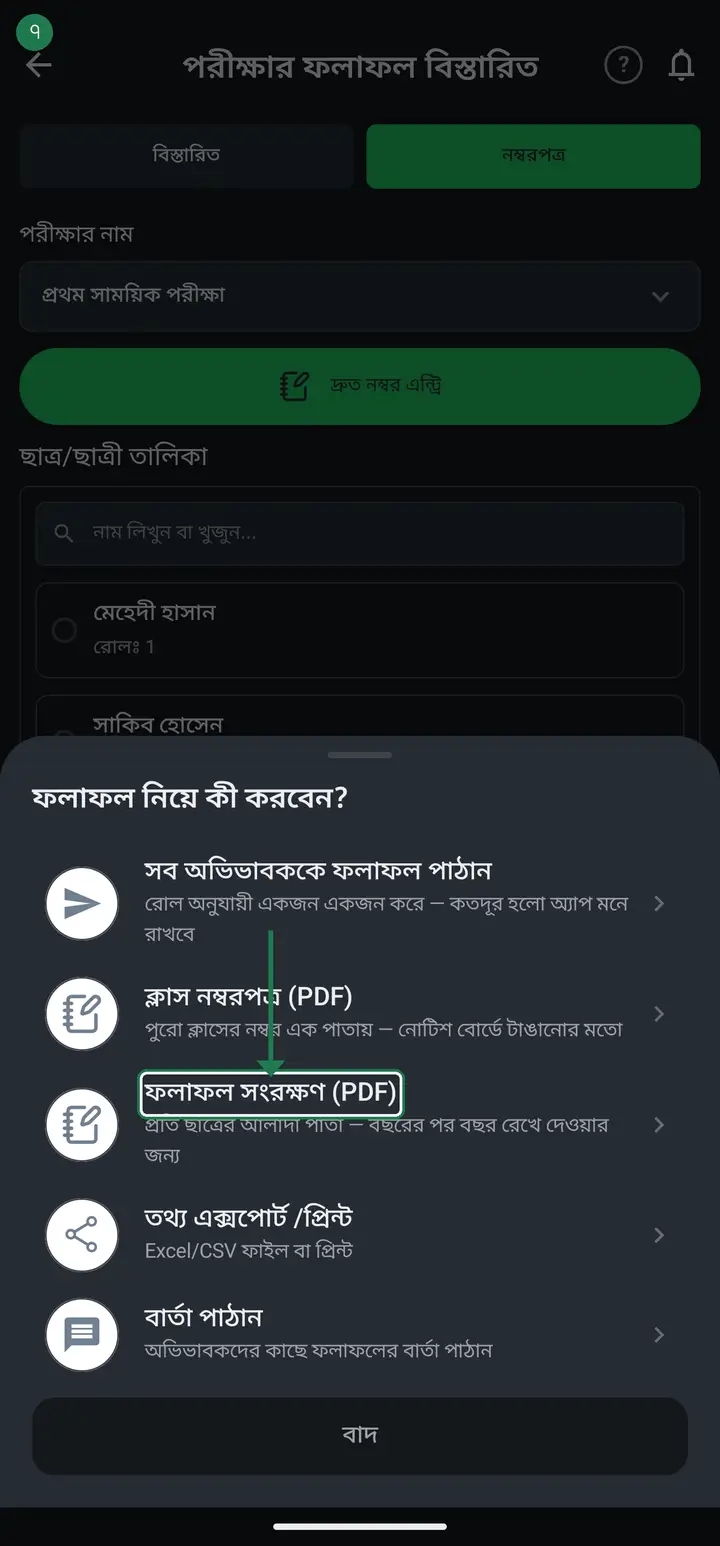
The small line underneath differs by app version — older builds say "one page per student, to keep over the years", newer ones say "every student's result in one PDF". Same button, same document.
-
It takes a moment, then shows the file name — for example ২০২৬_প্রথম সাময়িক পরীক্ষা_পঞ্চম শ্রেণি_ফলাফল.pdf — and how many students' pages are inside.
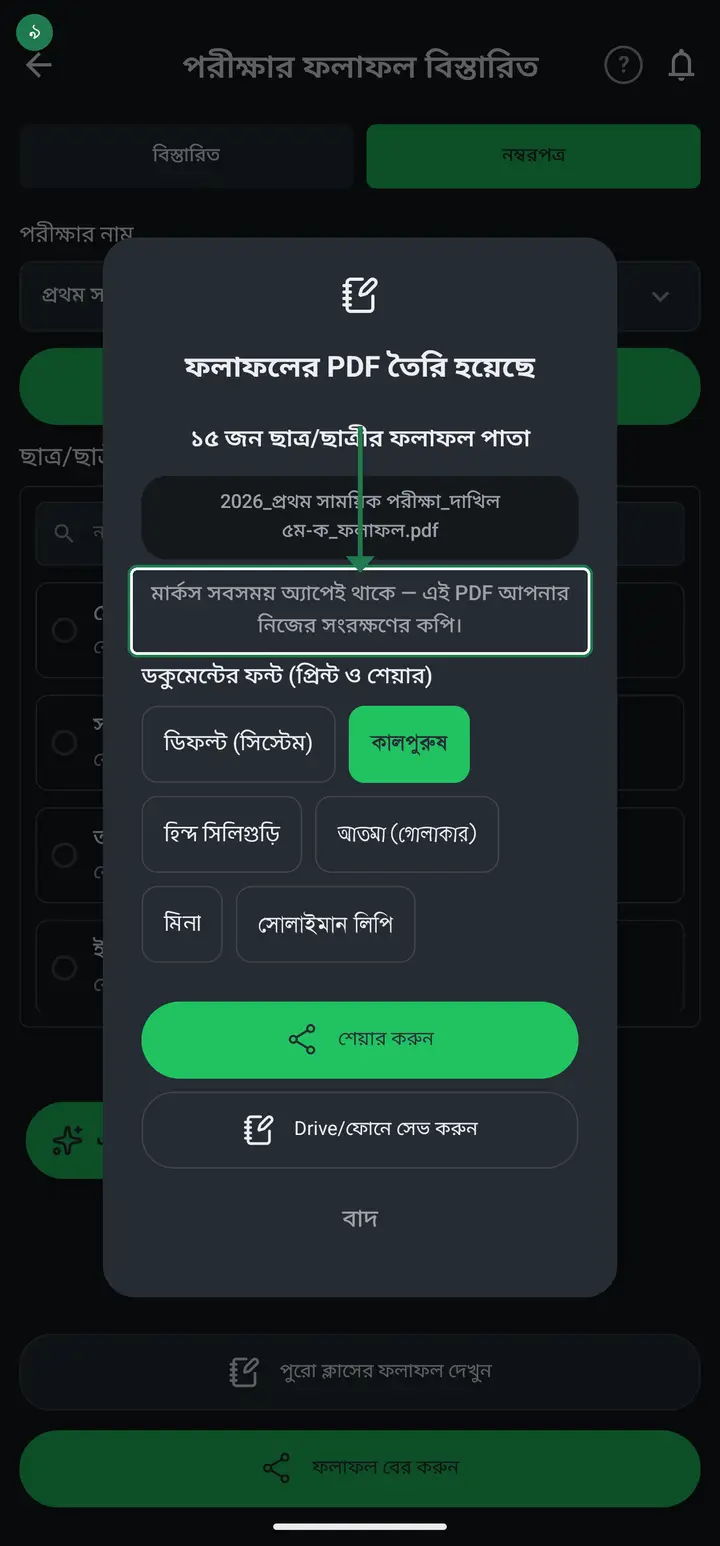
-
Tap "শেয়ার করুন" (Share) and the phone's share list opens. Pick Google Drive and the file goes into your own Drive. You can also send it on WhatsApp or imo.
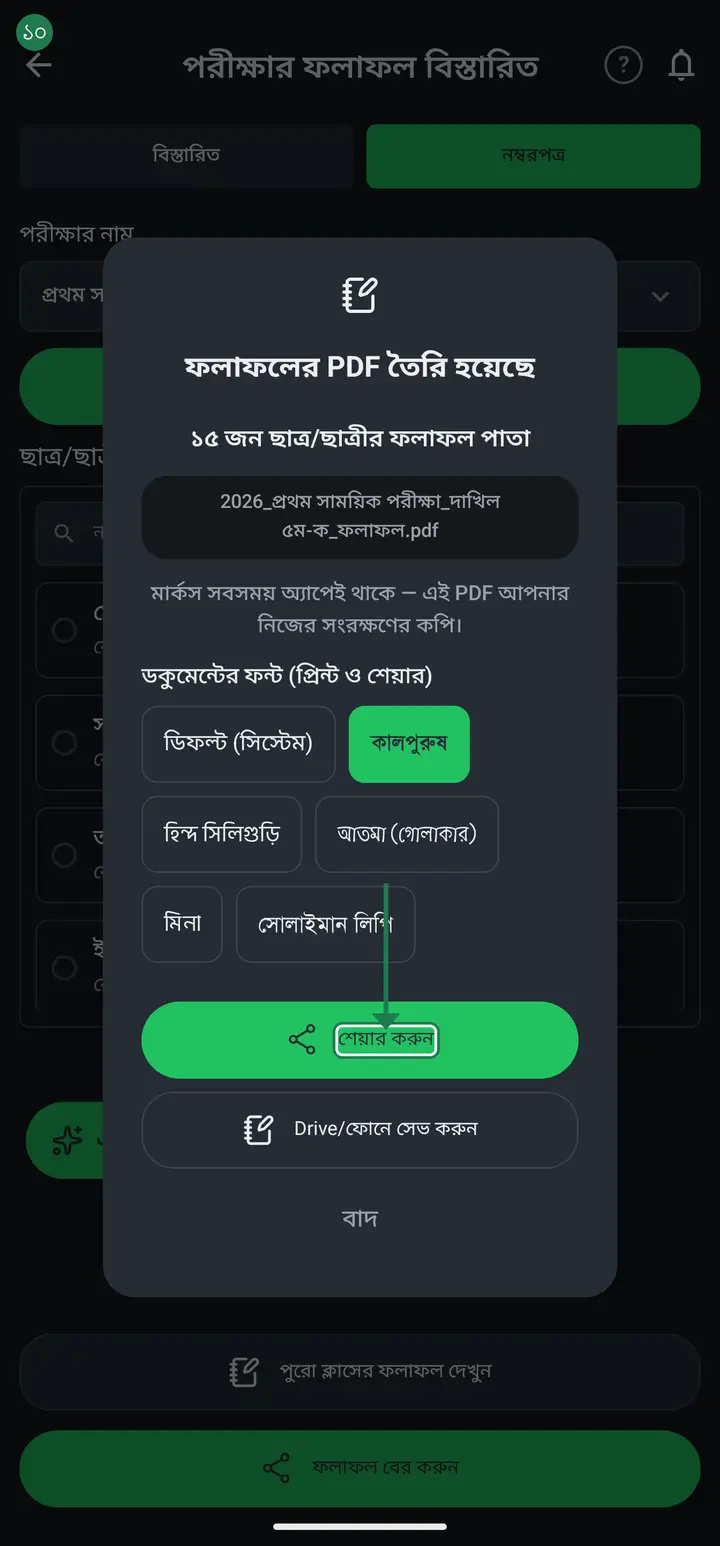
-
Or tap "Drive/ফোনে সেভ করুন" (Save to Drive/phone) to choose the exact folder yourself.
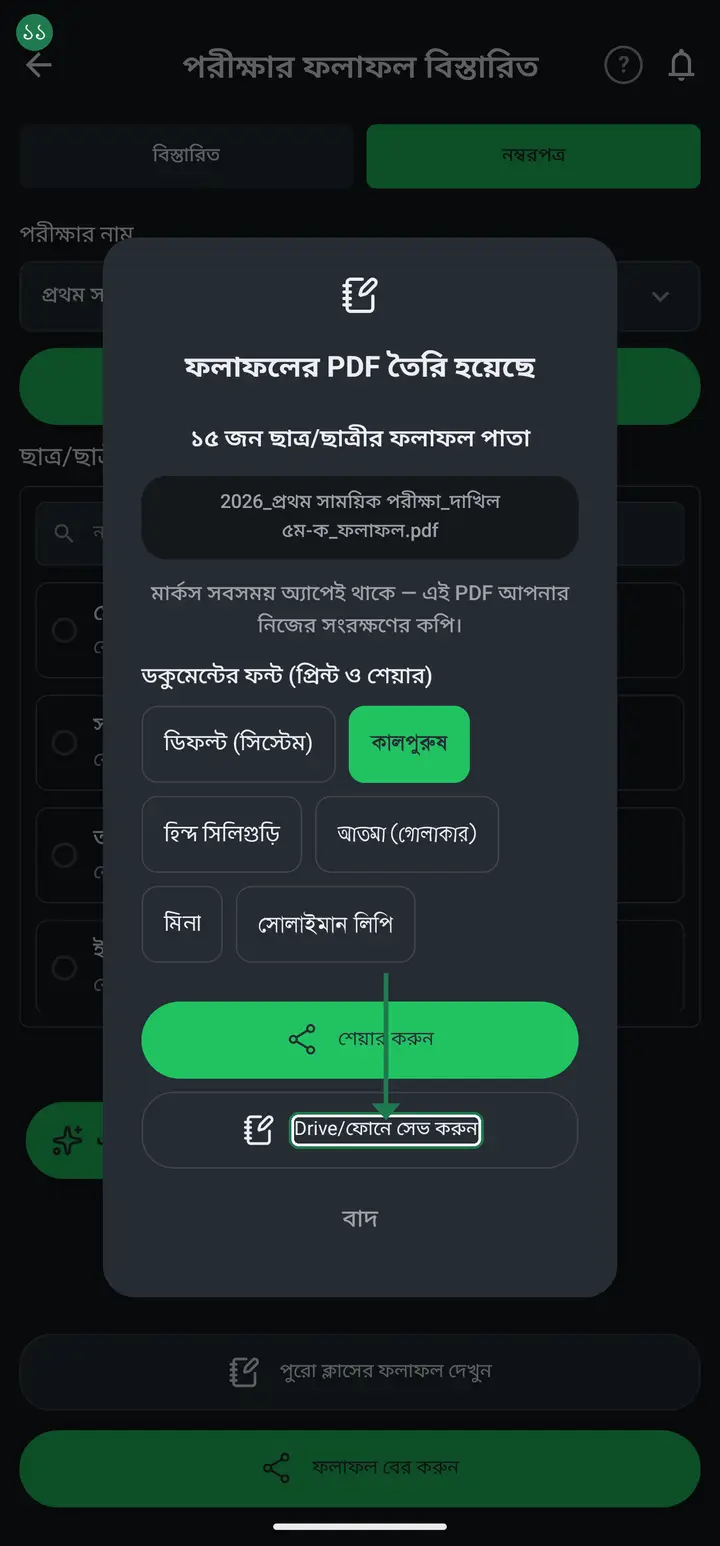
Once the file is in your Drive it belongs to your institution — we cannot delete it and nobody else can see it. Prefer the institution's own Gmail over a teacher's personal one: if that teacher leaves, the files leave with them.
Common questions
Do the results I make in the app stay in the app? If so, where do I find them?
They stay, and nothing is lost. Once you enter marks they are kept in the app — you do not have to save them anywhere yourself, and older exams are not deleted. To find them: open a class, go to "পরীক্ষার ফলাফল" (Exam results), and every past exam is listed there by date. Tap any of them to see the marks again and print or make a PDF as often as you like. || If the app looks empty, do not assume the data is gone — that is usually a different cause. You may have signed in through a different door: signing into a phone-number account with Gmail (or the other way round) makes the app treat you as a new person and show nothing. Open the left menu and your number or email is shown at the top — that is the door your data is behind.
I have to export results one student at a time — is there no way to get everyone at once?
There is, and it has been there for a long time. Tap "ফলাফল বের করুন" (Get the results out) and choose "ফলাফল সংরক্ষণ (PDF)" — the whole class comes out as a single PDF with one page per student, exactly the way admit cards come out for everyone in one tap. The word "সংরক্ষণ" (save) makes it read like storage only — it is also the file you print.
What is the difference between "ক্লাস নম্বরপত্র (PDF)" and "ফলাফল সংরক্ষণ (PDF)"?
The first is one sheet holding the whole class's marks as a table — for the notice board. The second gives every student their own page — to hand to a guardian or to file. If you want something you can give to one child, it is the second.
If I do not keep this PDF, are the marks lost? Will you delete them after a while?
No. Once marks are entered they are kept on the server — we never delete them, and there is no expiry after which they go. They only disappear if you yourself delete the class or the mark form; otherwise they stay, and you can generate this PDF again any day. So why keep the PDF? It is your own copy, held outside the app as well — in the institution's Drive, on the office computer, or printed in a file. Two places is peace of mind.
What is the difference between this and "ক্লাস নম্বরপত্র (PDF)"?
The class marksheet is the whole class on one sheet, for the notice board. The result archive is one page per student in a single PDF. The first is for showing; the second is for keeping.
A student comes back after 10 years asking for their result — then what?
Two ways. One, open the PDF in Drive and search the student's name — the names are real text, not a picture, so Drive finds them. Two, the marks stay in the app and are never deleted, so if the class is still there you can generate the PDF again.
Does it work without internet?
Making the PDF works offline. Only sending it to Drive needs internet.
I cannot find the button.
Close the app fully and reopen it — Settings → Apps → হাজিরা খাতা → Force stop, then open it again. Just backgrounding it keeps the old settings. Also check the class actually has students; with none the button does not appear.
Ask AI about this page
Ask an AI app to explain this page in simple language.
Copied — now paste it
Get Hazira Khata free on Google Play
More tutorials
- How to collect fees Create the month's fee once, then record what each student pays. The app works out who still owes what.
- When students pay different amounts One student pays 1000, another 2000, another nothing — each can have their own amount. Old dues are recorded the same way.
- Previous dues — recording old arrears and carrying them forward Enter the dues students carried in from before you started using the app, and let each month's unpaid balance carry into the next month by itself.
- How to make a marksheet Create a subject's mark form, enter the marks, then print the whole class's marksheet.
- How to make admit cards and seat cards Make and print exam admit cards and seat cards yourself — with the logo, signatures and dates. Both live on one screen, as two tabs at the top.
- How to make student ID cards Make and print student ID cards yourself — with your logo and their photos.
- How to make staff ID cards Print ID cards for teachers, office staff, guards and support staff — all on one sheet.
- Importing attendance from a machine Take the file off your fingerprint machine and load it into the app — the attendance fills itself in.