
How to make a marksheet
Create a subject's mark form, enter the marks, then print the whole class's marksheet.
The screenshots show the app in Bangla, its main language. The buttons sit in the same places in English.
-
Tap "দেখুন" (View) on the class card, then tap "পরীক্ষার ফলাফল তৈরী" (Create exam results).
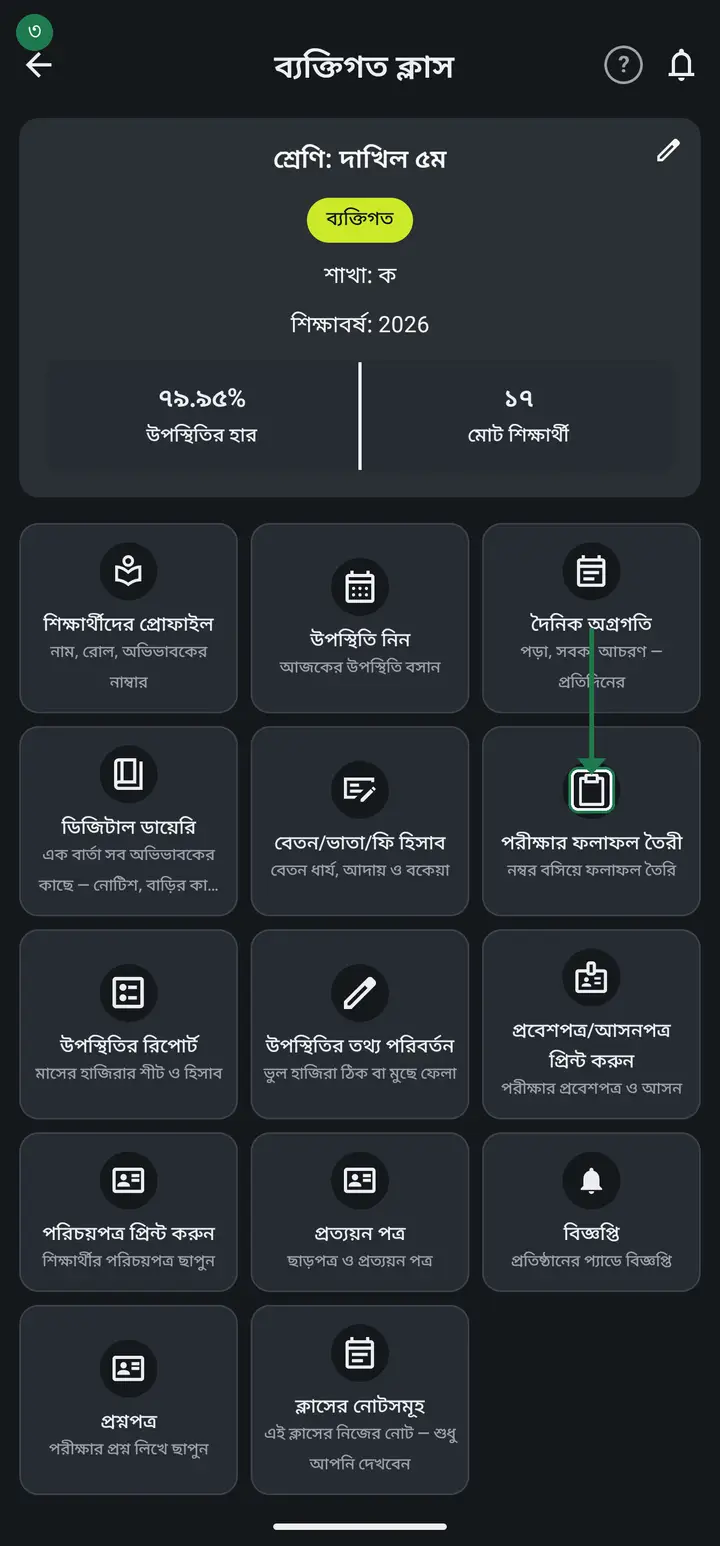
-
Tap the plus (+) button at the bottom. "নতুন নম্বরপত্র যুক্ত করুন" (Add a new mark form) opens.
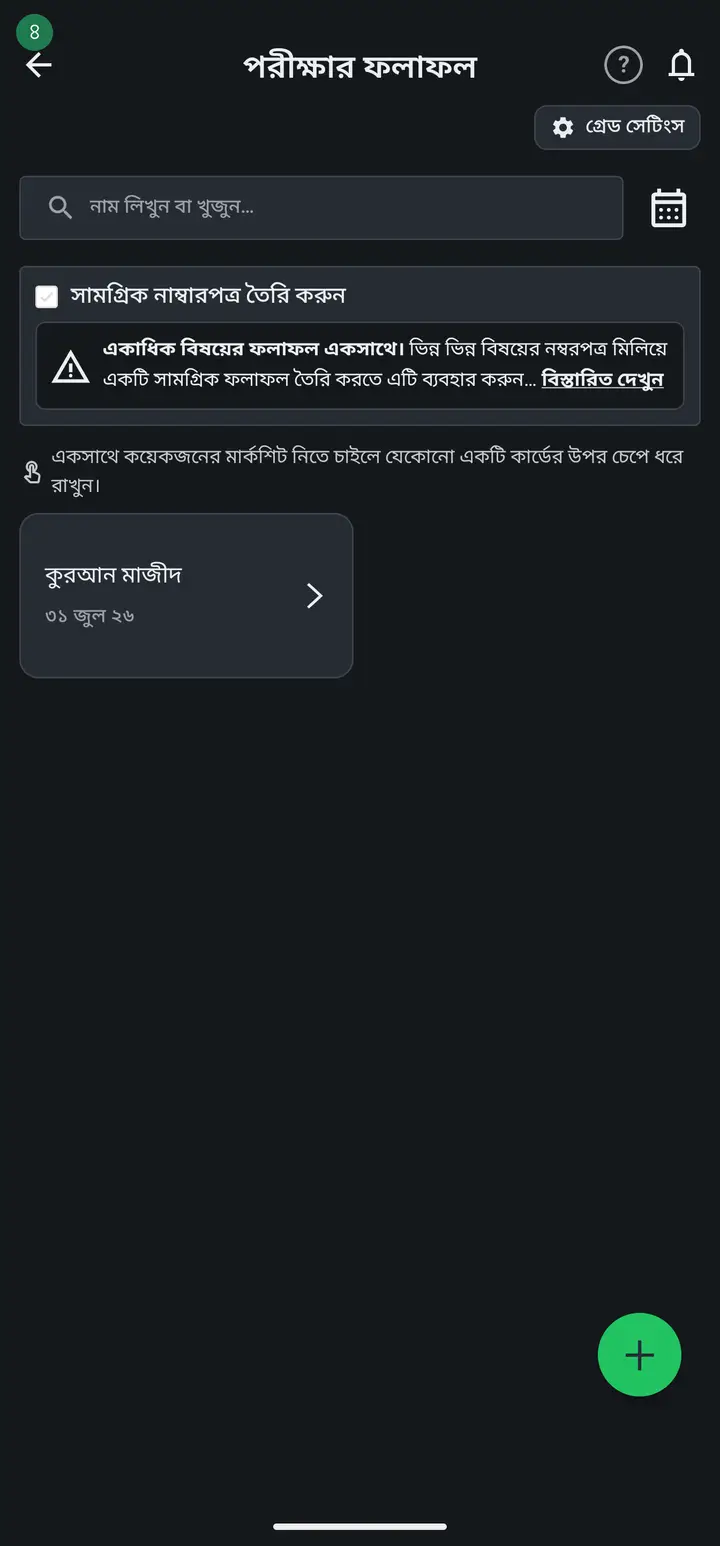
-
In "বিষয়ভিত্তিক নম্বরপত্রের নাম (আবশ্যক)" type the subject — for example বাংলা ১ম পত্র.
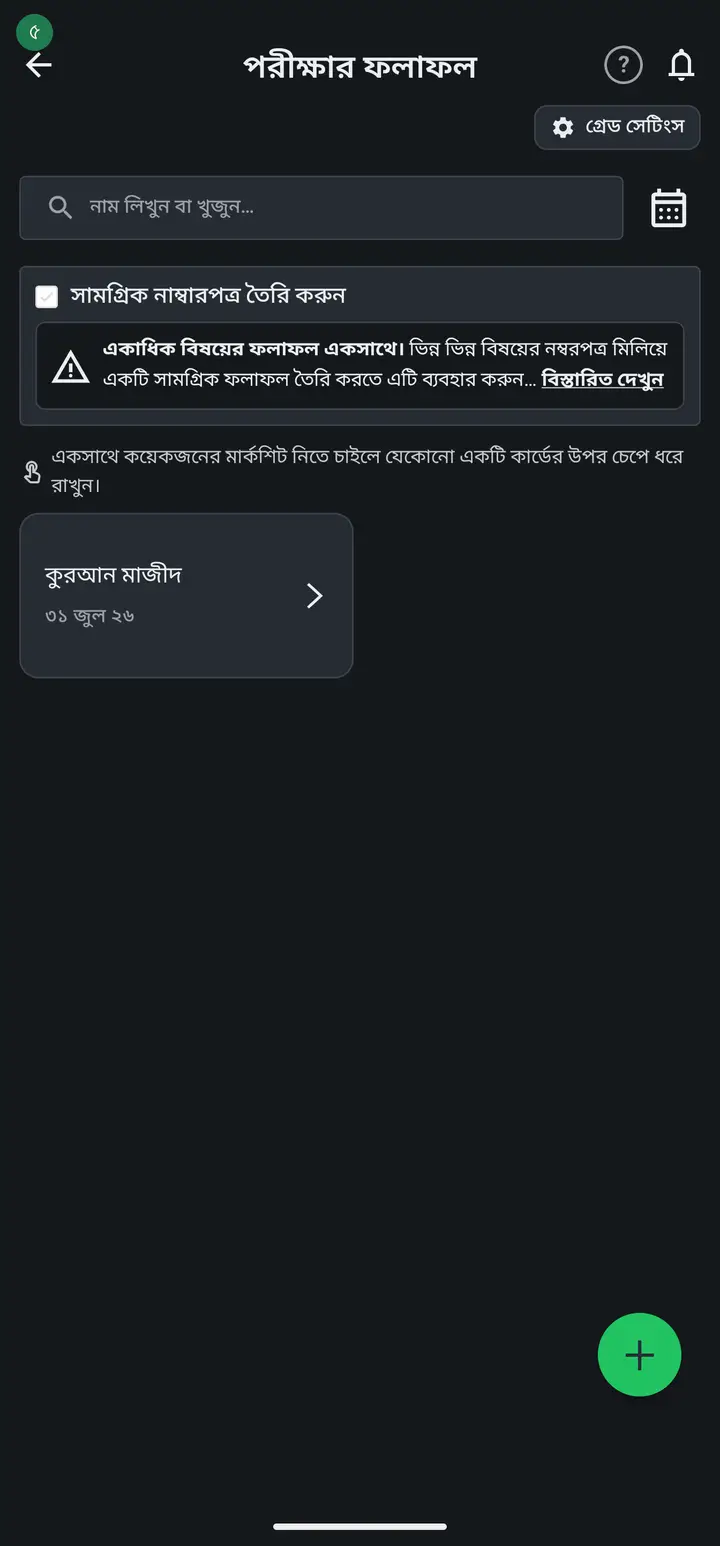
-
In "পূর্ণমান/নম্বর (আবশ্যক)" type the full marks — for example 100. Then pick which term the exam is.
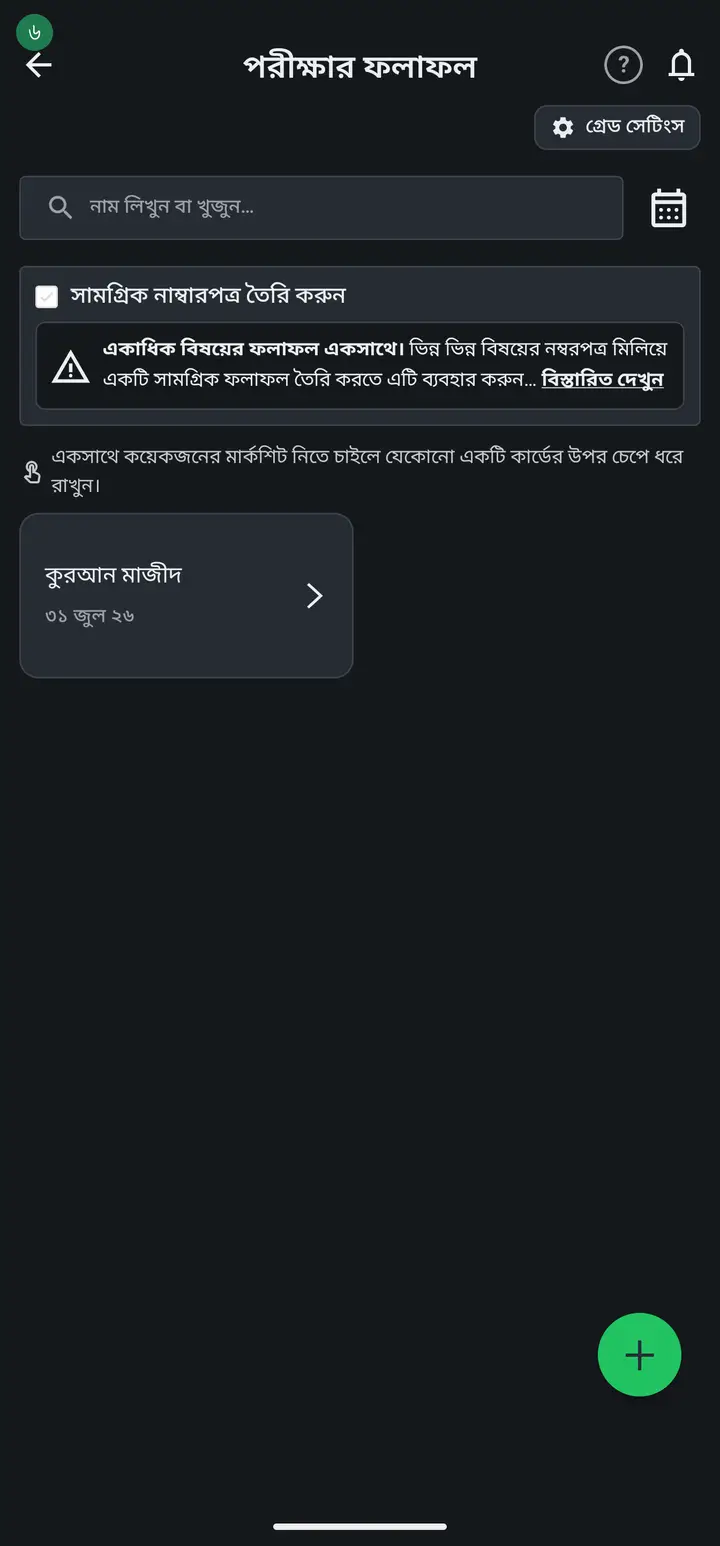
-
Beside the full-marks box sits a small "মানবন্টন" (mark distribution) tick box. If the subject is examined in one paper — maths, all 100 in one script — leave it unticked and skip the next four steps. Tick it only when one subject is examined in parts, for example Bangla: written 70 + MCQ 30.
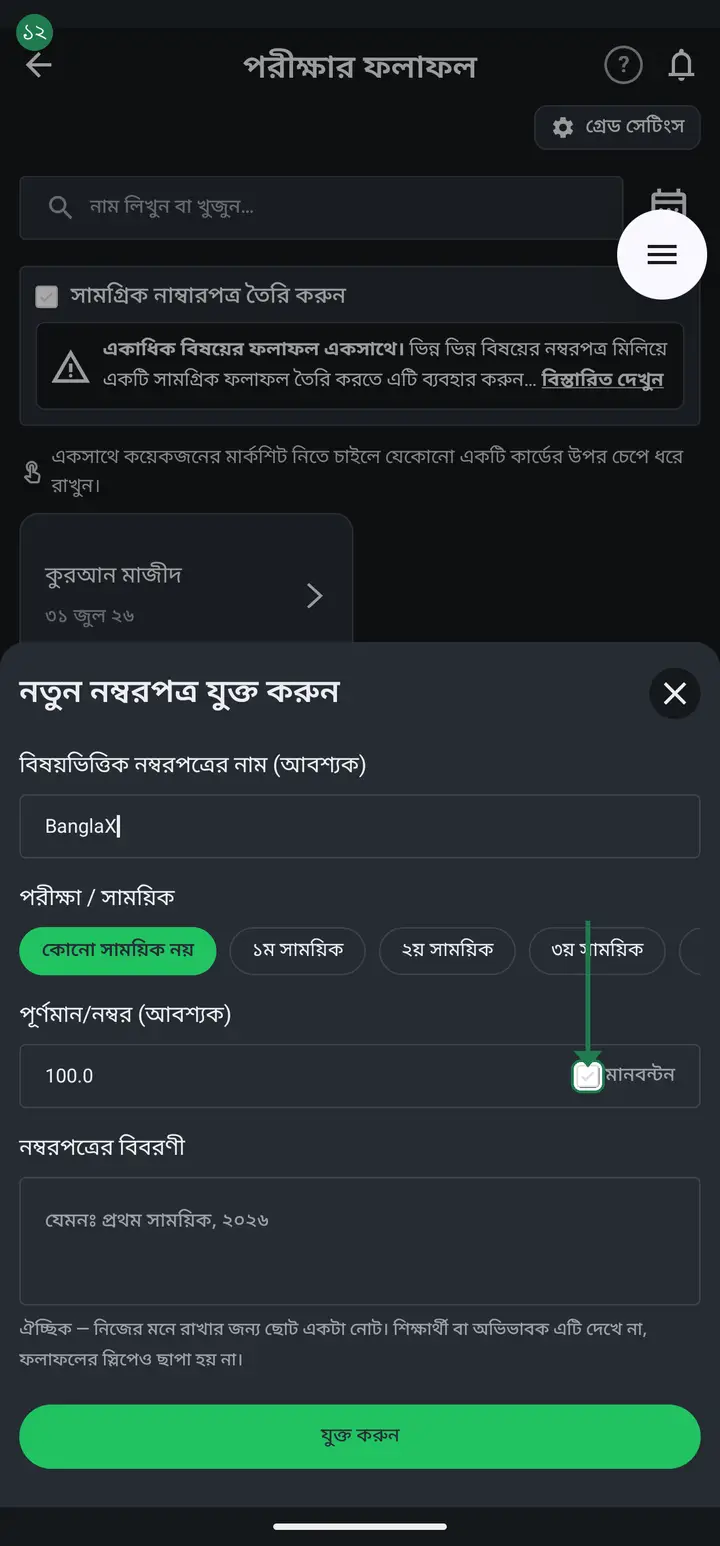
-
Ticking it reveals "মানবন্টন সংখ্যা (আবশ্যক)" (number of parts) — radio buttons 1 to 5. Tap how many parts the subject splits into: written + MCQ is 2, written + oral + practical is 3. That many pairs of boxes open below.
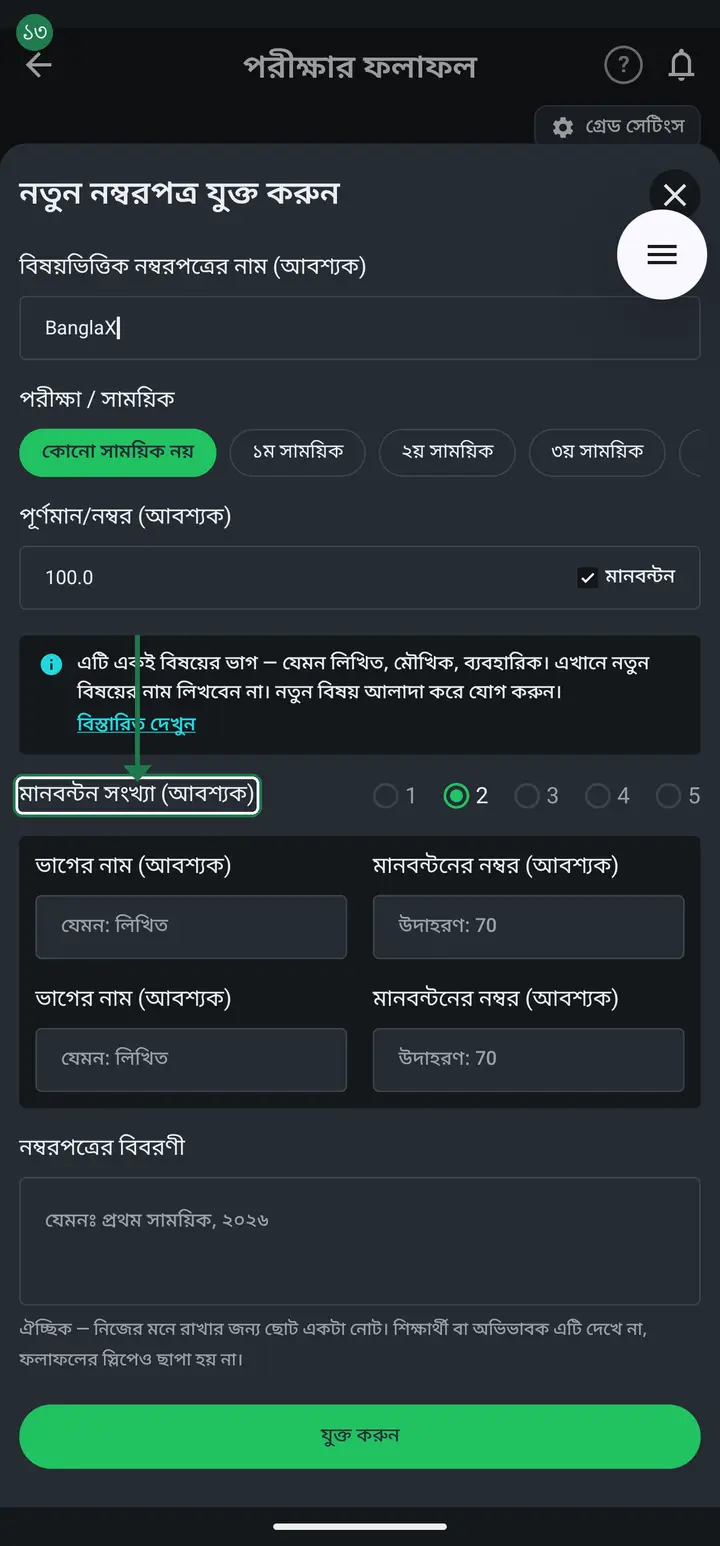
-
Each part has two boxes — "ভাগের নাম (আবশ্যক)" (part name) on the left, "মানবন্টনের নম্বর (আবশ্যক)" (part marks) on the right. Both are required; leave either blank and it will not save. The name is what you call that part — written, oral, practical, MCQ, first paper. The marks are the maximum that part carries — 70, 30. Not what a student scored: that goes in later under "দ্রুত নম্বর এন্ট্রি". The faint "যেমন: লিখিত" and "উদাহরণ: 70" inside the boxes are only examples and vanish as you type.
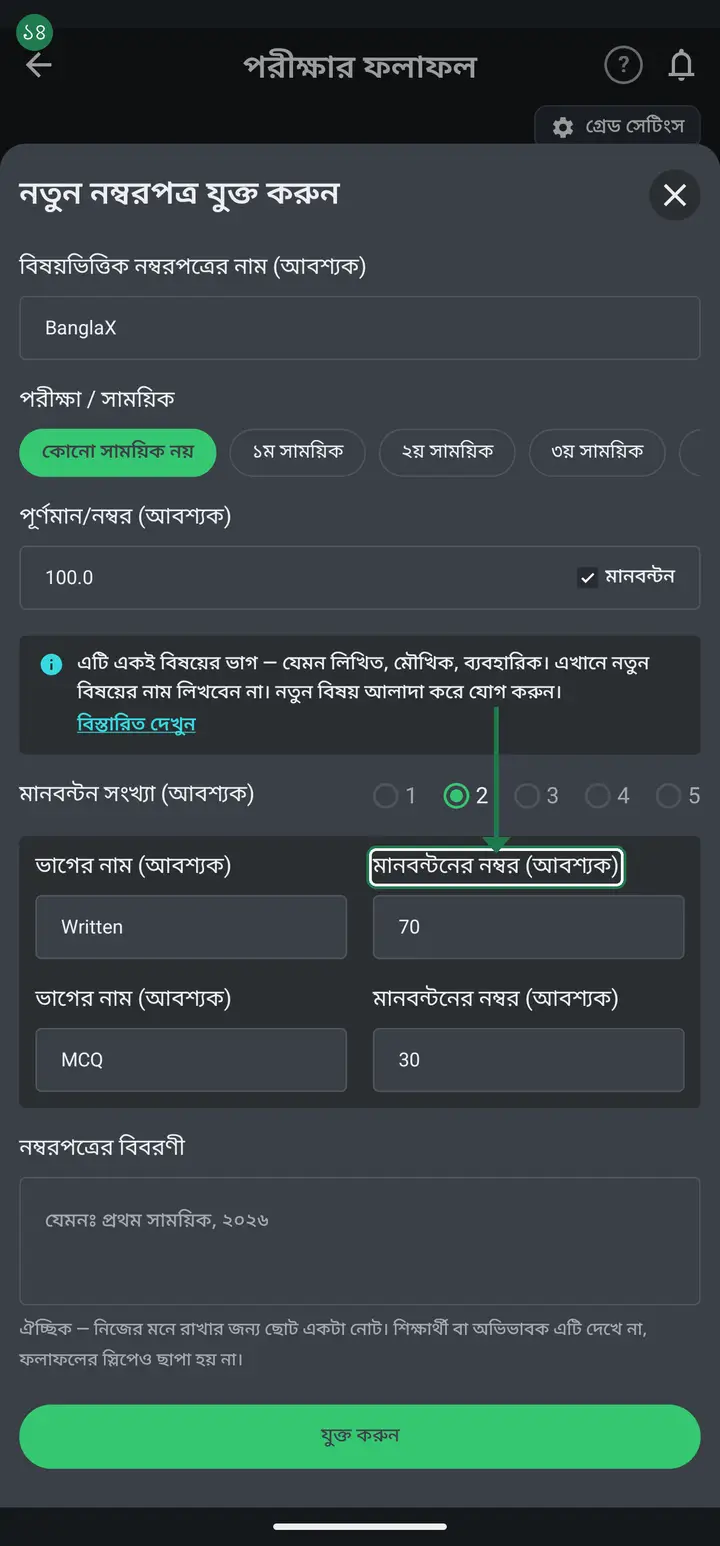
Never type another SUBJECT into the part-name box. Typing "গণিত" as a part of "বাংলা" glues them into "বাংলা - গণিত" and the same subject then shows twice. If maths is a separate subject, tap the plus (+) and give it its own mark form.
-
Before tapping "যুক্ত করুন" (Add), add the parts up — the total must equal the number in "পূর্ণমান/নম্বর" above. 70 + 30 = 100 and the full marks are 100, so it matches. If it does not, the app refuses to save and shows "মানবন্টনের মোট নম্বর পূর্ণমানের সমান হতে হবে" (the parts must add up to the full marks). Then tap "যুক্ত করুন".
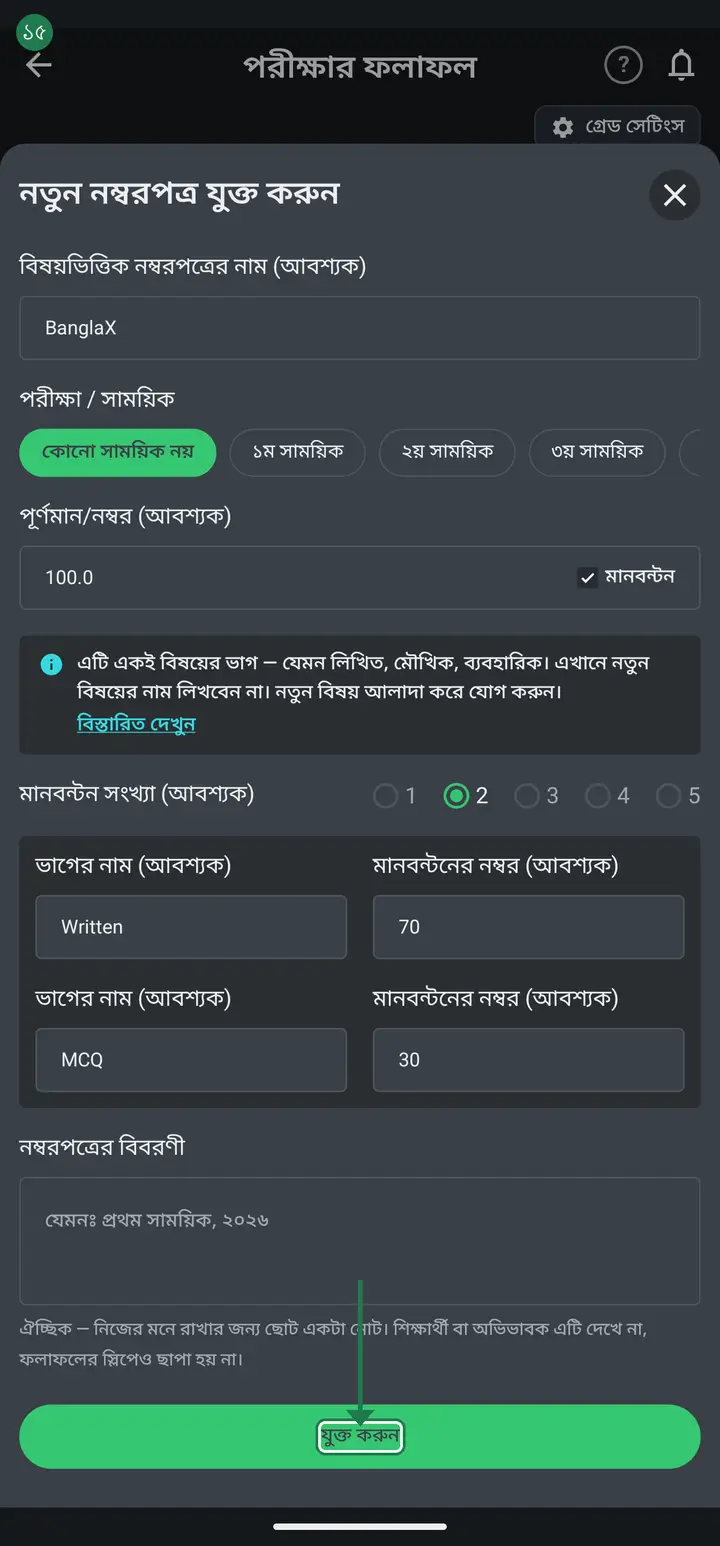
The NUMBER of parts and each part's marks are frozen the moment you tap "যুক্ত করুন" — reopening the form later shows those boxes read-only. Only the part NAME stays editable. Check both before you tap.
-
With a distribution set, mark entry gives each part its own column, headed "বাংলা - লিখিত", "বাংলা - MCQ". You type each part separately and the app adds the total itself.
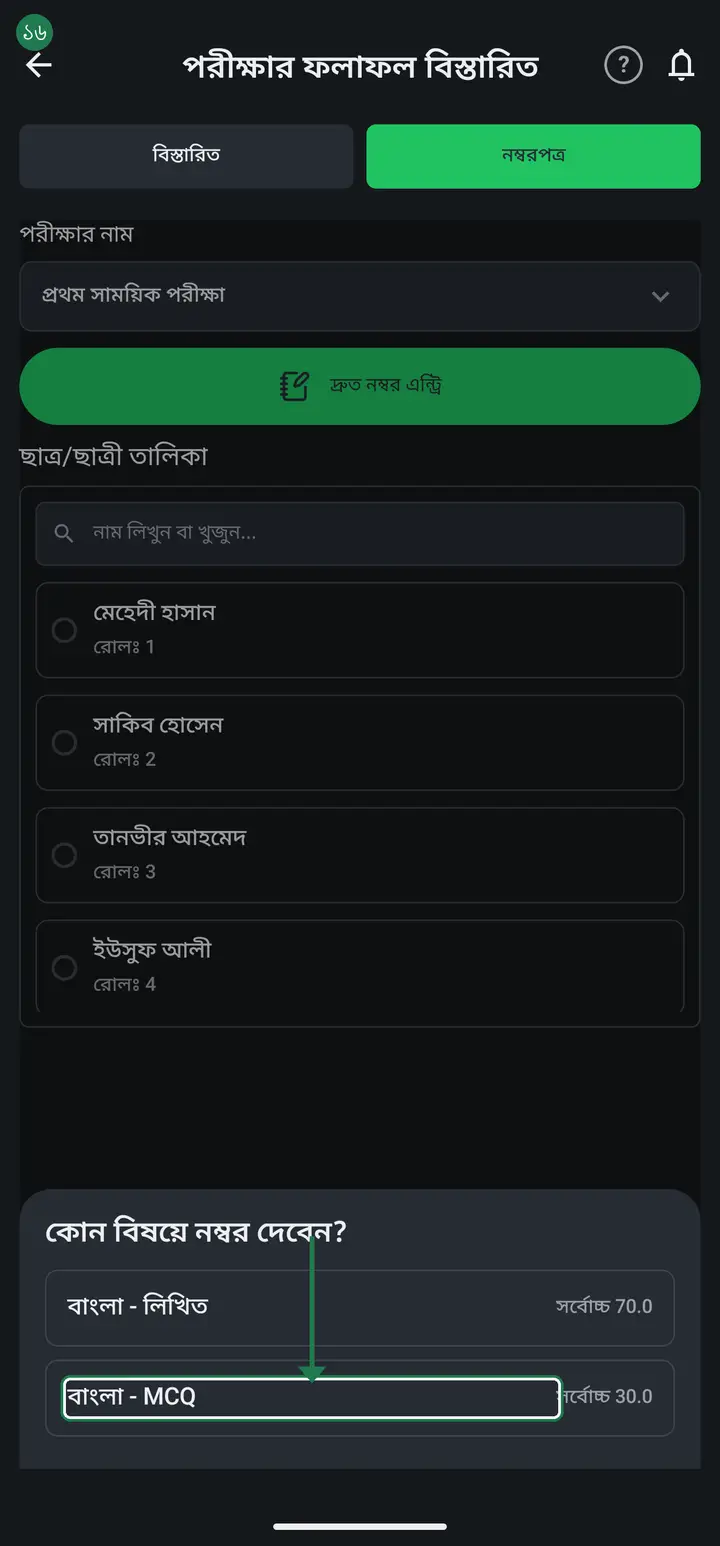
-
You can leave the "নম্বরপত্রের বিবরণী" (Marksheet description) box at the bottom empty — it is not required. Write in it only if you want a note for yourself, for example "প্রথম সাময়িক, ২০২৬".
-
Tap "যুক্ত করুন" (Add). You make one mark form like this for each subject.
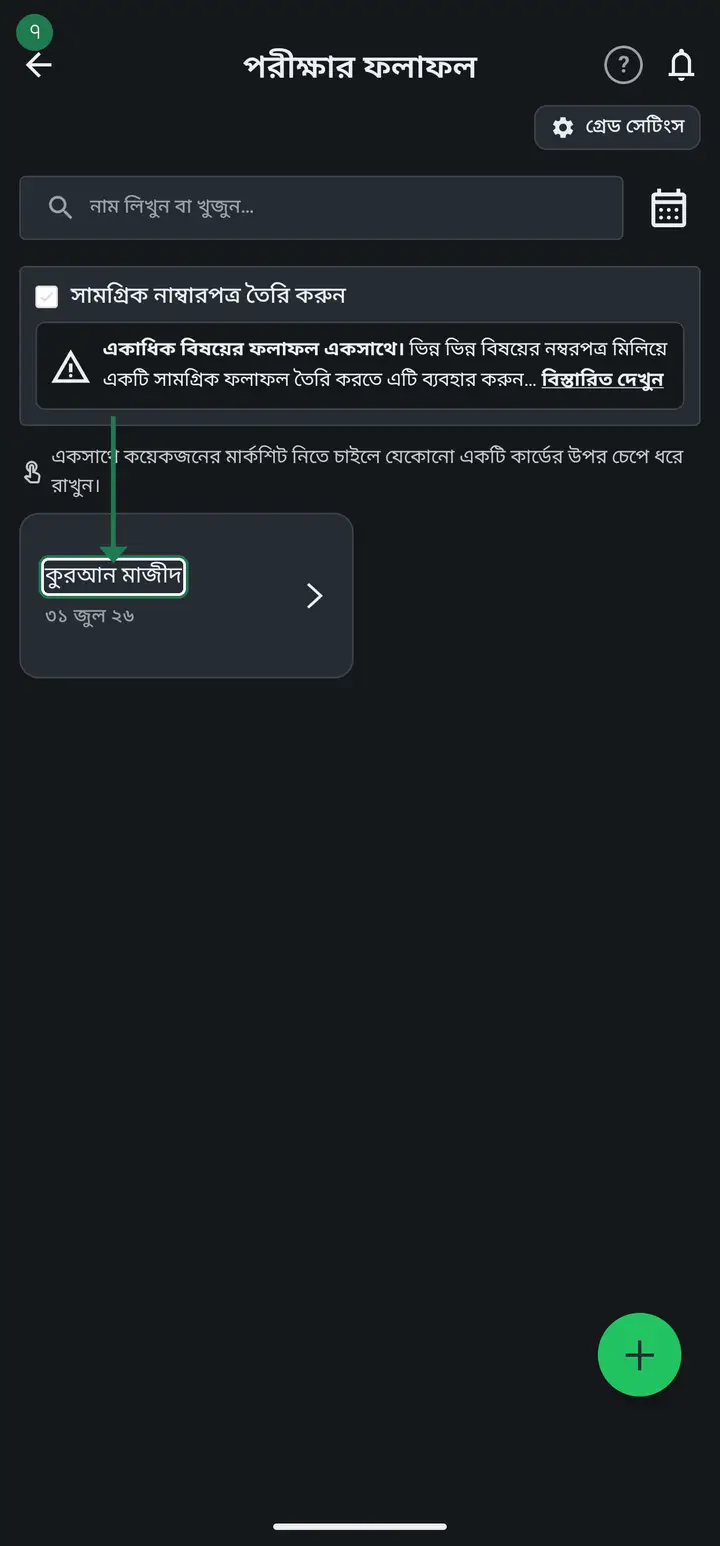
-
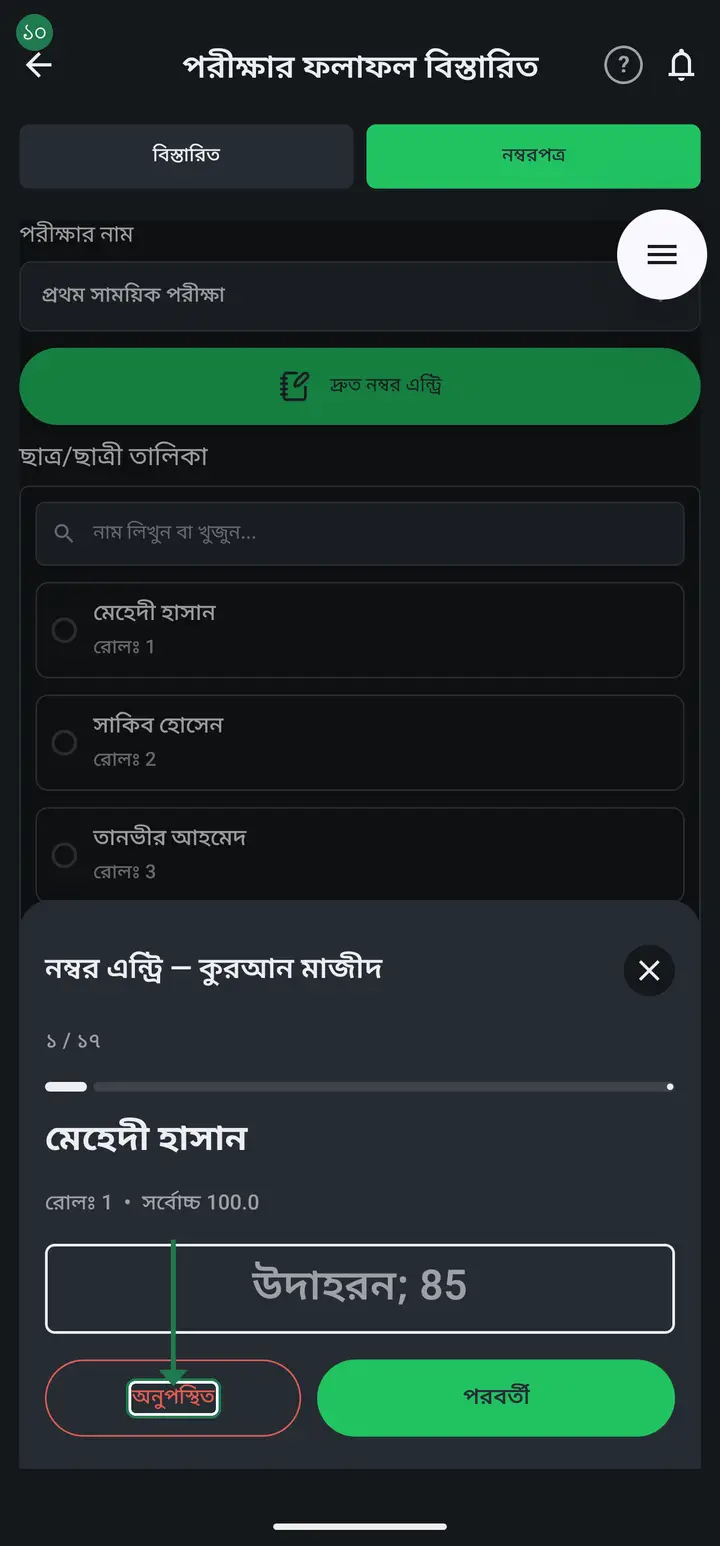
Tap the new card, then tap "দ্রুত নম্বর এন্ট্রি" (Fast mark entry) — the easiest way to go student by student.
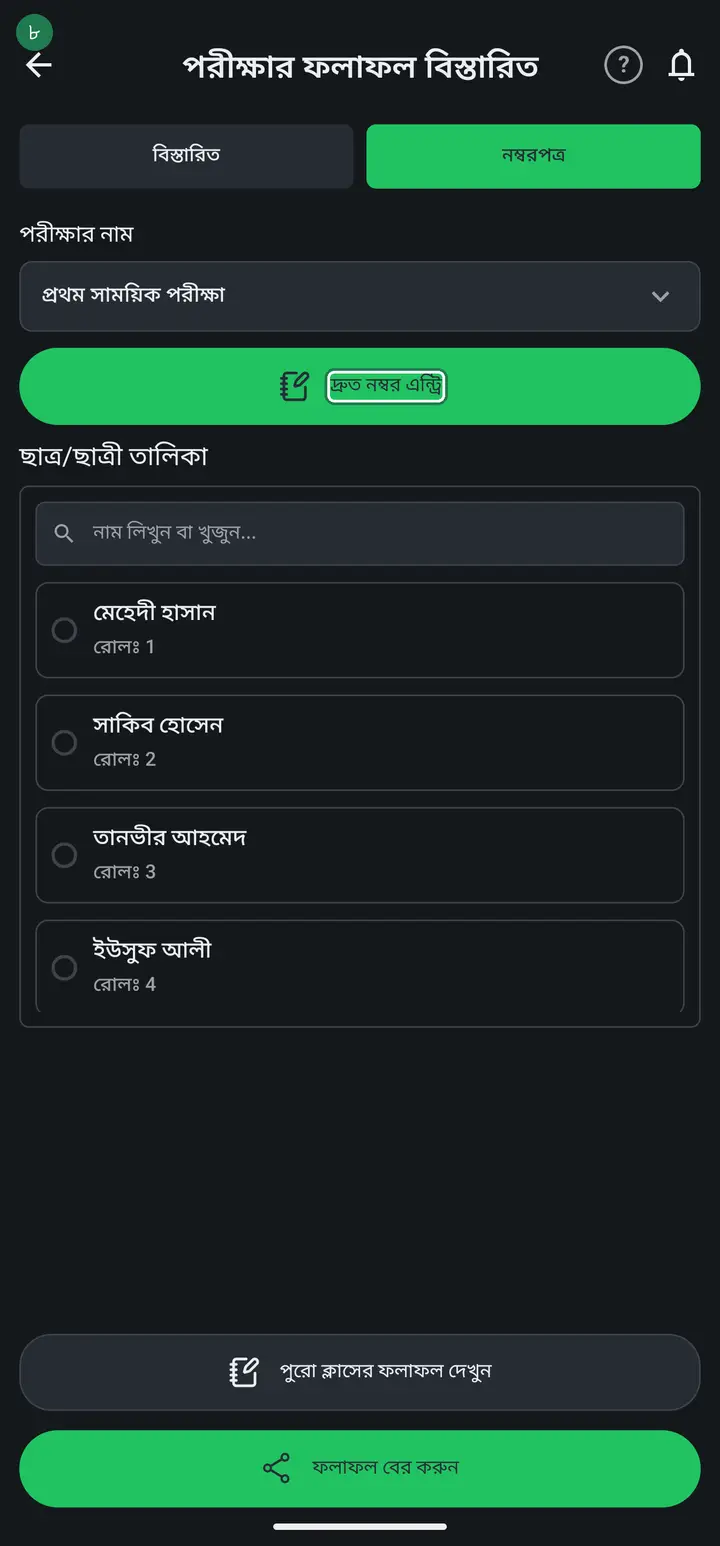
-
Type each student's mark and tap "পরবর্তী" (Next). The keyboard's own Next key does exactly the same thing — it saves and moves to the next student — so you never have to lift your finger off the keypad. For a student who missed the exam tap "অনুপস্থিত" (Absent). At the end tap "শেষ" (Finish).
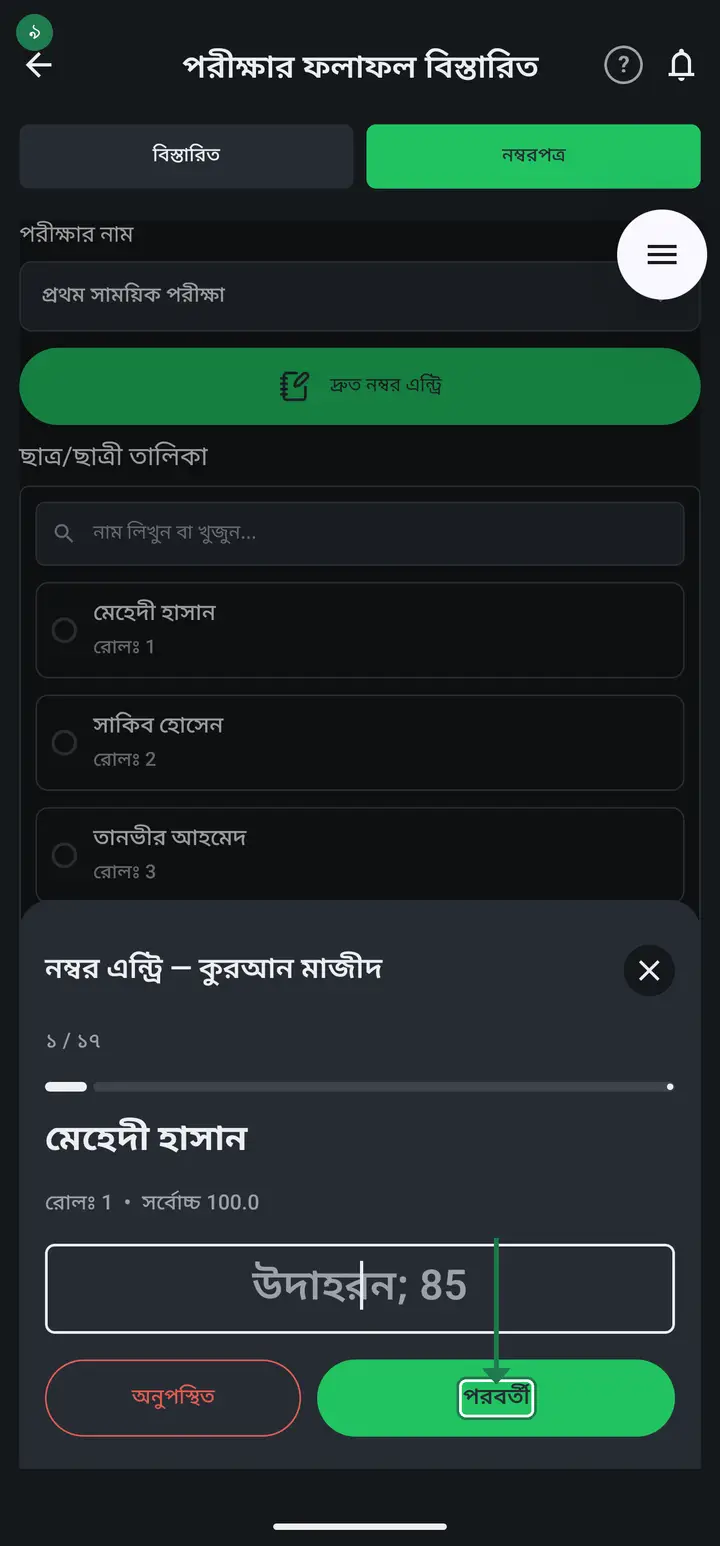
A student who sat the exam and scored nothing gets 0 in the box — do not tap "অনুপস্থিত". 0 means "sat it and scored nothing"; absent means "did not sit it at all", and the marksheet prints them differently.
-
Tap "সেভ করুন" (Save).
-
To do anything with the whole class's results tap the green "ফলাফল বের করুন" (Get the results out) button — PDF, website, export and messaging are all in there together. To send one student's result to their guardian, first tap their name in the list, then tap "রেজাল্ট পাঠান" (Send result).
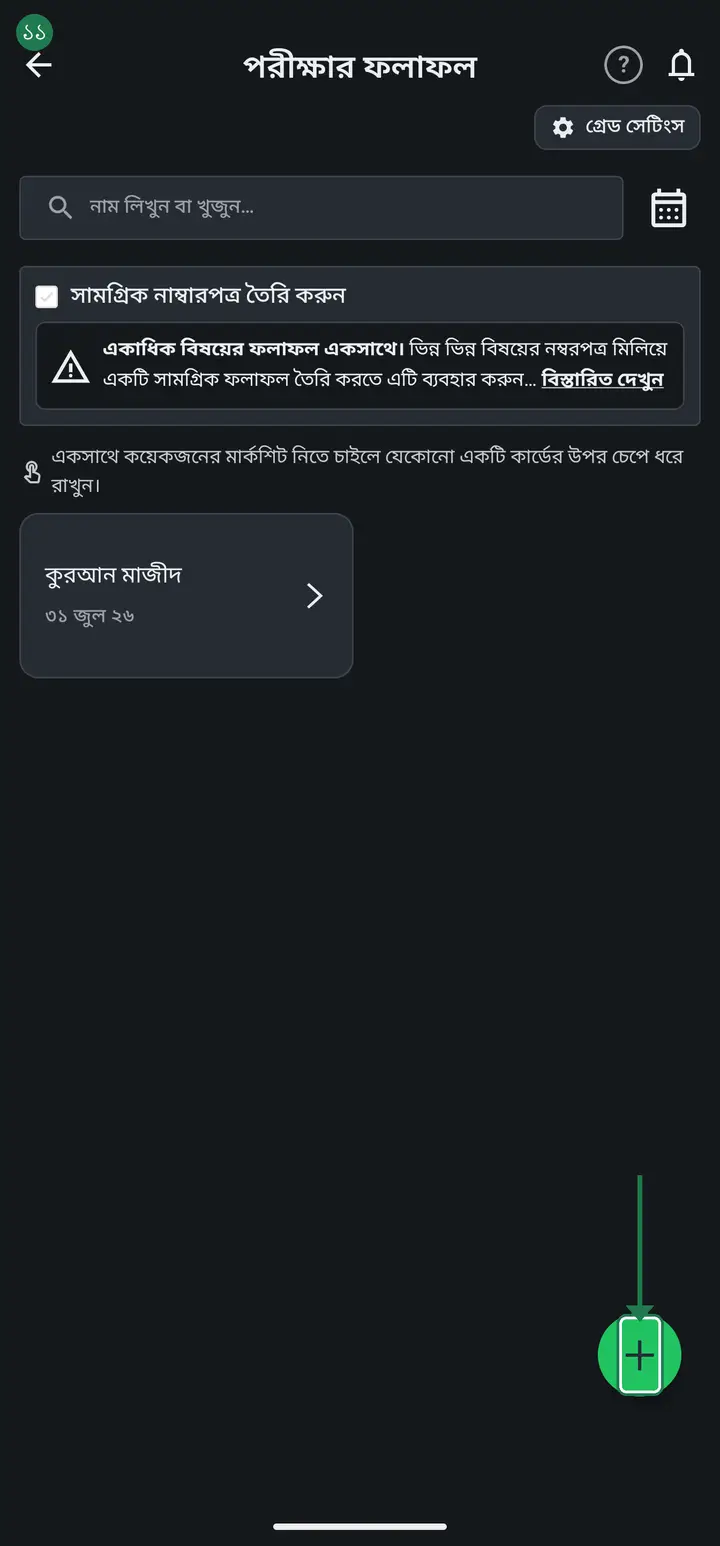
Check "গ্রেড সেটিংস" (Grade settings) before printing. Grades and GPA come from there, and changing it later means already-printed sheets no longer match.
-
You decide the order the subject columns appear in. On the "পরীক্ষার ফলাফল" screen tap "বিষয়ের ক্রম" (Subject order) near the top — you get the list with up/down arrows beside each subject. Use "উপরে নিন" (move up) and "নিচে নিন" (move down), then tap "সংরক্ষণ করুন" (Save).
This order is not per-document — the marksheet, the tabulation sheet, the result slip and the website all follow the same one, so setting it once lines every paper up. It needs internet to save; without it you get "ক্রম সংরক্ষণ করা যায়নি" and should retry. One thing to know: this works from version 3.2.251 onward. In earlier versions a bug of ours meant tapping it did nothing at all, so update first if your phone still has an older build.
Common questions
Can I get the whole-class result as a Word file? I want my own font, logo and layout on a computer.
Yes, from version 3.2.273. After "পুরো ক্লাসের ফলাফল দেখুন" builds the PDF, the message that appears has a "Word ফাইল — কম্পিউটারে এডিট করুন" (Word file) button. It opens the share list — send it to your own WhatsApp, email or Google Drive and open it on a computer. In Word you can change the font, move the logo, and move the header lines up or down however you like. Marks, totals, GPA and merit order are identical to the PDF, because both are built from the same figures. A Word file may not display well on a phone — it is meant for a computer; on the phone the PDF is better.
I set the full marks wrong — it should be 50, not 100. Do I have to delete the subject?
No. Tap the subject's card, and on the "বিস্তারিত" tab the "পূর্ণমান/নম্বর" box can now be edited — clear the old number, type the new one and tap "এডিট" at the bottom. Marks already entered stay where they are. If the subject has a breakdown (say written 70 + oral 30) you must change those parts to match as well: the app will not save while the parts do not add up to the full marks. With no breakdown, the single part follows the full marks by itself. ⚠️ Deleting a subject also deletes every mark entered against it, so avoid deleting once marking has started.
The subjects come out in a random order — how do I put লিখিত before মৌখিক?
Near the top of the "পরীক্ষার ফলাফল" screen there is "বিষয়ের ক্রম" (Subject order) — tap it. Each subject has up and down arrows, "উপরে নিন" and "নিচে নিন". Arrange them and tap "সংরক্ষণ করুন" (Save). After that the marksheet, the tabulation sheet, the result slip and the website all use that order. The app used to choose the order itself, which is why it looked arbitrary; it is yours to set now.
I made one subject's mark form — how do I add the rest of the subjects?
The same way you made the first one — tap the plus (+) button at the bottom again, type the new subject's name and full marks, and tap "যুক্ত করুন" (Add). Each subject gets its own mark form; there is no single form that holds every subject at once. Every subject you add shows up as its own card in the class list. If you want one marksheet that combines every subject, see the next question.
I cannot enter 0 as a student''s mark — it says "অবৈধ নম্বর" (Invalid marks).
That was a bug in the app, fixed in 3.2.195, and it has reached everyone. If 0 is still refused your app is an old build — update from the Play Store. Typing 0 used to be refused, so a student who sat the exam and scored nothing could not be recorded at all. On an older build: do not use "অনুপস্থিত" instead — it says something different, that the student never sat the exam, and the marksheet prints it that way. Once updated you can type 0 directly, and coming back to that box shows the 0 still there.
I get "সংরক্ষণ ব্যর্থ হয়েছে" (Save failed) while entering marks — what should I do?
That mark was not saved and has to be entered again. The message appears when the mark cannot reach the server, most often a network problem. In the newer update the message also names the student whose mark did not save, so you only have to redo that one. If your app shows just "সংরক্ষণ ব্যর্থ হয়েছে" with no name, watch for this: the message may not appear straight away, so by the time you see it you may be two or three students further on. Go back to the marksheet list and check the boxes of those few students — wherever a mark is missing or wrong, enter it again. Opening the app once more somewhere with a good connection is the surest way to confirm everything is there.
My internet is fine, but every mark says "সংরক্ষণ ব্যর্থ হয়েছে" (Save failed) — retrying never works.
It is not your network, it is a problem in the app. When the app sits in the background for a long time the phone sometimes closes it, and when you come back it reopens straight onto the result page — in that case the app never reloads your school, so marks cannot save. The fix is simple: open the recent-apps list (the square or three-line button at the bottom), swipe Hazira Khata away to close it completely, then open it again from its icon. Go from the first page to the class → পরীক্ষার ফলাফল তৈরী and enter the marks again — they will save now. Marks that failed earlier have to be entered again. The next update fixes this.
The "মোট" (total) on a result slip does not match the subject marks printed above it.
That was a bug in the app, fixed in 3.2.229, and it has reached everyone. If a total still comes out too high your app is an old build — update from the Play Store. The cause: when you later corrected a subject mark, the old mark stayed behind. The list showed the new one, but the total added both the old and the new — so it came out too high, sometimes higher than the full marks. The subject figures you see are correct, and so are the GPA, the grade and the merit position. Until the update reaches you, check the total with the "পুরো ক্লাসের ফলাফল দেখুন" (whole-class result) button below — that one has always been right. Once updated, print that exam's slips again.
I do not understand what to write in "নম্বরপত্রের বিবরণী".
It is optional — leaving it empty is fine and the mark form is created normally. Whatever you write there is only ever shown back to you, when you reopen that same box. Students and guardians never see it, and it is not printed on the class marksheet PDF or the result slip. So use it as a short note for yourself — for example "প্রথম সাময়িক, ২০২৬" — or leave it blank.
When I send a result I get the phone's whole app list — why does WhatsApp not have the number?
That student has no number saved on their profile. When a number is saved the app opens WhatsApp/SMS/imo straight on that number; with none saved it cannot tell who to send to, so it falls back to the full app list. The send sheet says "এই শিক্ষার্থীর কোনো নম্বর সেভ করা নেই" and offers a "নম্বর যোগ করুন" (Add a number) button — tap it, and that student's profile opens so you can save the guardian's number once. After that it goes directly every time.
What is the difference between "ক্লাস নম্বরপত্র (PDF)" and "সব ছাত্রের ফলাফল PDF/প্রিন্ট" (called "ফলাফল সংরক্ষণ (PDF)" before 3.2.309)?
The class marksheet is the whole class on one sheet, for the notice board. The result archive is one page per student, all in a single PDF — meant for keeping over the years, so when a past student asks for an old result you can find it. Both are inside the "ফলাফল বের করুন" button.
Can I enter marks without creating a mark form?
No. You first create the subject's form — which subject, what full marks, which exam. Only then does the mark entry appear.
I want one marksheet combining all subjects.
Tick "সামগ্রিক নাম্বারপত্র তৈরি করুন" (Create an overall marksheet), then select which subjects to combine. You must pick at least two — one is not enough.
Do I need internet to enter marks?
No. Entering marks and making the PDF work offline. Only publishing results to the school website needs internet.
How do I set up mark distribution?
In plain terms: a distribution just tells the app that one subject's exam comes in parts. Say Bangla is 100 marks — written 70 and MCQ 30. Then: 1) type 100 in "পূর্ণমান/নম্বর (আবশ্যক)"; 2) tick "মানবন্টন" beside it; 3) tap 2 under "মানবন্টন সংখ্যা (আবশ্যক)", because there are two parts; 4) first pair — name লিখিত, marks 70; 5) second pair — name MCQ, marks 30; 6) tap "যুক্ত করুন". 70 + 30 = 100 and the full marks are 100, so it saves. Put 70 and 20 instead and the total is 90 against a full mark of 100 — it will not save. If your subject is examined in one paper, do not tick মানবন্টন at all.
Both "ভাগের নাম" and "মানবন্টনের নম্বর" say (আবশ্যক) — what exactly goes in them?
(আবশ্যক) means required: every part needs both a name and a number. The name is what you call that part — written, oral, practical, MCQ, first paper, second paper. Do not type another subject's name there (maths, English); those are separate mark forms. The number is the maximum that part carries — 70 for a 70-mark written paper, 30 for a 30-mark MCQ. It is not a student's score; scores go in later under "দ্রুত নম্বর এন্ট্রি". The faint "যেমন: লিখিত" and "উদাহরণ: 70" inside the boxes are placeholders, not text, and disappear as you type. A blank name gives "প্রতিটি মানবন্টনের একটি নাম দিতে হবে", and 0 marks gives "মানবন্টনের নম্বর শূন্যের চেয়ে বড় হতে হবে".
I set the distribution wrong — how do I change it?
The part NAME can be changed: tap that subject's card, open "বিস্তারিত", fix the name and tap "এডিট". The number of parts and each part's marks cannot — those boxes are read-only once created. If either is wrong the only route is "ডিলিট" on that same screen and building the mark form again. Deleting also removes every mark already entered for that subject, so check both before tapping "যুক্ত করুন".
I have read all this and still do not follow — who can I ask?
There is an "এআই" (AI) button inside the app, on the very screen you are stuck on. Tap it and the app writes the question for you; you only pick ChatGPT or Gemini. After that you can keep asking it as many follow-ups as you like, in plain Bangla, at any hour. This tutorial page also has an "AI-কে জিজ্ঞেস করুন" box with a "প্রশ্ন কপি করুন" (Copy the question) button — copy it, paste it into the AI app. Walkthrough with screenshots — hazirakhata.xyz/tutorials/ask-ai/
The pass mark is 33% — can I change it to 40 or 50?
Yes. 33 is only the starting default, not a rule built into the app. On the result page open "গ্রেড সেটিংস" (Grade settings) and type your number into "পাস মার্ক (%)"; the fail boundary moves with it automatically. One thing to know: the pass mark belongs to the CLASS, not to an individual exam. So setting it to 50 for an improvement exam also re-reads every earlier exam in that class at 50 — a student who passed at 33 will now show as failed. If you have already printed results, think before changing the number.
Can I put the subject columns on the result sheet in my own order — written subjects first, oral after?
Yes. On the "পরীক্ষার ফলাফল" (Exam results) screen, just above the subject tiles, there is "বিষয়ের ক্রম" (Subject order) — tap it and you get the subject list with up/down arrows. Use "উপরে নিন" (move up) and "নিচে নিন" (move down) to arrange them, then "সংরক্ষণ করুন" (Save). Lift the written subjects up and push the oral ones down. || Before version 3.2.251 this did not work, and two bugs of ours were behind that. One, the control was hidden whenever "সামগ্রিক নাম্বারপত্র তৈরি করুন" (Create an overall marksheet) was ticked. Two, even when you found it, the dialog opened underneath the screen so nothing appeared to happen. Both are fixed. If your phone still has an older build, tapping it will do nothing — update first. || The order is not per-document: the marksheet, the tabulation sheet, the result slip and the website all follow the same one. A subject you add later lands after the ones you arranged, at the very end rather than in the middle — open "বিষয়ের ক্রম" once more to move it where you want it. || One thing to expect: after changing the order, sheets you printed earlier will not match the new ones column-for-column. No mark and no calculation changes — only the order of the columns.
Why does a student get A+ although they scored under 80 in one or two subjects?
Because the grade currently comes from the percentage of the TOTAL, not from each subject's grade. Example: 90, 70, 88, 80, 95, 100 totals 523/600 = 87.2%, so it prints A+ — even though Bangla is 70. Under the national rule it should be the mean of the subject grade points: 5, 4, 5, 5, 5, 5 = 4.83, which is an A. This is being fixed: from the next update, Bangladeshi institutions take the GPA from the subject grades automatically — nothing to switch on. A student who genuinely scored well in every subject keeps their A+; only the ones carried by an average change. One thing to know in advance: after the update, reprinting an OLD exam's result shows the corrected grade, which may not match the paper parents are already holding. An institution that wants to keep the old way can turn the switch off in the class's grade settings. The WhatsApp group will be told when the update is out. Until then, printing the মার্কশিট instead of the রেজাল্ট সিট shows each subject's own grade.
The merit position is not in serial order — there is a 1, a 2, then no 3, and the rest carry on. Is it wrong?
It is not wrong, and no student has been dropped. Merit position is decided by the total mark. When two students have exactly the same total they share one position, and the next student moves past all the places those tied students filled. || An example. If five totals are 590, 587, 587, 587, 536, the positions print 1, 2, 2, 2, 5. Three students tied on 587 are all second, and between them they occupy places 2, 3 and 4 — so the next student is 5th. Places 3 and 4 were not skipped; people are standing in them. This is how every school and madrasa in the country ranks: two equal scores are both second, and nobody is third. || Older versions printed ১ম, ২য়, ৩য় in the top three cells and a bare number in every cell below — two styles in one column, which made it look as though places had gone missing. Now every merit cell prints a plain number, and students in merit places 1 to 3 carry a ★ on their row (a failed student gets no ★). If your sheet still shows ১ম, ২য়, ৩য়, update the app and make the sheet again. || To check who tied, read the "মোট" (Total) column — students sharing a position have exactly the same total. A decimal was also added to the percentage column (so 99.8 and 100.0 no longer both read 100) — if you do not see it, update the app.
Can the students placed 1st, 2nd and 3rd stand out on the result sheet?
From version 3.2.275, with nothing to switch on. On the sheet made from "পুরো ক্লাসের ফলাফল দেখুন", every student at merit position 1, 2 or 3 gets a ★ before the name, and their total, percentage, GPA, grade and position print in bold. No colour, so it still shows on a black-and-white printer. Students tied on a place all get the ★; with positions 1, 1, 3 there is no 2nd, so those three are the ones marked. A student who failed (grade F) keeps the position printed as before but gets no ★ and no bold. The Word file matches. Older versions print the sheet as before, with no ★.
Can the result list put the highest scorer on top (position 1 first) — sorted by merit?
From version 3.2.302 (testers only for now; everyone gets it later). Tap "পুরো ক্লাসের ফলাফল দেখুন" below the marksheet. At the bottom of the page that opens there are two buttons, "রোল অনুযায়ী" (by roll) and "মেধাক্রম অনুযায়ী" (by merit) — tap "মেধাক্রম অনুযায়ী" and the preview reorders at once: 1st place on top, then 2nd, 3rd and so on. Two students on the same total stay together (smaller roll first), and a student with no marks entered goes to the bottom. Then tap "এই সাইজে পিডিএফ বানান". Only the order changes — roll, marks and merit position print exactly as before; this button does not change any student's roll (to change rolls, see the next question). The app remembers your choice; for roll order again, tap "রোল অনুযায়ী" and make the PDF again.
After an exam, can the app set new rolls from the merit list by itself? (1st place becomes roll 1)
From version 3.2.303 (testers only for now; everyone gets it later). Tap "পুরো ক্লাসের ফলাফল দেখুন" → tap "মেধাক্রম অনুযায়ী" at the bottom → a "এই ক্রমে নতুন রোল বসান" (set new rolls in this order) button appears; tap it. Nothing changes yet — first a "নতুন রোল বসানোর আগে দেখে নিন" (check the new rolls first) page lists every student's old roll → new roll, and says which exam and how many subjects the totals come from. If it is right, tap "ঠিক আছে, বসান"; if not, "বাদ". The rule: 1st place gets roll 1, then 2, 3…; two students on the same total keep the smaller previous roll first; a student with no marks goes last. A student whose roll is already right is not touched. If a new roll equals the roll of a student who has left, you are warned. Made a mistake? On the same phone, open "পুরো ক্লাসের ফলাফল দেখুন" again and tap "আগের রোল ফিরিয়ে আনুন" to bring the previous rolls back. Only people who may change students in this class see the button.
Ask AI about this page
Ask an AI app to explain this page in simple language.
Copied — now paste it
Get Hazira Khata free on Google Play
More tutorials
- How to collect fees Create the month's fee once, then record what each student pays. The app works out who still owes what.
- When students pay different amounts One student pays 1000, another 2000, another nothing — each can have their own amount. Old dues are recorded the same way.
- Previous dues — recording old arrears and carrying them forward Enter the dues students carried in from before you started using the app, and let each month's unpaid balance carry into the next month by itself.
- Getting every student's result in one go The whole class's results in one PDF in one tap — one page per student, so you never export them one at a time. Print it, or keep it in your own Google Drive and find any student by name years later.
- How to make admit cards and seat cards Make and print exam admit cards and seat cards yourself — with the logo, signatures and dates. Both live on one screen, as two tabs at the top.
- How to make student ID cards Make and print student ID cards yourself — with your logo and their photos.
- How to make staff ID cards Print ID cards for teachers, office staff, guards and support staff — all on one sheet.
- Importing attendance from a machine Take the file off your fingerprint machine and load it into the app — the attendance fills itself in.