
A teacher has left — removing a member
Somebody has resigned, or you approved the wrong person. Take the name off in one tap without losing any of the attendance or fees they recorded — and how to leave an institution yourself.
The screenshots show the app in Bangla, its main language. The buttons sit in the same places in English.
-
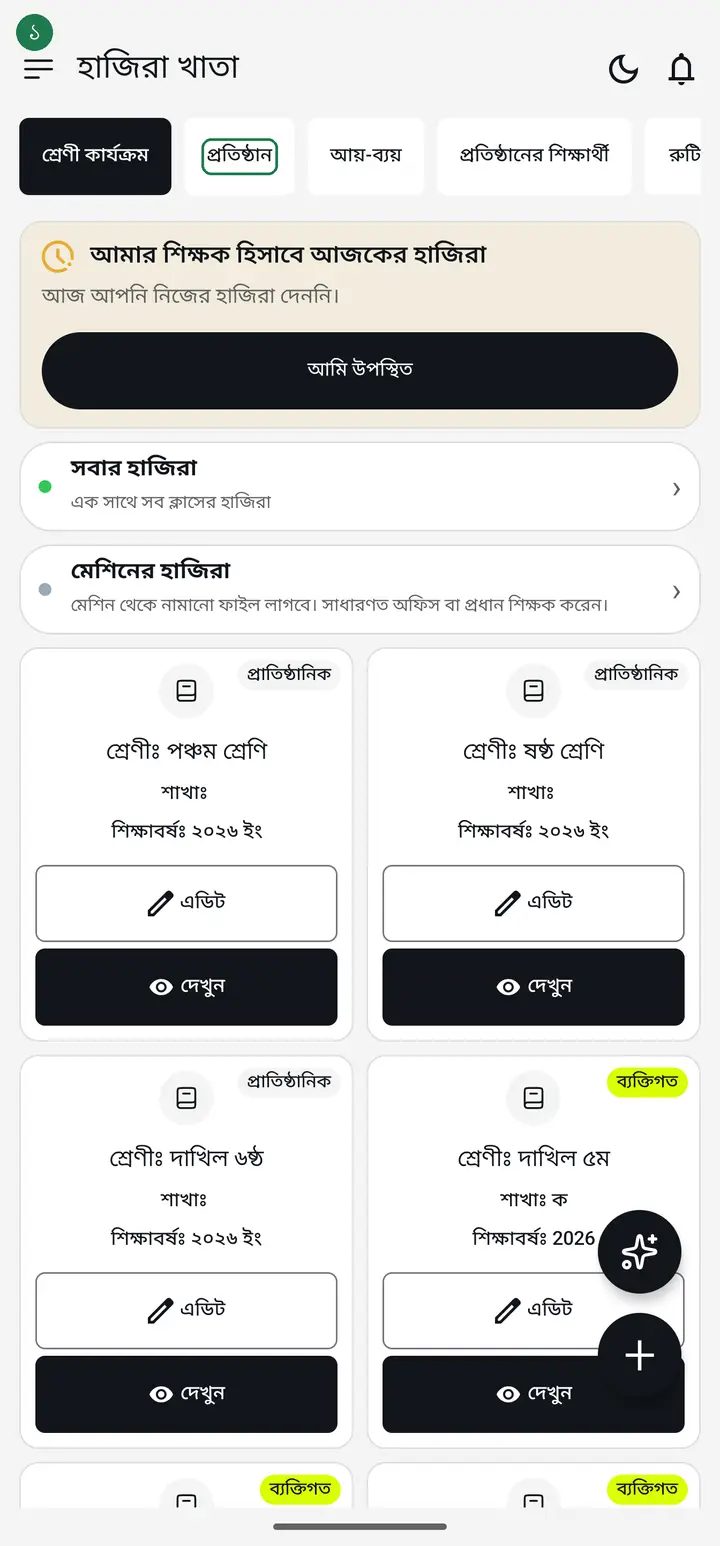
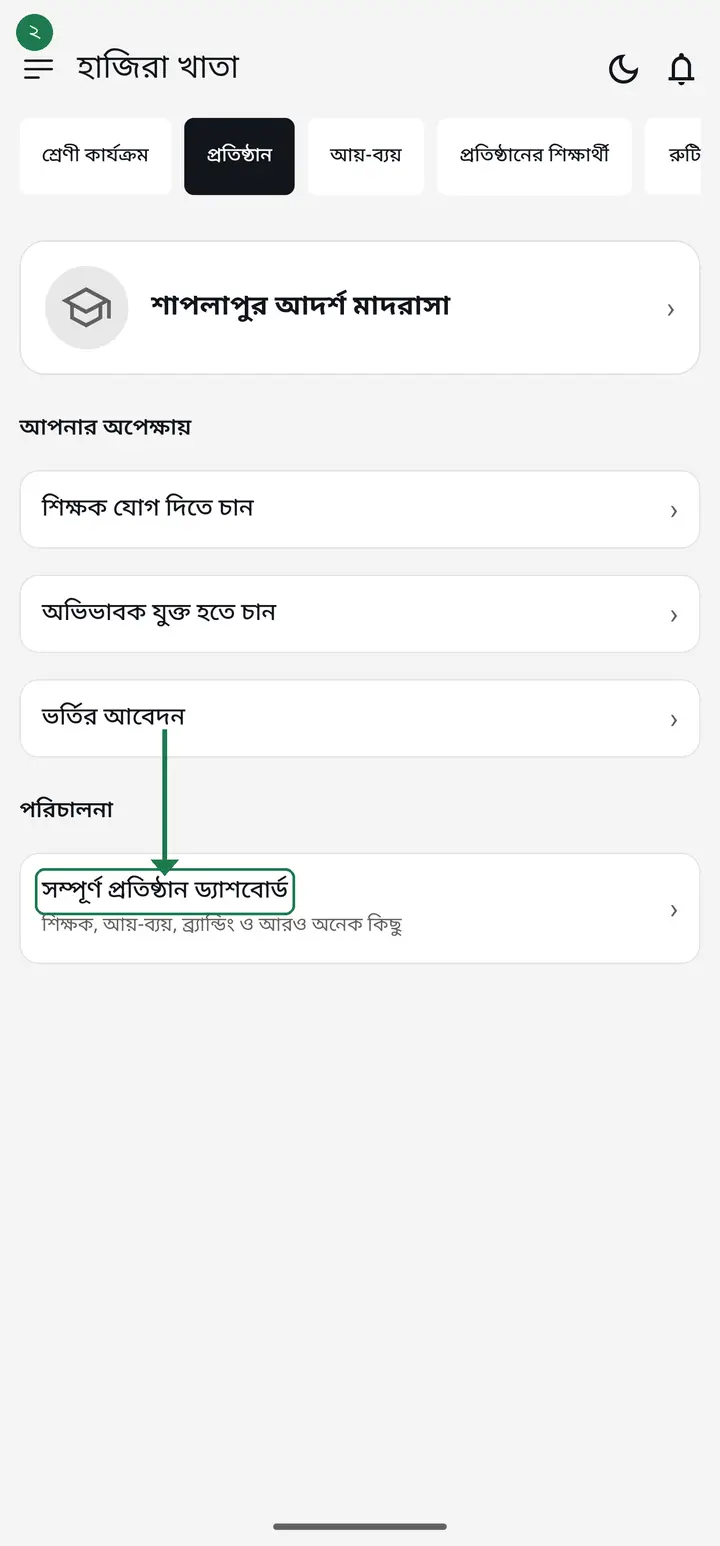
Tap the "প্রতিষ্ঠান" (Institution) tab, then "সম্পূর্ণ প্রতিষ্ঠান ড্যাশবোর্ড" (Full institution dashboard).
-
Scroll down to "প্রতিষ্ঠানের সকল কর্মকর্তা" (All members). Everyone in the institution is listed here.
-
First decide which you want. Somebody has left but you want to keep their name and their old attendance and pay records — use "চলে গেছেন হিসাবে রাখুন" (Mark as left), not "রিমুভ" (next step). You added the wrong person, or want to shut someone out of the app completely — then "রিমুভ".
-
On the card of the teacher who left, tap "চলে গেছেন হিসাবে রাখুন", then "ঠিক আছে" (OK). Their name gets a "চলে গেছেন" (Left) label and drops off today's attendance, payroll and ID-card lists. Nothing is deleted, and if it was a mistake, "আবার যোগ দিয়েছেন" (Rejoined) on the same card brings them back.
People marked "ফোন নেই" (no phone) have no such button on their card up to 3.2.278 — see the FAQ below for them. From 3.2.279 their cards get this button too.
-
The card of the person you want to remove has two buttons — a red-outlined "রিমুভ" (Remove) and "এডিট" (Edit). Your own card shows neither; it shows "প্রতিষ্ঠান ছাড়ুন" (Leave institution) instead.
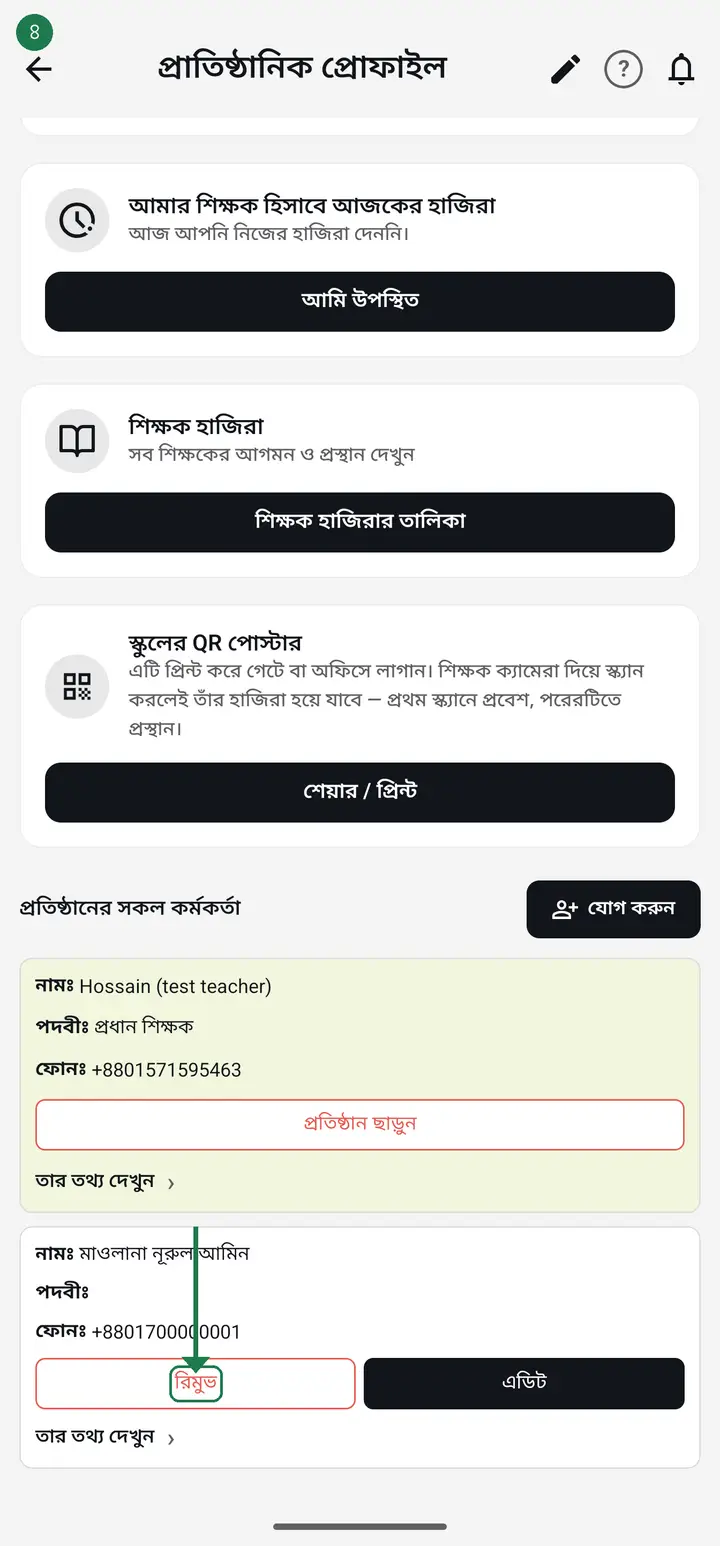
Do not look for "রিমুভ" on your own row — you cannot remove yourself. To leave, see the steps further down.
-
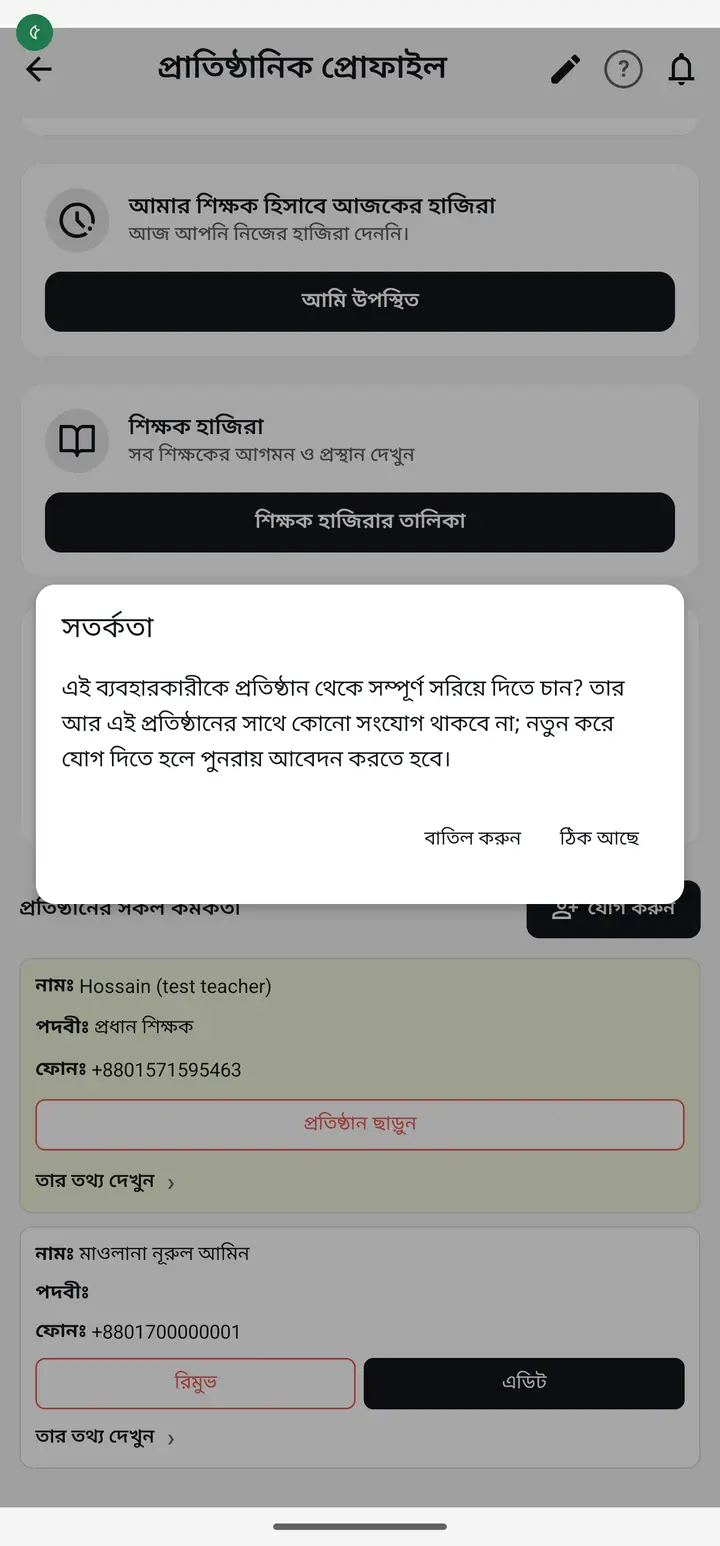
Tap "রিমুভ". A "সতর্কতা" (Warning) box asks whether you want to remove this user completely from the institution. Tap "ঠিক আছে" (OK) to confirm, or "বাতিল করুন" (Cancel).
-
That severs the connection completely. They can no longer see any of the institution's classes, students or attendance. To come back they have to send a fresh join request.
-
Nothing of the institution's data leaves with them. Every attendance they took, every payment they collected, every income or expense they entered in আয়-ব্যয় and every zakat/donation record stays with the institution — only their access is switched off.
-
Want to leave yourself? From the new version (3.2.306) the "প্রতিষ্ঠান" tab also has a red "এই প্রতিষ্ঠান ছাড়ুন" at the very bottom (separate page: leave-old-institution). On older versions, on the same list, your own card has "প্রতিষ্ঠান ছাড়ুন". It asks "প্রতিষ্ঠান ছেড়ে দেবেন?" — after leaving you can no longer see the institution's classes, students or attendance, but all of that data stays with the institution.
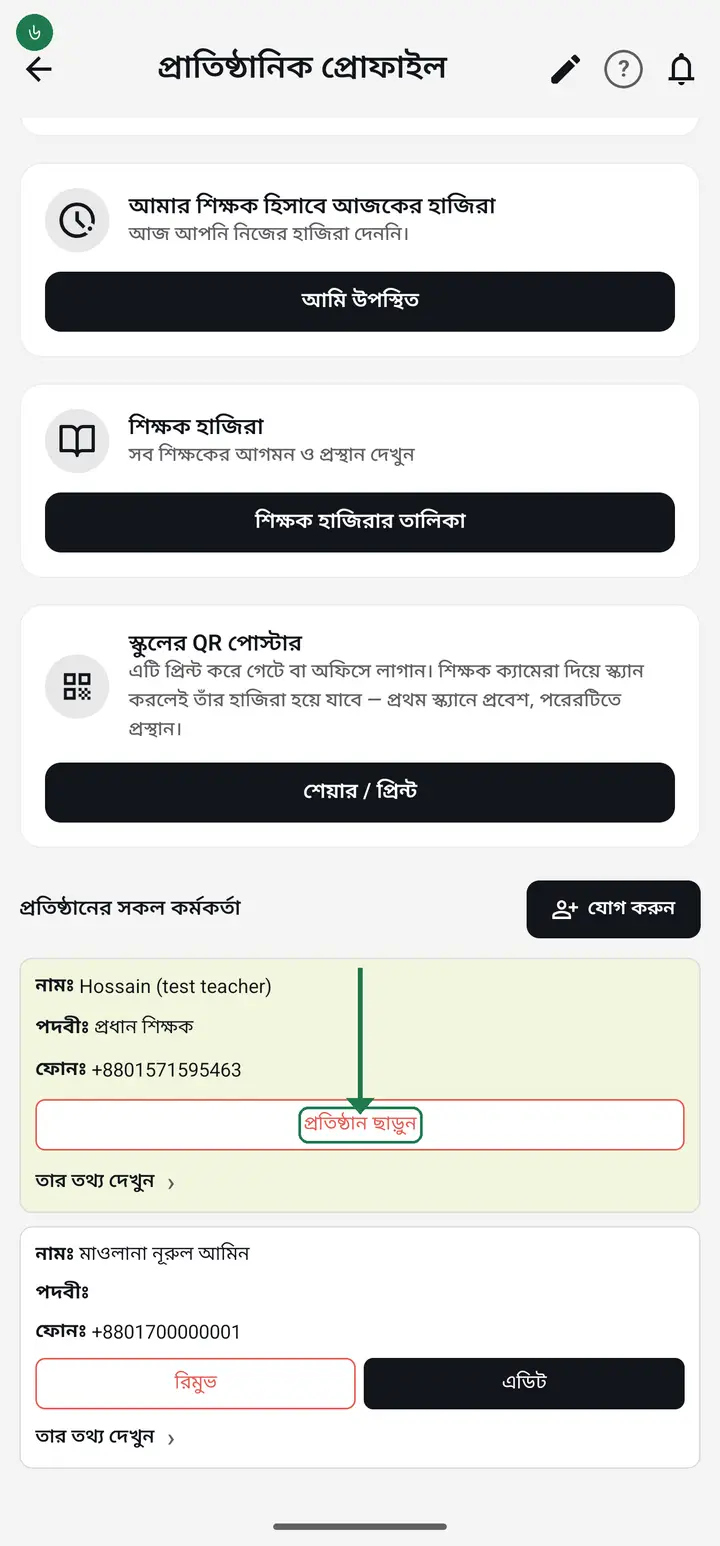
-
If nobody else in the institution is an admin or head master, tapping "প্রতিষ্ঠান ছাড়ুন" on your own card first asks "কাকে অ্যাডমিন বানাবেন বেছে নিন" (Choose who becomes admin) — pick one person from the list of members. The moment you pick, they become an admin, and only then does the leave question appear. This is the way to change the admin.
-
To come back, someone in the institution has to add you again, or you send a fresh join request with the code.
Common questions
If I remove a teacher, is the attendance they took deleted?
No. Attendance, fee collections and results are the institution's data and stay with the institution. Only that person's access ends.
If I remove a teacher, is the income and expense they entered deleted?
No. What they entered in the institution's book under "আয়-ব্যয়" — income, expenses, salaries, zakat and donations — belongs to the institution's book, not to them. Removing them deletes no line and changes no total, and who entered each line still shows. One exception: if someone wrote school money into their own "ব্যক্তিগত" (personal) book by mistake, it was never in the institution's book — before removing them, ask them to move those entries to the "প্রাতিষ্ঠানিক" (institution) book.
I removed someone by mistake — how do I get them back?
Ask them to send a join request with the invitation code again and approve it. You then have to hand over the classes again as well — their name is gone from the class-teacher lists.
Does a teacher who resigns have to be removed?
They are two different jobs. "চলে গেছেন হিসাবে রাখুন" takes them off the attendance, payroll and ID-card lists but does not end their app access. If you also want them to stop seeing the institution's classes and students on their phone, use "রিমুভ". Neither one deletes old records.
People marked "ফোন নেই" (no phone) have no buttons on their card — how do I take one who has left off the list?
"ফোন নেই" means you typed their name in yourself and they have no account, so there is nothing to remove — only a list to take them off. Go to the "শিক্ষক হাজিরা" tab → tap "ব্যবস্থাপনা" → tap "ফোন নেই এমন শিক্ষক বা কর্মী যোগ করুন" → in the list that opens, tap "তালিকা থেকে সরান" under their name, then "তালিকা থেকে সরান" again to confirm. Their name gets "আর কাজ করেন না". Nothing is deleted; "তালিকায় ফেরত আনুন" in the same place brings them back. From 3.2.279 their card on this list gets the "চলে গেছেন হিসাবে রাখুন" button itself.
Why is there no "রিমুভ" on my own row?
You cannot remove yourself, by design. Your own card carries "প্রতিষ্ঠান ছাড়ুন" instead — that is the way out.
Why will it not remove the last admin?
An institution must always have at least one admin or head master. With none, nobody can approve new teachers, change designations or hand over classes. So if you are the only admin and tap "প্রতিষ্ঠান ছাড়ুন", the app does not block you — it shows "কাকে অ্যাডমিন বানাবেন বেছে নিন" (Choose who becomes admin): pick one person, then leave. You can also make someone "প্রধান শিক্ষক" first from the "এডিট" next to their name; in that case the list does not appear.
What happens to that teacher's own private classes?
Nothing. A private class belongs to their own account, not to the institution, and stays with them.
Ask AI about this page
Ask an AI app to explain this page in simple language.
Copied — now paste it
Get Hazira Khata free on Google Play
More tutorials
- How to set up your institution Once your institution profile exists you can add other teachers, and everyone sees the same classes and students.
- Inviting and approving teachers Adding a teacher to your institution — share the code, then approve the request with one tap.
- Assign a teacher to a class (make them a class teacher) Teacher joined the institution but sees nothing? This one job fixes it — 2 minutes.
- Who can see what — designations and permissions How your other teachers sign in, how much power to give each one through designations — and now, more precisely for one person, through permissions too.
- Record a teacher's salary and send the receipt After paying a teacher, send them a receipt right from the app — instantly if they use WhatsApp, and as a shareable picture even if they don't.
- Leaving my old institution to open my own Want to leave your old school, or open your own? The red "এই প্রতিষ্ঠান ছাড়ুন" at the very bottom of the প্রতিষ্ঠান tab changes nothing until you confirm. After leaving, open your own.
- Taking admissions online Make one link and share it. Guardians fill the form from home, the applications land in your app, and approving one adds the student straight into a class.
- Join a school as a teacher Use the 6-character code your school gave you to join by yourself.