
Who can see what — designations and permissions
How your other teachers sign in, how much power to give each one through designations — and now, more precisely for one person, through permissions too.
The screenshots show the app in Bangla, its main language. The buttons sit in the same places in English.
-
One thing first — you do not all share one account. Each teacher signs in on their own phone with their own number (or their own Gmail). Everyone sits inside the same institution but each has a separate identity, so you can always tell who did what.
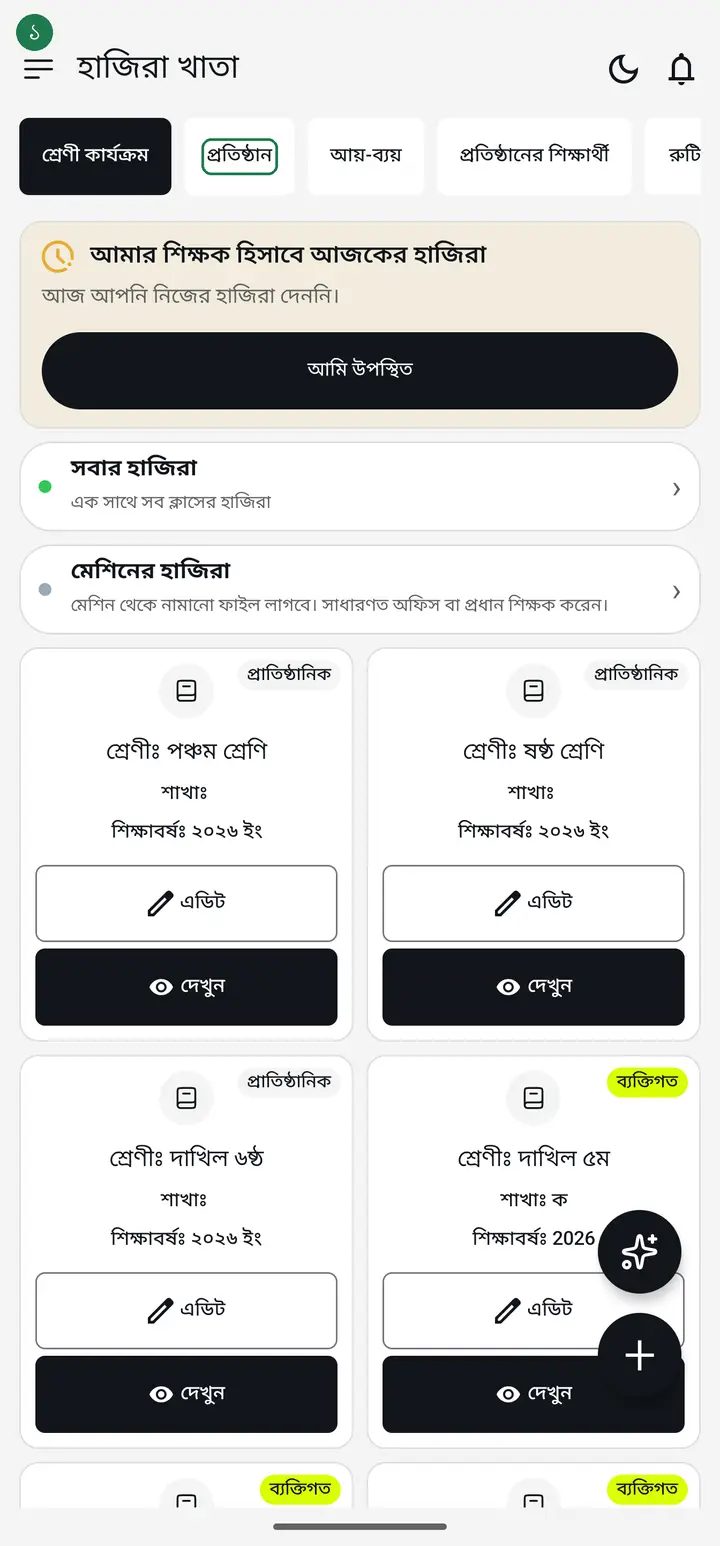
One number belongs to one person. Never let two teachers share a login — both their work lands under one name and you lose any way to tell them apart later.
-
There are two ways in. (1) You add their number and they tap "একসেপ্ট করুন" (Accept) after signing in with it. (2) Or you send a 6-character code and they request with it. Either way you tap "এপ্রুভ" (Approve) at the end and they are a member.
-
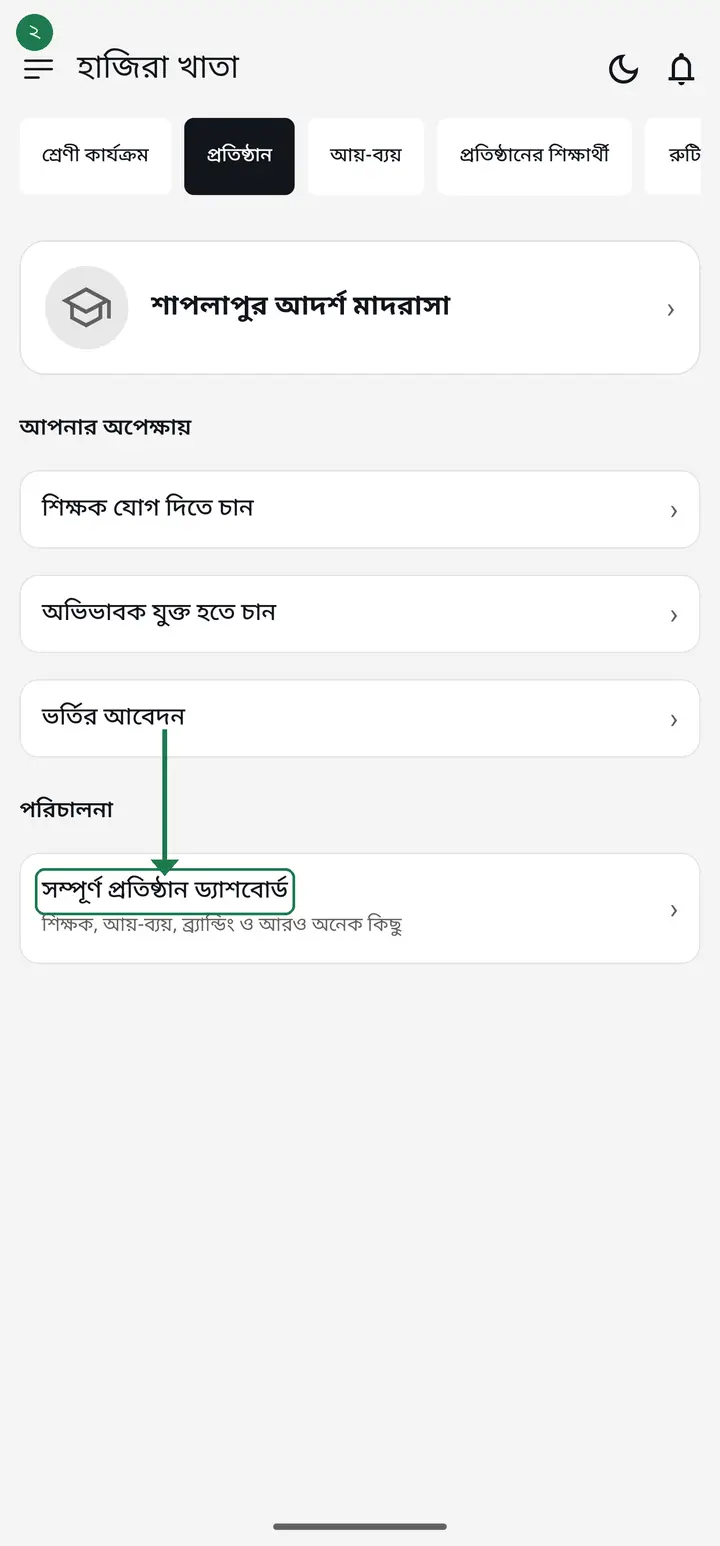
Now, where the permission setting lives. Go to the "প্রতিষ্ঠান" (Institution) tab — your member list is there. Tap "এডিট" (Edit) next to the person whose powers you want to set.
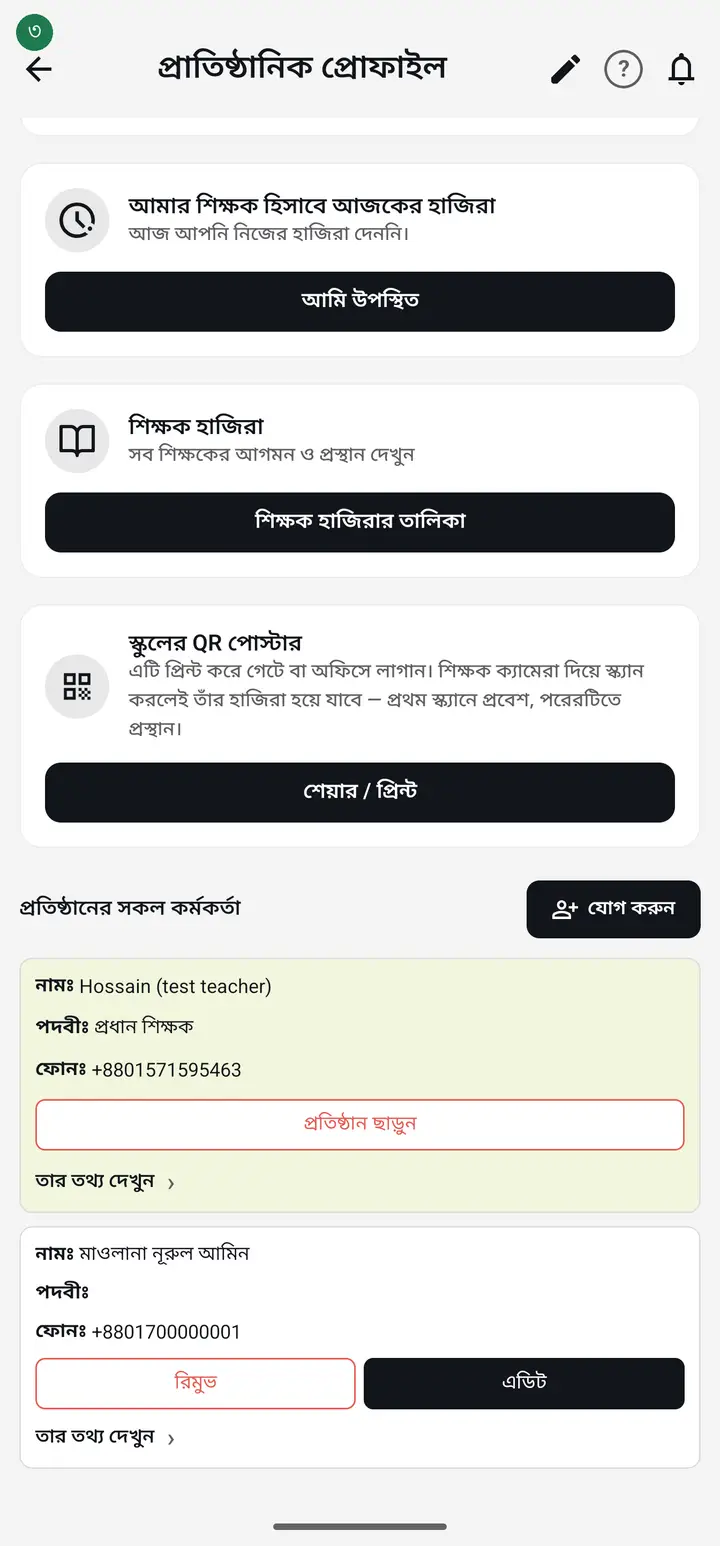
Only the Hazira Khata admin and the head master get that "এডিট". An ordinary teacher cannot change anyone's designation — deliberately, otherwise two teachers could promote each other.
-
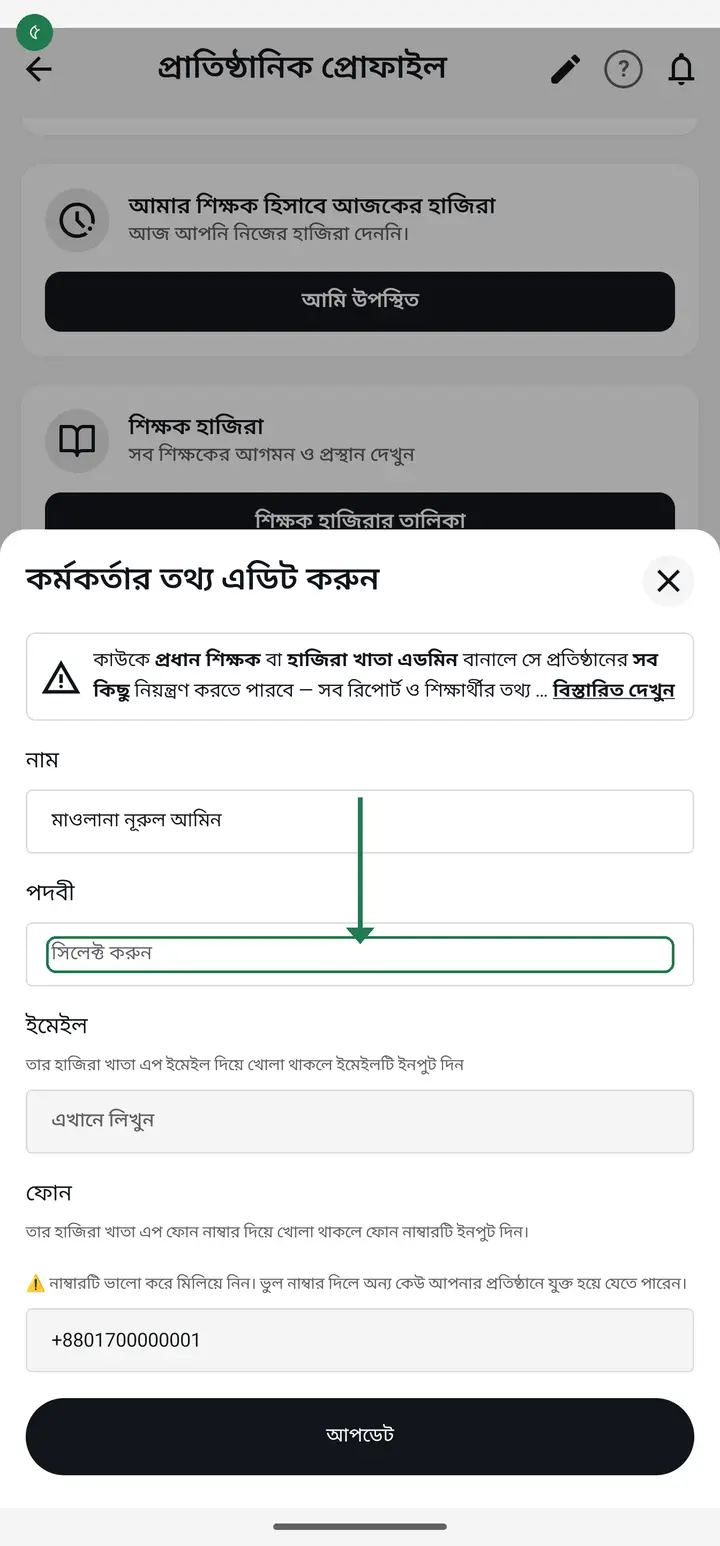
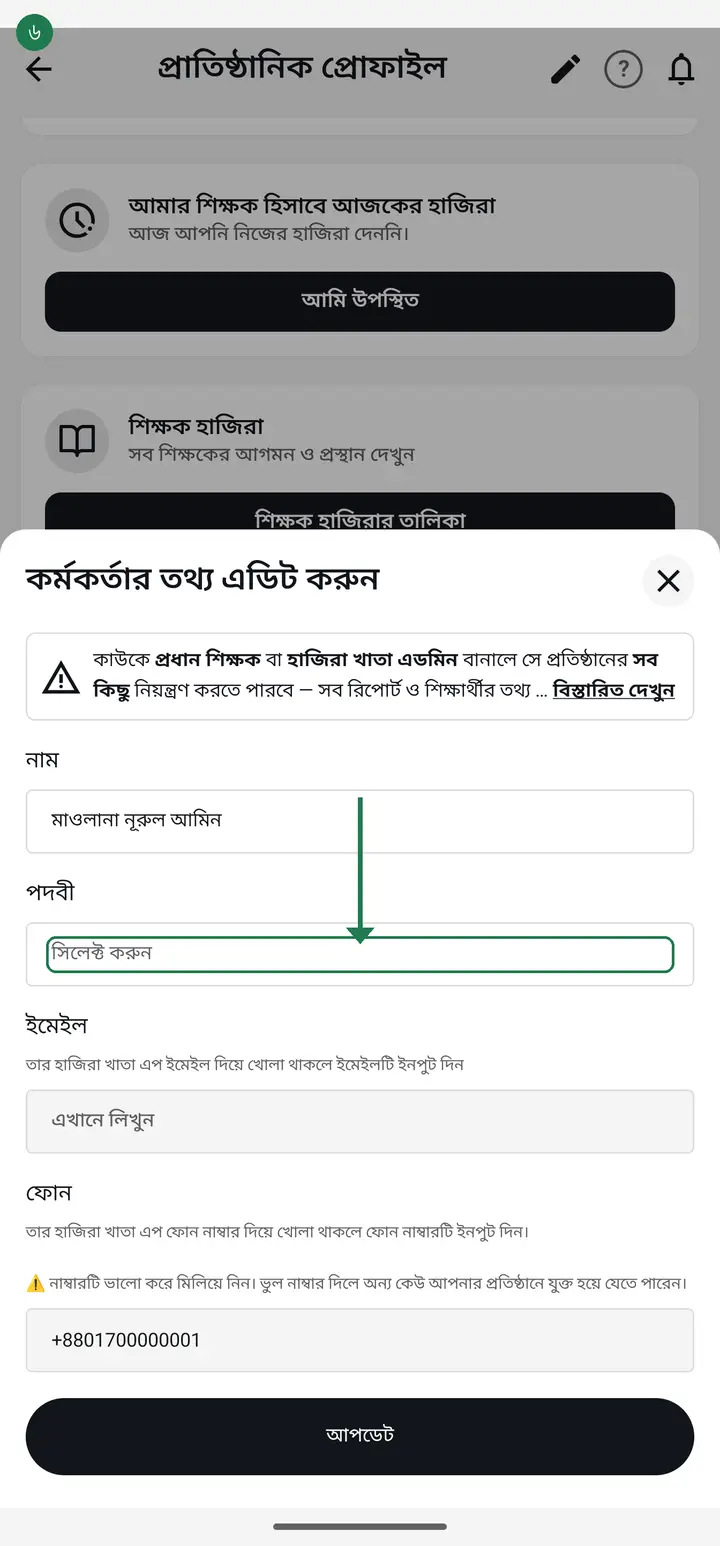
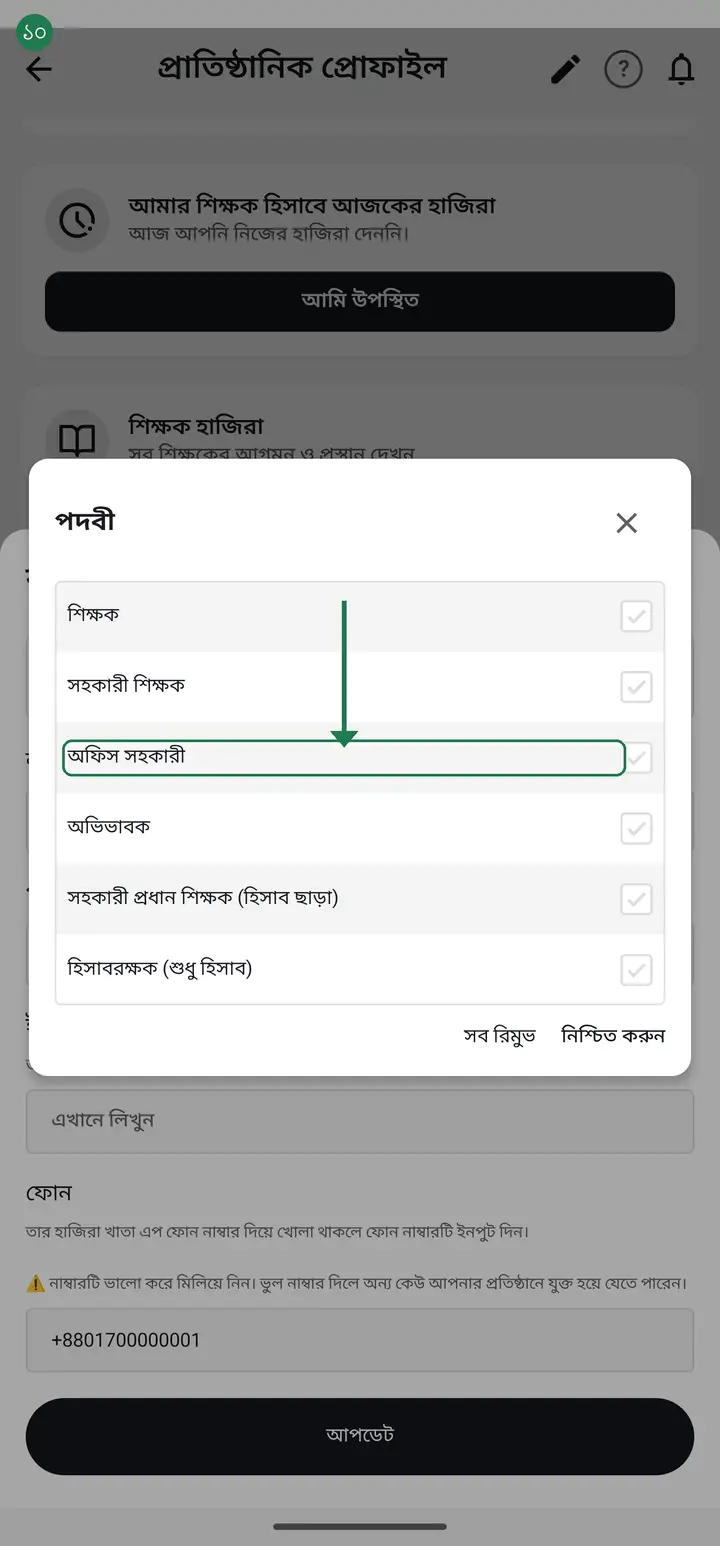
The "কর্মকর্তার তথ্য এডিট করুন" (Edit staff details) page opens. In the "পদবীঃ" (Designation) box tap "সিলেক্ট করুন" (Select) and the list of designations appears.
-
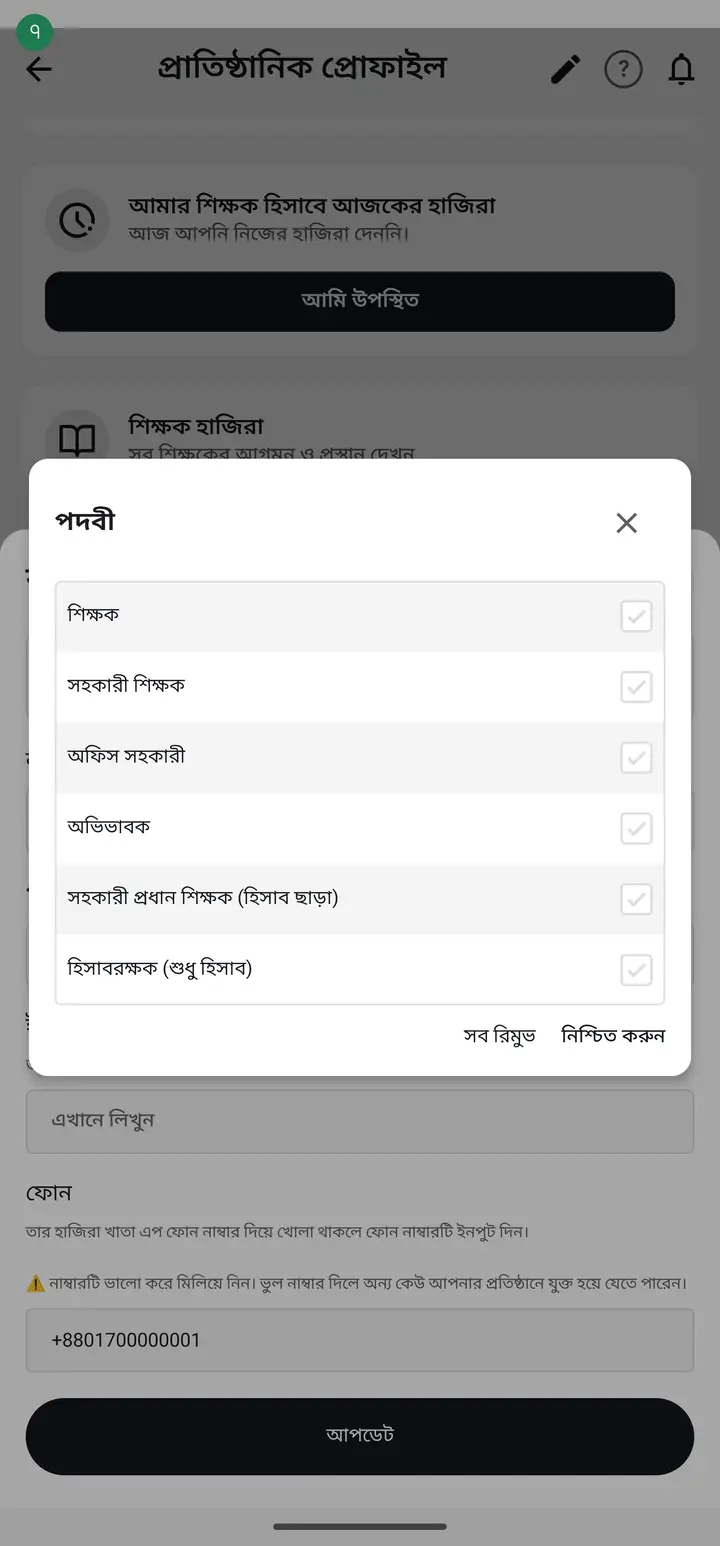
Tick the one you want and tap "নিশ্চিত করুন" (Confirm). One person can hold more than one designation. What each designation unlocks is listed below — read it before choosing.
-
What each designation actually unlocks — this is the part that matters:
-
**প্রধান শিক্ষক (Head master)** — everything. Every class, every student, changing other people's designations, and the institution's income, expense and salary books. The most power you can hand anyone.
Think before you do it. A head master can see everyone's salary figures and can change other people's designations. The app warns you about this too.
-
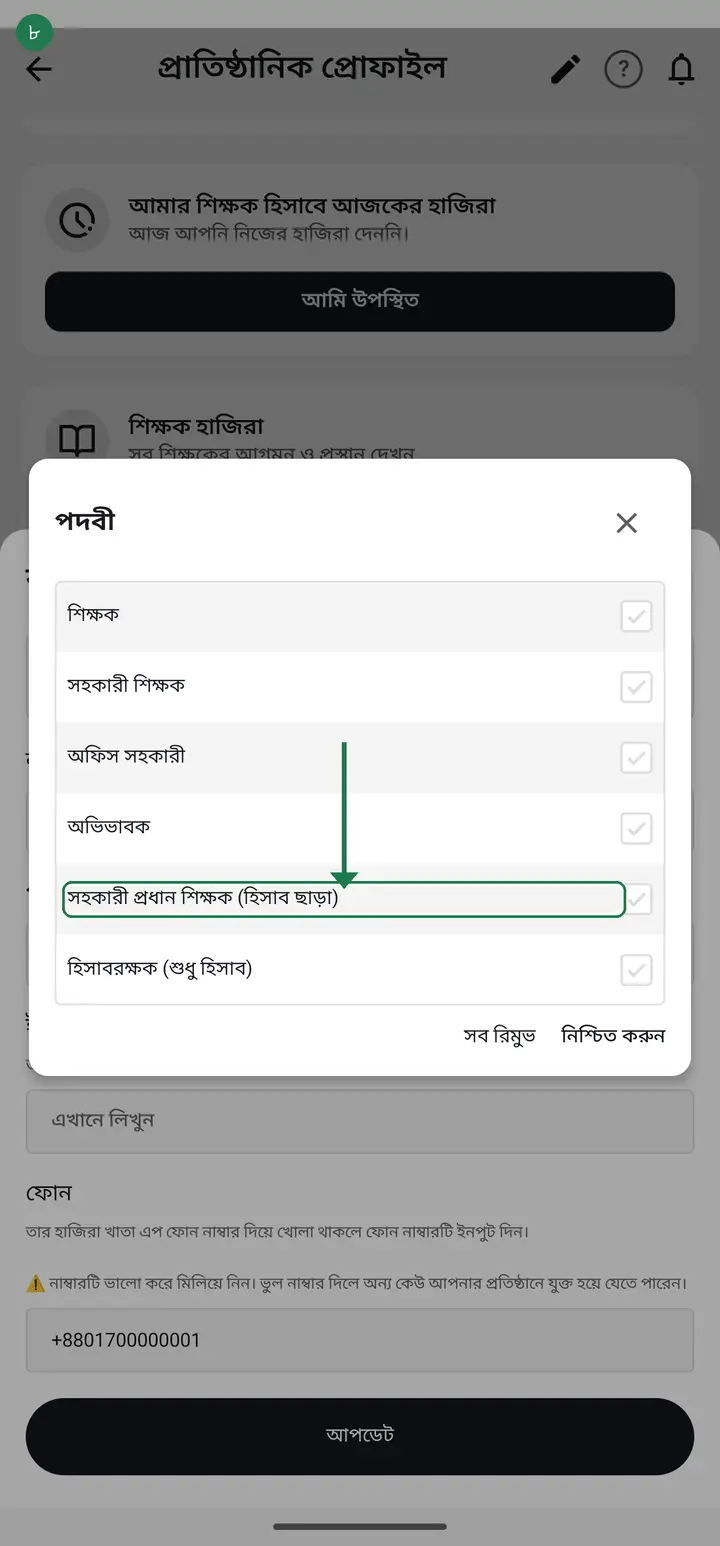
**সহকারী প্রধান শিক্ষক (হিসাব ছাড়া)** — runs the school day to day: approving joiners, staff files, admission, correcting attendance. Cannot see the money. The best choice for a second-in-command.
-
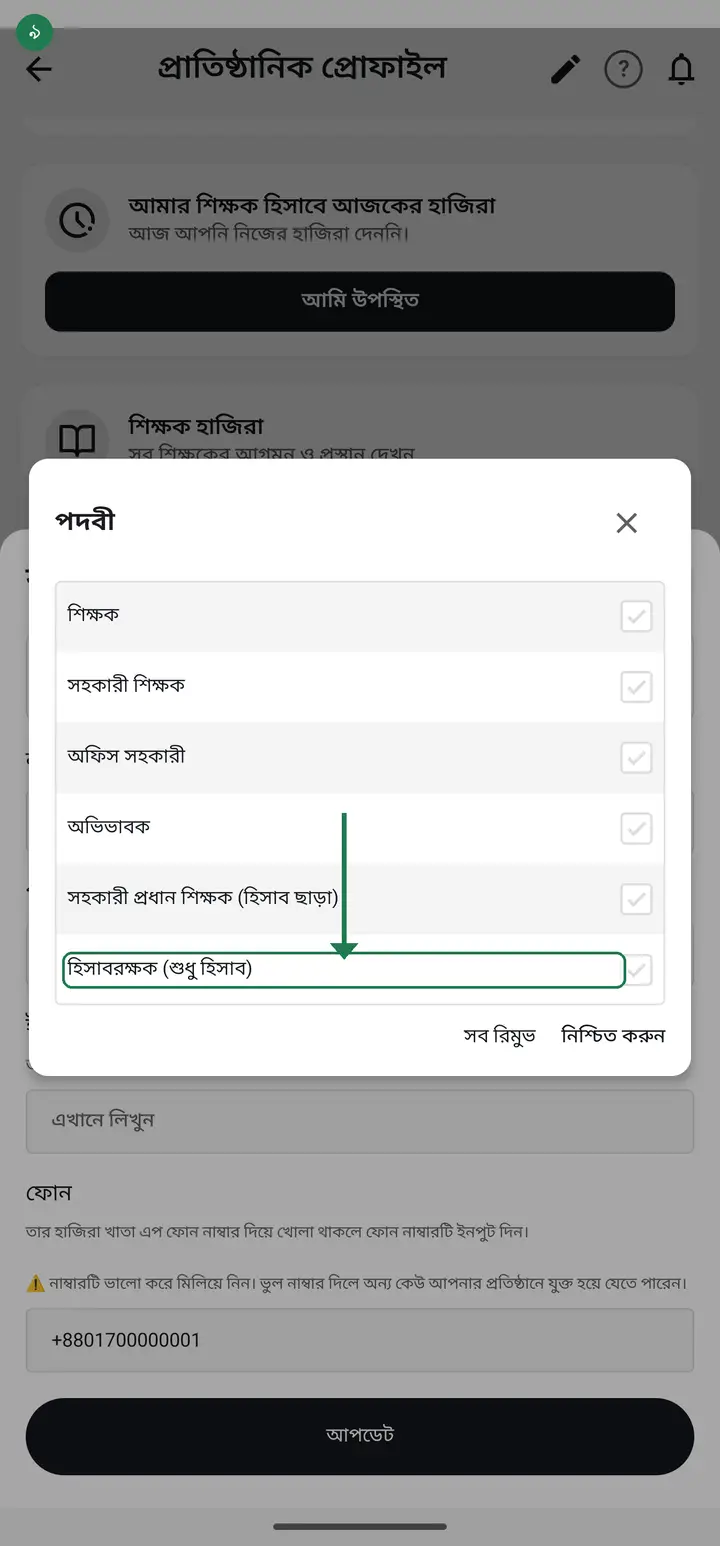
**হিসাবরক্ষক (শুধু হিসাব)** — income, expense and salary only, nothing else. Exactly right for the clerk who keeps the books; before this existed you had to make them a full admin.
-
**শিক্ষক / সহকারী শিক্ষক / অফিস সহকারী** — ordinary designations. They see only the classes you made them class teacher of. The institution's income/expense and **staff salary** ("বেতন ব্যবস্থাপনা" in the আয়-ব্যয় tab) stay closed, and they cannot change anyone's designation. Note that "বেতন" here means STAFF salary — a class's own "বেতন/ভাতা/ফি হিসাব" is a different thing and a class teacher does see it. The next step explains exactly that difference; do not stop before it.
-
But "money" means two different things here, and mixing them up is where the confusion starts. **The institution's income, expense and staff salary books** are fully closed to ordinary designations. **A student's fee in his own class** is different — a class teacher can see it and can collect it, because collecting is his job. What he cannot do is **set the amount, create a fee, rename it, change its dates, give one student their own amount, or delete it** — those five belong to the Hazira Khata admin and the head master only. Collecting itself can now also be switched off per class — class "এডিট" → the "বেতন কালেকশনের অনুমতি" box. Leave it alone and every class teacher collects, exactly as before.
Older versions got this wrong — a class teacher could change the amount too. Fixed in the August 2026 update. If a teacher's phone still lets them change it, ask them to update the app from the Play Store.
-
One thing people mix up — **a designation is not the same as being a class teacher.** The designation decides how much power someone has. Being a class teacher decides which classes they can see. Give only a designation and an ordinary teacher still sees no class at all — you must assign the classes separately.
When a teacher says they see nothing, this is the cause 99% of the time. How to assign classes: hazirakhata.xyz/tutorials/assign-class-teacher/
-
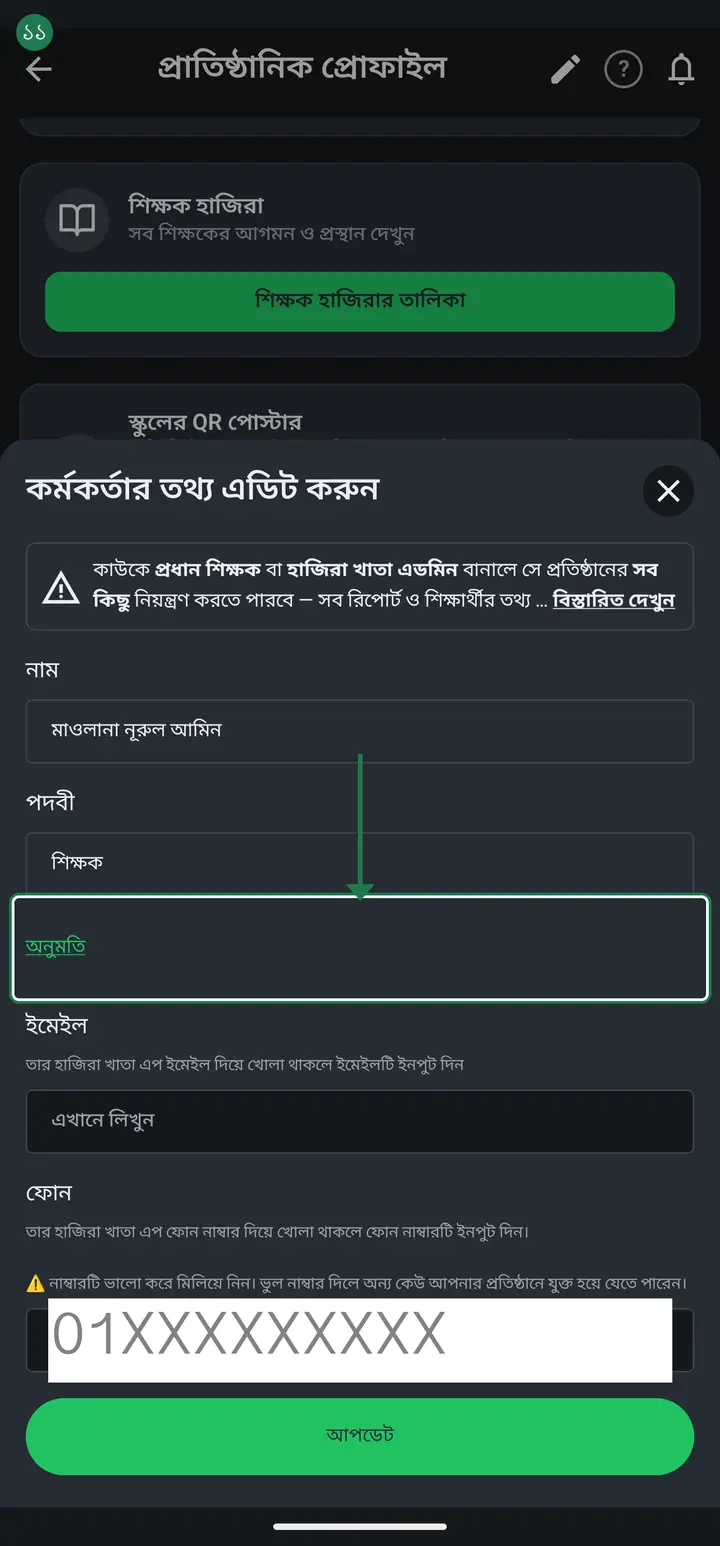
Alongside designations there is a newer tool (August 2026), for one specific person — "অনুমতি" (Permission). It sits on the same "কর্মকর্তার তথ্য এডিট করুন" page, right below the designation box. Tap it.
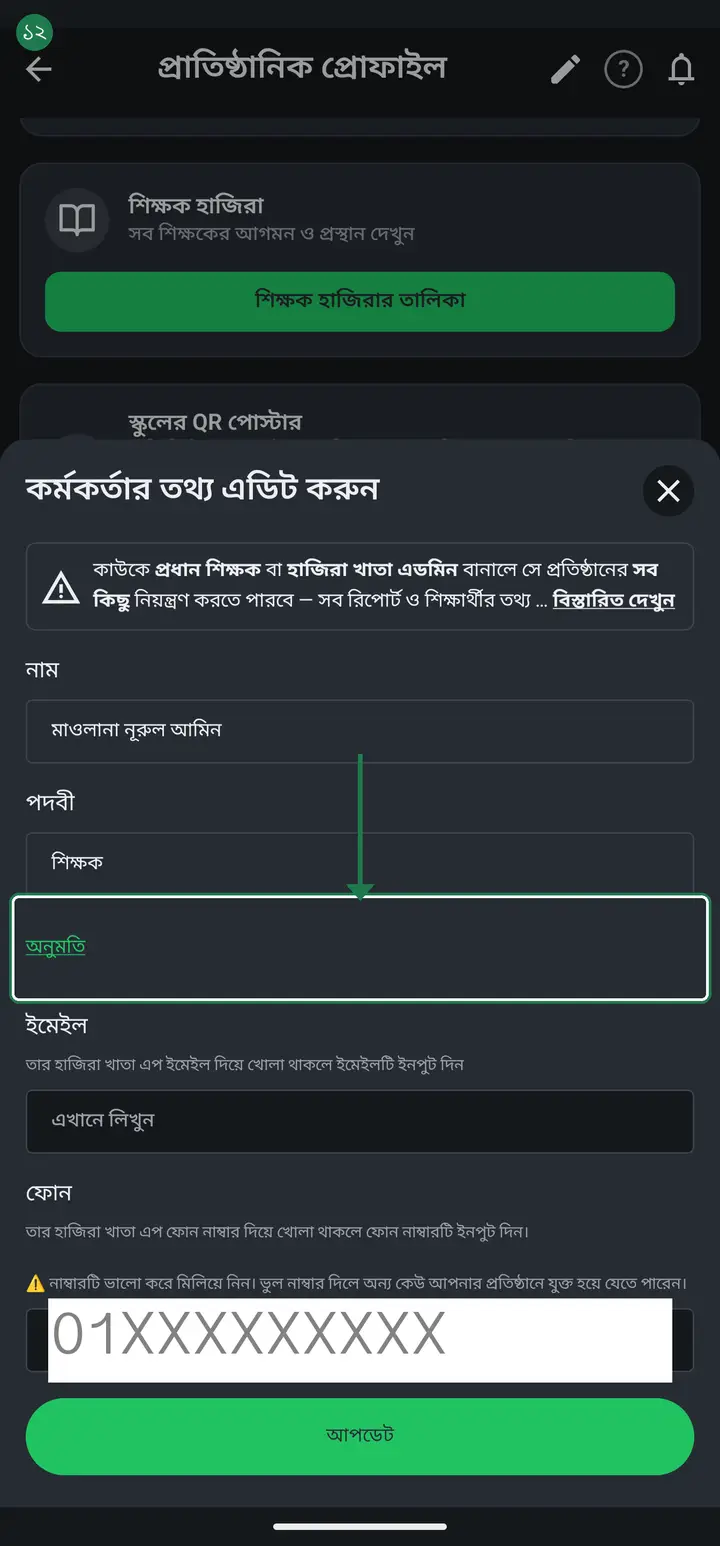
If you do not see "অনুমতি" below the designation box, your app is an old build — it has been there since 3.2.207 and has reached everyone. Update once from the Play Store.
-
A designation sets the broad boundary — teacher, head master, and so on. Permission is a finer lock on top of that, for one specific person — it can take away some of what the designation would otherwise allow. Someone can stay a সহকারী শিক্ষক by designation but be limited to attendance only, with everything else closed. A designation alone cannot do that; permission can.
Permission only narrows a person, never widens them beyond their designation. To give someone more power, change the designation itself, not this screen.
-
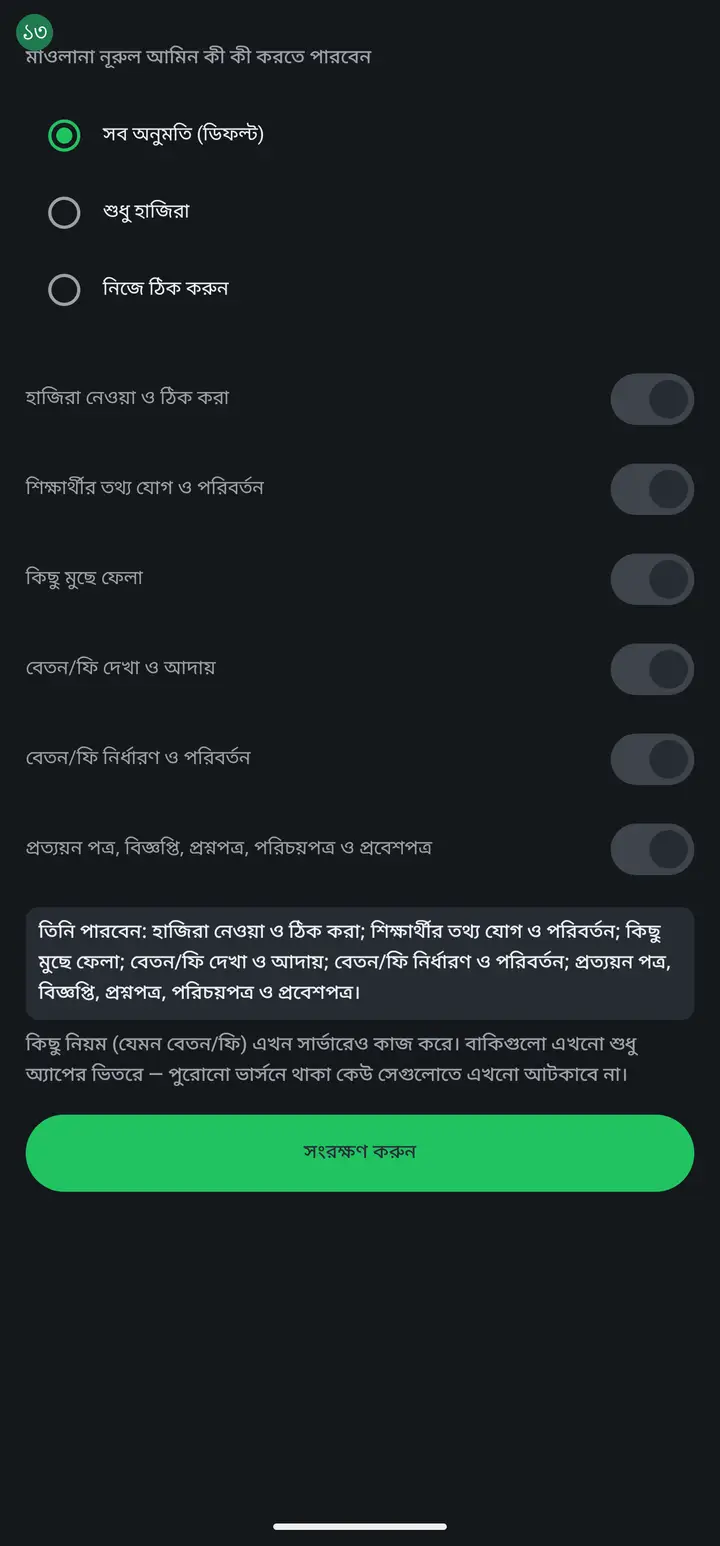
The "অনুমতি" page opens with three choices. "সব অনুমতি (ডিফল্ট)" (All permissions, default) — nothing blocked, same as before. "শুধু হাজিরা" (Attendance only) — one tap leaves only attendance open and closes everything else. "নিজে ঠিক করুন" (Set it yourself) — switch each of seven things on or off individually.
-
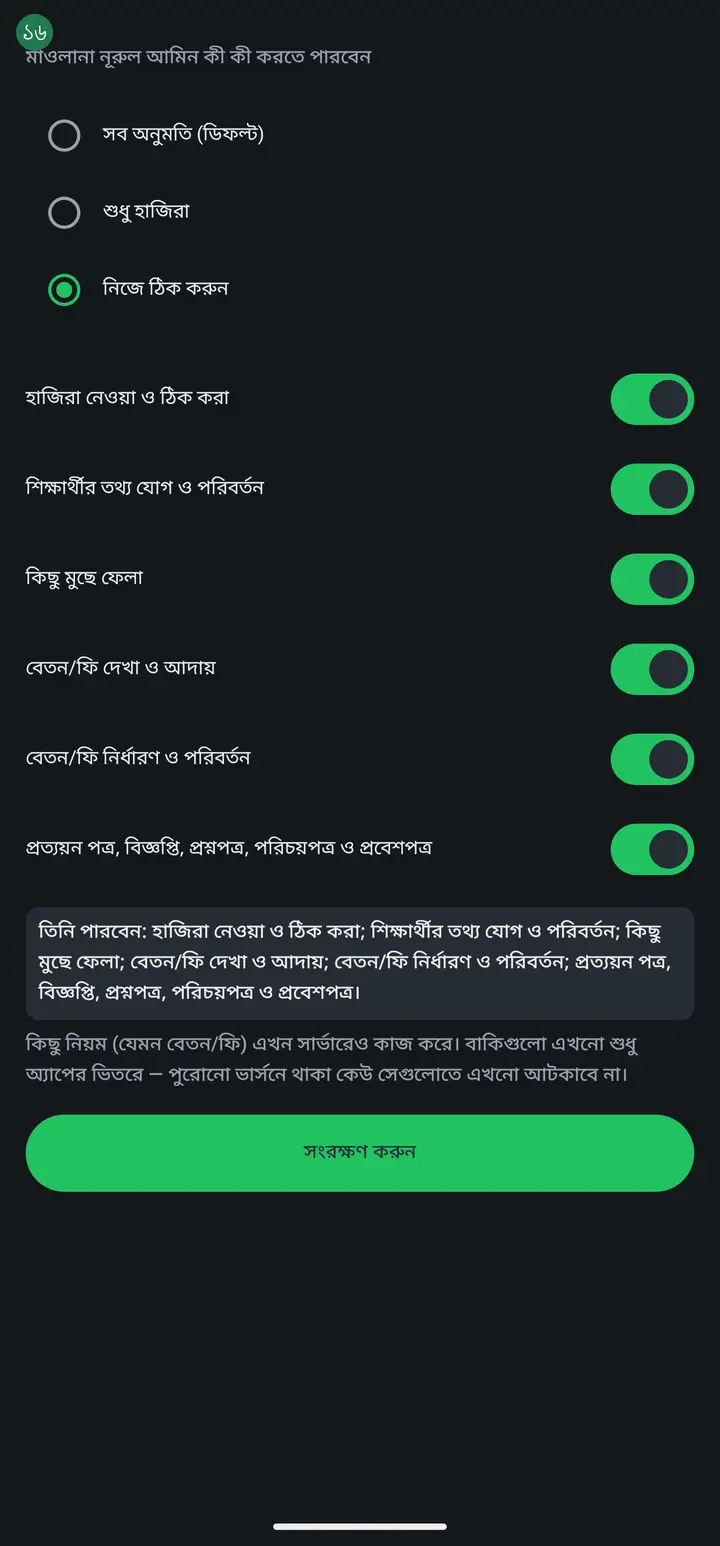
Pick "নিজে ঠিক করুন" and seven switches appear: taking and correcting attendance, adding and changing student info, deleting anything, seeing and collecting fees, setting fee amounts, printing certificates, notices, question papers, ID cards and admit cards, and seeing other staff members' attendance. Whichever you turn off is closed for that person.
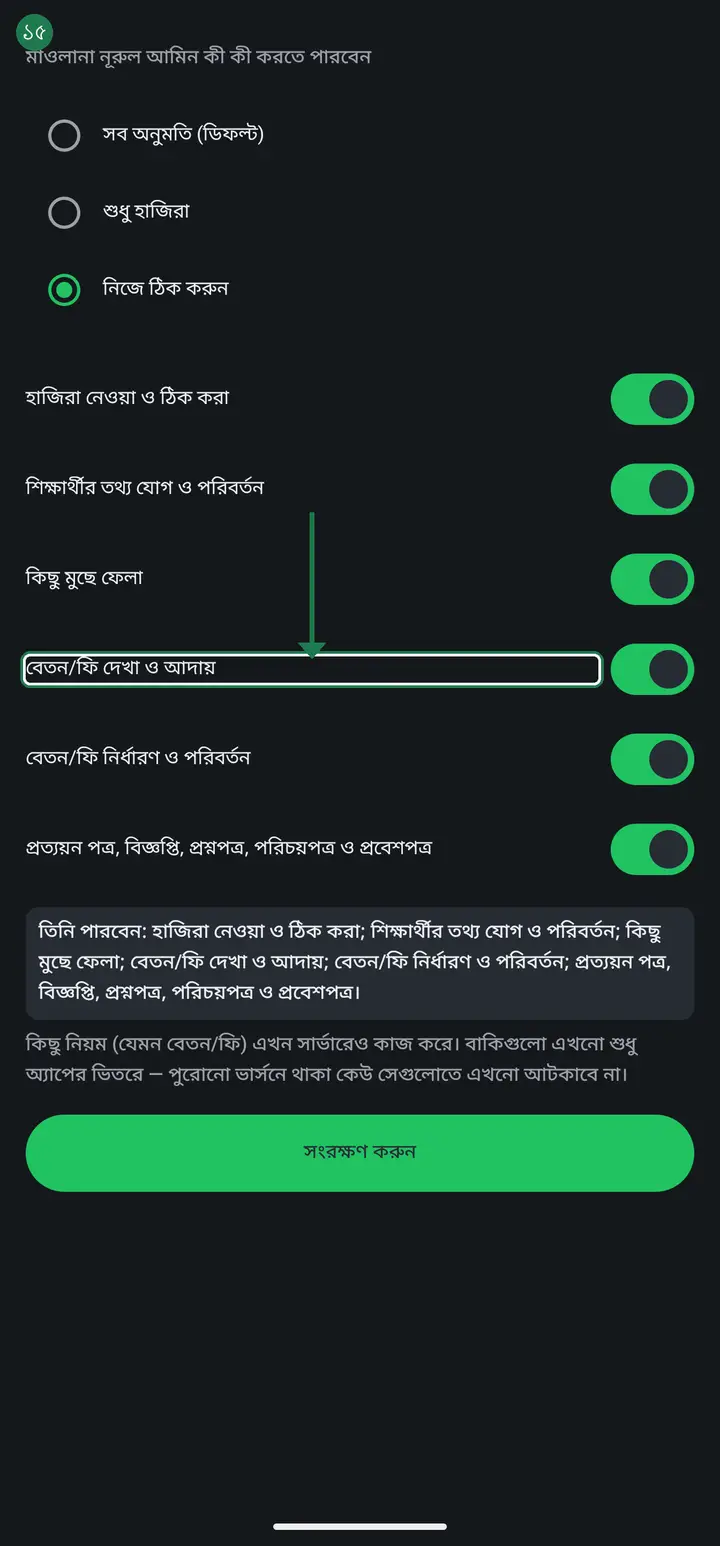
TWO switches close SEEING as well as doing; the other five only close DOING. Turning off "seeing and collecting fees" also hides the money columns in the all-students register. Turning off "seeing other staff attendance" closes the staff attendance log itself — but never that person's own check-in, which always stays open.
-
Before tapping "সংরক্ষণ করুন" (Save), read the line near the top of the page — it already states, in one Bangla sentence, exactly what the person will and will not be able to do. The change takes effect almost immediately; to be safe, ask the teacher to close the app fully and reopen it.
-
Read the small print near the bottom too — it tells you which locks are real ones. Two switches are now enforced on the server as well: **seeing and collecting fees** and **seeing other staff attendance**. Turn either off and that person is blocked no matter how old their build is. The other five are still an in-app control only, and on a very old build they may not hold. (If your own app still names only fees there, your app has not been updated yet — the rule is live on the server regardless.)
When the restricted person taps a closed thing, they see: "This section is closed for you. The institution admin or head master can turn it on from the প্রতিষ্ঠান page, next to your name, under 'অনুমতি'." Nothing disappears — it stays visible but locked, and it names exactly who to ask.
Common questions
A teacher's name is in English and I want it in Bangla — on the salary and attendance sheets some names print in Bangla and some in English. How do I make them all match?
The name printed on the sheets is the big name at the top of the শিক্ষকের তথ্য (Teacher info) page. It is the teacher's account name — whoever opened their account in English gets English, whoever opened it in Bangla gets Bangla. To change it: on the "প্রতিষ্ঠান" (Institution) tab, in the member list, tap "এডিট" (Edit) next to that teacher → on the "কর্মকর্তার তথ্য এডিট করুন" (Edit staff details) page type the Bangla name into "নাম" (Name) → "আপডেট" (Update). Once per teacher. From version 3.2.292 a teacher marked "ফোন নেই" (no phone) has an "এডিট" (Edit) on their card too, opening their name form directly. On older versions there is no "এডিট" on that card — rename them from the green "+" button at the bottom right of the "প্রতিষ্ঠান" tab → "ফোন নেই, বা অ্যাপ ব্যবহার করেন না" (No phone, or does not use the app) → under their name "নাম বা নম্বর বদলান" (Change name or number) → type the Bangla name in "নাম" → "সংরক্ষণ করুন" (Save). The "পূর্ণ নাম (বাংলা)" (Full name, Bangla) box on the teacher info page goes only to the ID card — changing it does not change the sheets. The attendance sheet shows the new name straight away. Salary months already saved keep the old name; new months use the new one. Only the Hazira Khata admin and the head master get "এডিট". On some phones this page grew taller than the screen and the "আপডেট" (Update) button sat below it with no way to scroll to it — fixed in version 3.2.291: the page now scrolls and the button always shows. Until that version reaches the Play Store, if you cannot see the button, ask in the support group and we will send the test link.
Someone asked to join and picked "হাজিরা খাতা এডমিন" (admin) or another senior designation themselves. If I approve, do they get it?
From version 3.2.273, no. What the person picked for themselves is no longer written as-is — they get only a designation you are allowed to give, and the Hazira Khata admin can never be obtained this way. When you tap approve, the question itself says what they will join as, e.g. "আপনি কি রহিম-কে সহকারী শিক্ষক হিসেবে যুক্ত করতে চান?" (Add Rahim as assistant teacher?) — read it, then confirm. To change the designation later, tap "এডিট" next to their name. On older versions, check their designation in the member list once after approving.
Can permissions GIVE someone more access — say, let a teacher see the accounts?
No, and this is the most common misreading. Permissions can only **take away**, never add. Someone with no permission row set is already unrestricted for their designation; the permissions screen lets you switch attendance, fee collection or printing OFF for one person. Who may see MONEY is decided by the **designation**. The institution ledger and staff salaries cannot be opened to an ordinary or assistant teacher by any switch — the server itself refuses it. To let someone see them, change their designation: **হিসাবরক্ষক** for the accounts, or **সহকারী প্রধান শিক্ষক** for everything except the accounts.
Can assistant teachers do certificates, notices, question papers, ID cards and admit cards?
Yes. None of those five needs a special designation — whoever can open the class can make the certificate, the notice, the student ID card and the admit card from inside it. The question paper does not even need a class; any teacher can build one. The single condition is that an admin or head master has attached that teacher to the class: if their name is not on the class, they never see the class at all, so there are no students to print for. One exception: STAFF ID cards are not open to everyone — only the head master, the admin and the assistant head master can print those, because they are built from the staff personal-information files. Student ID cards carry no such restriction.
The Hazira Khata admin designation is in the list but I cannot give it to anyone. Why?
You cannot give it from the "এডিট" (Edit) button next to a name — that is deliberate. The admin is the only one who can appoint a head master, and if the Edit box could mint admins, the whole school's salary records could end up with the wrong person. There is a separate, direct way to change the admin though: "প্রতিষ্ঠান ছাড়ুন" (Leave institution) on your own card, step by step in the next question. And if you only want to give someone more power, make them head master instead — you do not have to leave for that.
Can I change the admin in the Hazira Khata app? I want to make someone else the admin.
Yes, but there is no "change admin" button — the way is "প্রতিষ্ঠান ছাড়ুন" (Leave institution) on your own card. (1) Tap the "প্রতিষ্ঠান" (Institution) tab → "সম্পূর্ণ প্রতিষ্ঠান ড্যাশবোর্ড" (Full institution dashboard) → on your own card in the "প্রতিষ্ঠানের সকল কর্মকর্তা" (All members) list tap "প্রতিষ্ঠান ছাড়ুন". (2) If there is no other admin or head master besides you, a list titled "কাকে অ্যাডমিন বানাবেন বেছে নিন" (Choose who becomes admin) opens, showing people who are already members of the institution. Tap the person you want as admin. (3) The moment you tap, they become an admin and a message says "হয়ে গেছে — তিনি এখন অ্যাডমিন। আপনি এখন ছাড়তে পারেন।" (Done — they are now an admin. You can leave now.) (4) Then the app asks "প্রতিষ্ঠান ছেড়ে দেবেন?" (Leave the institution?) — if you really want to go, tick "আমি বুঝেছি, আমি এই প্রতিষ্ঠান ছাড়তে চাই" and tap "প্রতিষ্ঠান ছাড়ুন". After leaving you can no longer see the institution's classes, students or attendance; they stay with the institution. If you want to stay, tap "বাতিল করুন" (Cancel) in that box — then you and the new person are both admins (the app does not stop this), because making them admin already happened before the leave question. Two things to know: if the institution already has a head master, that list does not appear and you go straight to "প্রতিষ্ঠান ছেড়ে দেবেন?". And the person you pick must already be an approved member — add and approve a new person first.
I am a head master but I cannot change another head master's designation.
That is correct. A head master can manage ordinary staff but not another head master. Only the Hazira Khata admin — whoever created the institution, or whoever they handed admin to — can do that. Ask them.
I want a teacher to handle admission and attendance but not see salaries. Which one?
সহকারী প্রধান শিক্ষক (হিসাব ছাড়া) — Assistant head master. It was built for exactly this: it opens the running of the school and keeps the money closed. Do not use head master, which opens the money too.
Can one person hold two designations?
Yes — tick more than one. Someone can be both a teacher and the accountant, so they see their own classes and keep the books.
Is adding a teacher or setting a designation admin-only, or can others do it?
Two people can — the Hazira Khata admin (whoever created the institution, or whoever they made admin) and the head master. Those two get the "এডিট" on the member list, approve new teachers and set designations. সহকারী প্রধান শিক্ষক (হিসাব ছাড়া) runs the rest of the school but cannot set designations, because anyone who can set a designation could give themselves a bigger one. An ordinary teacher cannot add anybody.
One of my teachers is a সহকারী শিক্ষক and class teacher of one class, yet he can see AND update the students'' fee settings. Is that the rule or a bug?
Seeing it is the rule; changing it was a bug. He sees his own class''s fees and collects them because that is his job — close it and he could not collect at all. Setting the amount or renaming the fee is not his job, and in older versions that button had no check on it. Fixed in the August 2026 update: tapping it now says "only for admin". Ask him to update the app from the Play Store.
My students pay different amounts — some ৳1000, some ৳2000. Where do I set that?
Not in "জন প্রতি টাকার পরিমাণ" on the fee's বিস্তারিত page — that is one price for the whole class. For a student who differs, open the "টাকা কালেকশন" tab, tap that student, then "এই শিক্ষার্থীর জন্য আলাদা টাকা ঠিক করুন" and enter their own amount. Do not use মওকুফ (waiver): a waiver means the money was owed and forgiven, while an own-amount means that is simply what they owe. Your books read very differently.
I am making several সহকারী শিক্ষক into হিসাবরক্ষক per class, but some of them still cannot see the accounts. Why?
The হিসাবরক্ষক (accountant) designation is not tied to any one class — it opens the WHOLE institution's income-expense ledger for whoever holds it. There is no such thing as a per-class accountant; everyone with the designation sees the same complete ledger. Whoever still cannot see it most likely still has an ordinary teacher designation instead — go back to the member list and check whether "হিসাবরক্ষক" is actually ticked for that person. That said, if what you actually wanted was "which teacher collects which class's fees", that IS now settable per class: class "এডিট" → the "বেতন কালেকশনের অনুমতি" box. That controls only collecting that class's fees, not the institution's full income-expense ledger, which is still হিসাবরক্ষক / admin / head teacher only.
Does a designation change take effect immediately?
Almost immediately. To be safe, ask that person to close the app fully and reopen it so the new powers show up at once.
What is the difference between অনুমতি (permission) and পদবী (designation) — do I need both?
পদবী sets the broad boundary — teacher, head master, and so on. অনুমতি narrows that boundary further, for one specific person. Most schools never need to touch অনুমতি at all — the designation alone is enough. You need it only when you want to give one particular person less than their designation would normally allow.
If I turn off a permission, does the teacher also stop SEEING that information?
For the other five, no — they still see it, they just cannot change or do it. Turn off "adding/changing student info" and they still see a student's details, just cannot edit them. The one exception is "seeing and collecting fees" — turning that off hides the money too; the columns simply will not appear.
Every switch on the অনুমতি screen is ON, so why does the teacher still get "you do not have permission to collect this class's fees"?
Because collecting has TWO locks, not one, and both have to be open. First, that person's own permission — "অনুমতি" beside their name on the institution page → "বেতন/ফি দেখা ও আদায়". That one covers the whole school, every class at once. Second, that class's collector list — class "এডিট" → "বেতন কালেকশনের অনুমতি". That one covers only that single class. The message you are seeing is the SECOND lock: their own permission is fine, but their name is not on that class's collector list. Fix it there — class "এডিট" → "বেতন কালেকশনের অনুমতি" → add their name, or tap "সব শ্রেণী শিক্ষককে আবার অনুমতি দিন". One thing worth knowing: while that list is EMPTY there is no restriction at all and every class teacher can collect. The moment one name goes in, everybody else is shut out. Most schools are better off never touching it.
Why is the permission for the same thing in two places? Could one of them not be removed?
They look alike but they do different jobs, which is why neither can go. The অনুমতি switch is school-wide: turn it off once and that person cannot touch money in ANY class, including classes you create later. The class list is per class — it decides who collects in that one class and changes nothing elsewhere. Remove the switch and taking a teacher off the money means editing every class by hand, and any new class quietly lets them back in. Remove the class list and "which teacher collects which class" can no longer be set at all. The short rule: the switch answers "may this person handle money at all", the class list answers "in which classes".
Ask AI about this page
Ask an AI app to explain this page in simple language.
Copied — now paste it
Get Hazira Khata free on Google Play
More tutorials
- How to set up your institution Once your institution profile exists you can add other teachers, and everyone sees the same classes and students.
- Inviting and approving teachers Adding a teacher to your institution — share the code, then approve the request with one tap.
- Assign a teacher to a class (make them a class teacher) Teacher joined the institution but sees nothing? This one job fixes it — 2 minutes.
- A teacher has left — removing a member Somebody has resigned, or you approved the wrong person. Take the name off in one tap without losing any of the attendance or fees they recorded — and how to leave an institution yourself.
- Record a teacher's salary and send the receipt After paying a teacher, send them a receipt right from the app — instantly if they use WhatsApp, and as a shareable picture even if they don't.
- Leaving my old institution to open my own Want to leave your old school, or open your own? The red "এই প্রতিষ্ঠান ছাড়ুন" at the very bottom of the প্রতিষ্ঠান tab changes nothing until you confirm. After leaving, open your own.
- Taking admissions online Make one link and share it. Guardians fill the form from home, the applications land in your app, and approving one adds the student straight into a class.
- Join a school as a teacher Use the 6-character code your school gave you to join by yourself.