
How to see the staff attendance log
Who came in today and who did not, for the whole institution in one place — including why the tab looks empty when it does.
The screenshots show the app in Bangla, its main language. The buttons sit in the same places in English.
-
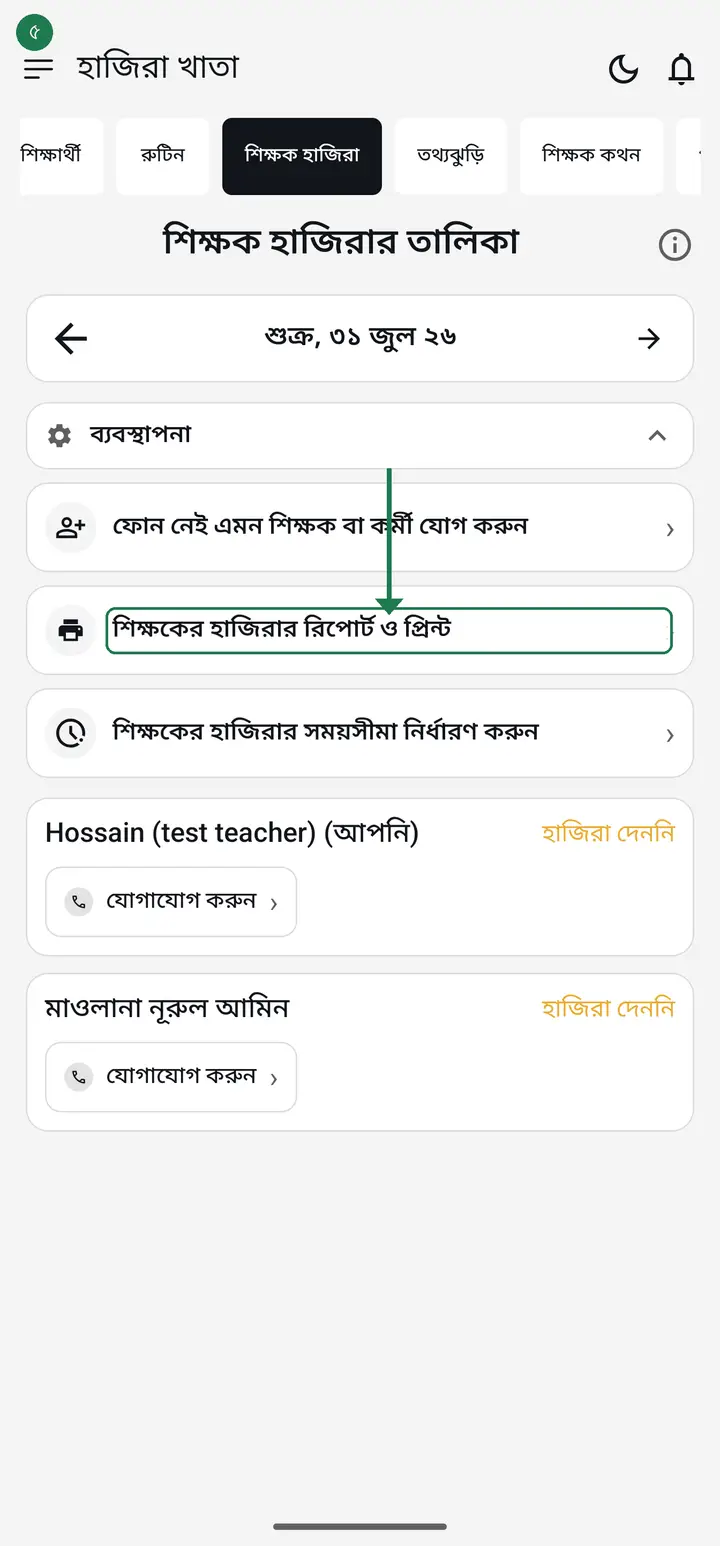
Scroll the tabs at the top to the right and tap "শিক্ষক হাজিরা" (Staff attendance). The "শিক্ষক হাজিরার তালিকা" (Teacher attendance log) opens.
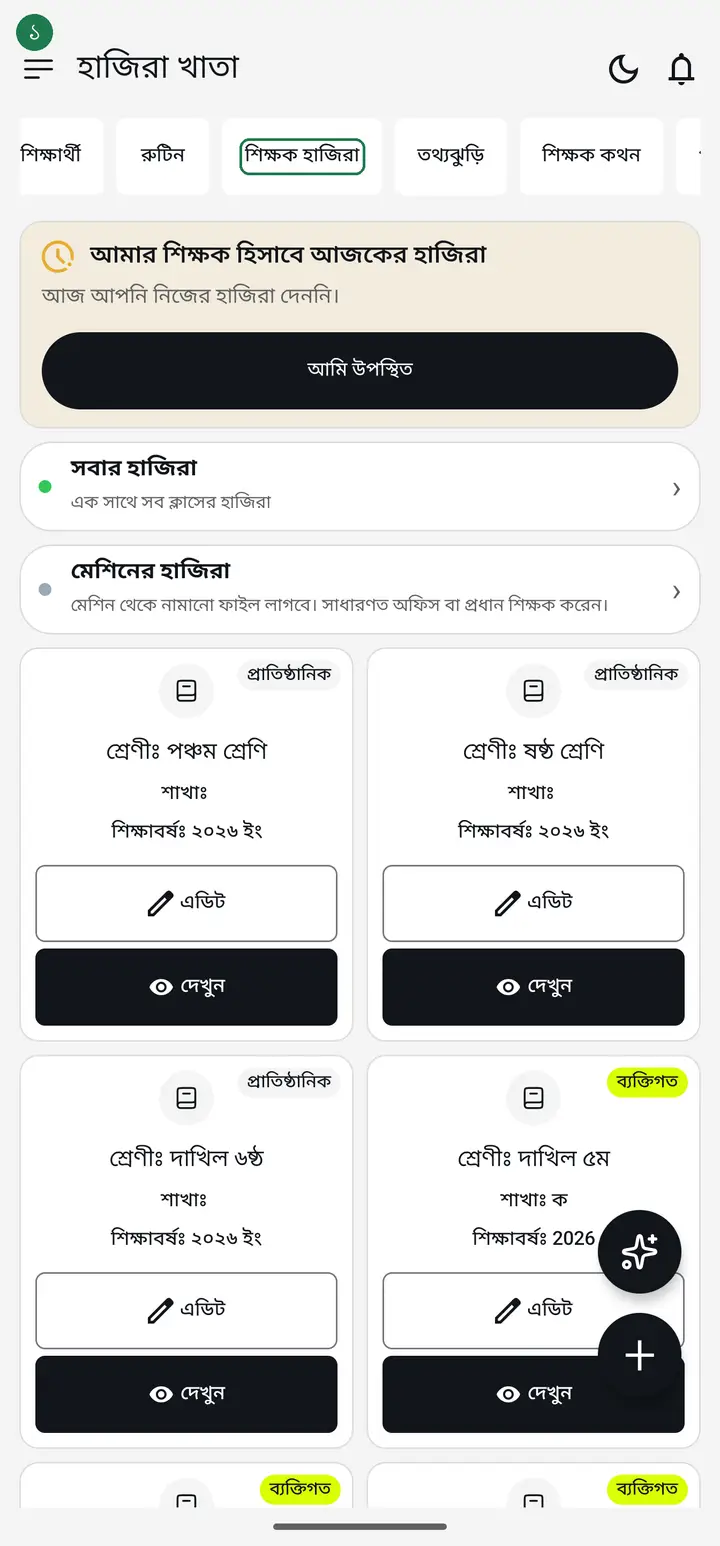
If the tab opens completely blank, or says staff attendance is for institutions, nothing is broken — you are simply not attached to an institution yet. See the FAQ below.
-
The date at the top shows today. Tap the left/right arrows to move a day at a time, or tap the date itself to jump to any day.
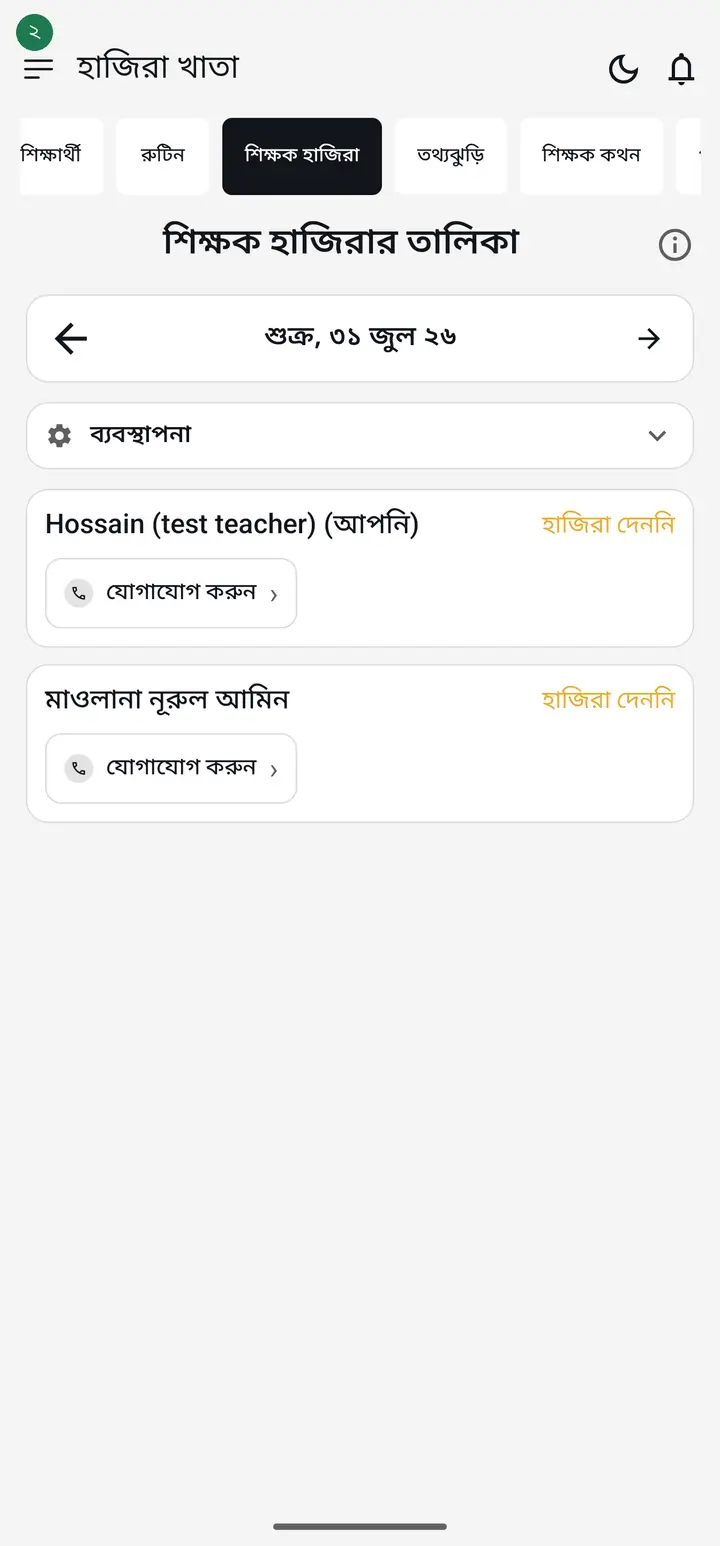
-
Below, the institution's teachers are listed — who arrived when, and who has not marked attendance yet.
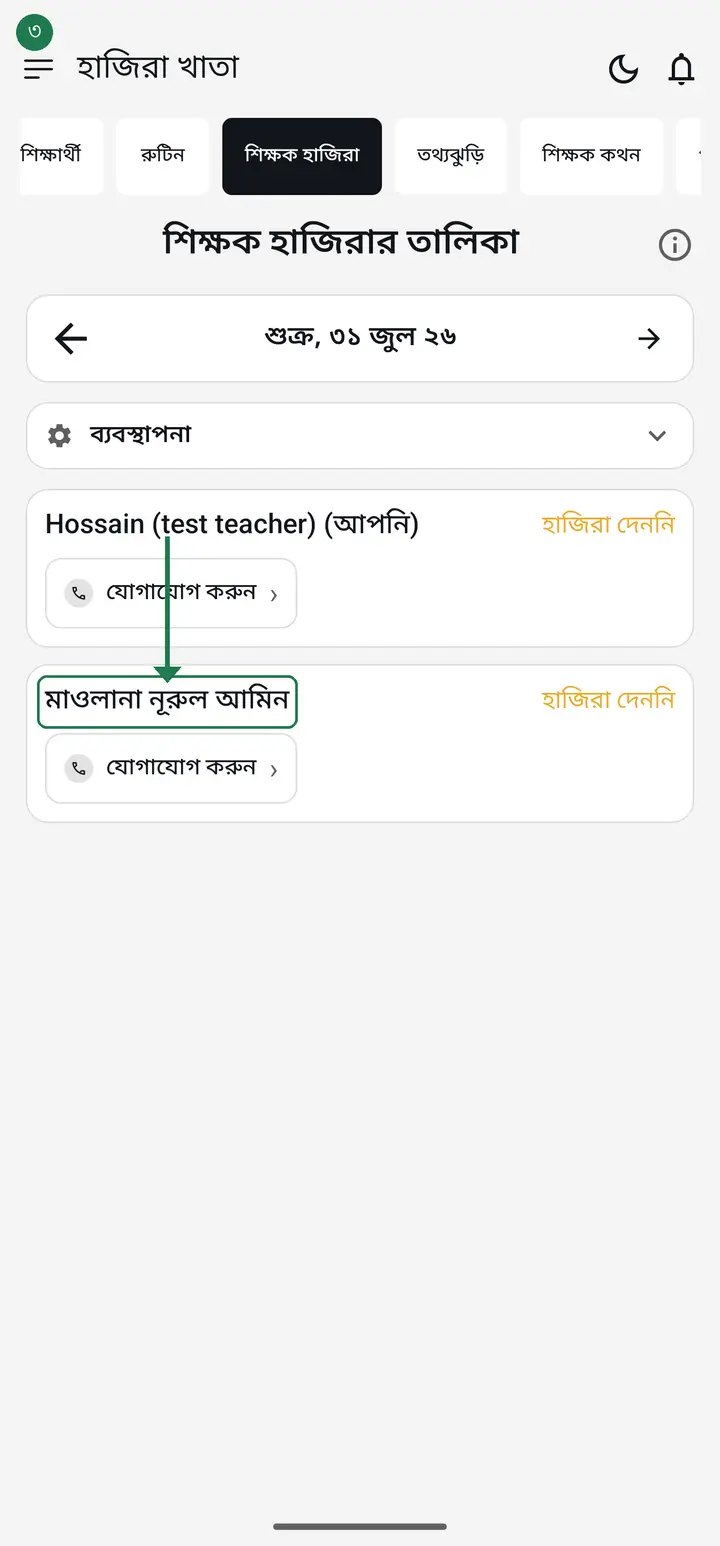
If it says there are no teachers yet, the institution is fine — you just have not added staff. Add teachers first; the names appear here after that.
-
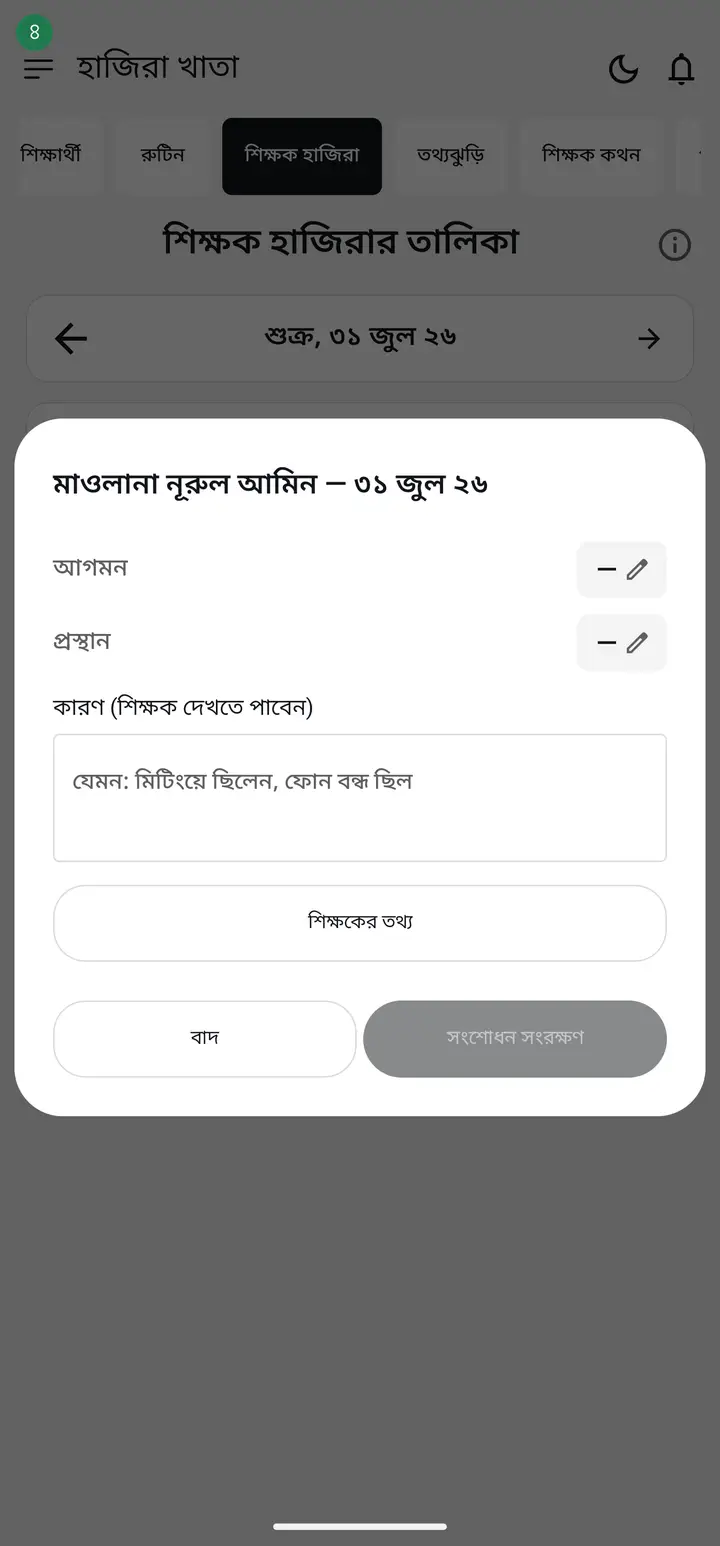
Tap a name to open that person's day in detail. If you are an admin or head master you can correct the times.
-
On that same detail screen, under the arrival and departure times, you see where the teacher marked attendance from — the place name, how far it was from the institution, and a small map. On the map the red circle is where the teacher was and the green square is your institution, so you can compare the two at a glance.
Notice the faint circle around the red dot. It shows how sure the phone was — the teacher was somewhere inside that circle, not exactly on the dot. In villages and indoors GPS often drifts 100-200 metres, so when the circle is large do not judge anyone on a small difference in distance.
-
Tap "শিক্ষকের হাজিরার রিপোর্ট ও প্রিন্ট" (Staff attendance report and print) to build and print a report between any two dates. Set the start and end date, tap "রিপোর্ট দেখুন" (Show report), then "প্রিন্ট করুন" (Print).
-
Under the two dates there is a "তালিকা সাজান" (sort the list by) control with two buttons — "পদবী অনুযায়ী" (by designation) and "আইডি নম্বর অনুযায়ী" (by ID number). A tick marks the one in use. If you touch nothing it stays on designation: head master first, then assistant head master, then the teachers, then the office staff.
Tapping "আইডি নম্বর অনুযায়ী" sorts strictly by number — 1001, 1002, 1003 — whatever the designation. In this order the number is also PRINTED in front of each name, on screen and on paper, so you can check the order yourself. It is worth knowing where the number comes from: you can type machine numbers yourself, but once you open "শিক্ষকদের নম্বর ঠিক করুন" the app hands a number to anyone who does not have one. So if a name sits somewhere you did not expect, do not assume the sorting is wrong — open that page, look at their number, and change it if you want. Anyone who genuinely has no number goes to the very end of the list but is never dropped: nobody disappears from the report. And whichever order you pick is exactly the order the printed sheet comes out in.
-
For each teacher the report shows উপস্থিতি (present), অনুপস্থিত (absent), ছুটি (leave), উপস্থিতির হার (attendance rate) and total hours. The working-day count is printed above the table and the generation date below it.
The অনুপস্থিত column does not appear until the institution's closed days are set. Without them the app cannot tell a Friday from a working day, and would print "absent" against a teacher on Eid — on a sheet their salary depends on. Until then the report says "লেখা হয়নি" (not recorded) instead, which is a statement about missing data, not an accusation.
-
To switch absences on, go to Settings → "ছুটি ও বন্ধের দিন" (Holidays and closed days). On that page tap your weekly holiday under "সাপ্তাহিক ছুটি", and add dated closures like Eid with "ছুটি যোগ করুন". Once set, the অনুপস্থিত column appears in the report.
Careful — Settings also has a "সাপ্তাহিক ছুটির দিন" row of weekday chips further down. It looks the same but saves to YOUR PHONE only; ticking Friday there will not bring the absent column back. Only the "ছুটি ও বন্ধের দিন" page sets it for the whole institution, and only a head master or admin can.
-
When a teacher does not come in at all, tap their name. If both আগমন and প্রস্থান are empty you will see two boxes — "অনুপস্থিত লিখে দিন" (write them absent) and "ছুটি লিখে দিন" (write them on leave). Tick the one you need, write a line in "কারণ" saying what happened, and tap "সংশোধন সংরক্ষণ" (Save correction). The report then counts that day as absent.
Save is refused without a reason, on purpose: the teacher can read that reason, and who wrote it and when stays in পরিবর্তনের ইতিহাস (edit history). An absence on a sheet that decides salary and promotion should say why.
-
If you do not see those two boxes, the day already has an arrival or departure time on it. A time means the person was here, so the app will not let it be called an absence. A "সময়টা তুলে দিন" (remove this time) action sits under each time; clearing the times brings the two boxes back. If you do not see it, update the app from the Play Store.
-
Marked the wrong teacher present, or marked someone present who was not actually there that day? Tap the person's name to open the detail screen, then check "এই দিন বাতিল করুন" (cancel this day) further down. Write a line in "কারণ" saying what happened — for example "ভুল করে অন্যজনের হাজিরা বসে গিয়েছিল" (marked the wrong person by mistake) — then tap "সংশোধন সংরক্ষণ" (Save correction). The box reads "এই দিন বাতিল করুন (শিক্ষকের হাজিরা নেই ধরা হবে)" (counts as not marked): the day counts exactly as if nobody had marked it — absent on a working day, leave if approved leave covers it. So if the person really did not come, cancelling is the whole fix. If the box instead reads "এই দিন বাতিল করুন (গণনায় ধরা হবে না)" (it will not be counted), your app is an older version where a cancelled day is neither present nor absent — update the app.
Save is refused without a reason, exactly like marking an absence — the teacher can read it. Cancelling does not delete the arrival/departure times; they stay on record, but they no longer count as attendance. The report shows "বাতিল" beside that date — from 3.2.274 together with where the day was counted, e.g. "বাতিল → অনুপস্থিত". Ticked it by mistake? The same spot then offers "বাতিল তুলে নিন" (undo cancel), which reverses it. Two things do survive, so write accordingly: "পরিবর্তনের ইতিহাস" at the bottom of that teacher's detail page records your name and the time, and the teacher can read the "কারণ" you typed. If the mistake was yours, say so there rather than writing something that reads as a mark against them.
Common questions
Why do some teachers' names print in English and some in Bangla on the attendance sheet? How do I make them all Bangla?
The sheet prints each teacher's account name — however they opened their account. The "পূর্ণ নাম (বাংলা)" (Full name, Bangla) box on the teacher info page does not reach the sheet; it is only for the ID card. To rename: "প্রতিষ্ঠান" (Institution) tab → "এডিট" (Edit) next to that teacher → type the Bangla name in "নাম" (Name) → "আপডেট" (Update). Full steps — hazirakhata.xyz/tutorials/staff-roles-permissions/
The list shows only my own attendance and nobody else's — why?
Your institution's admin or head master has left the "seeing other staff attendance" permission off for you. Nothing is broken and nothing is lost. You can still mark your own attendance exactly as before, and you can see your own row on that page — only everyone else's rows are hidden. Changing the date works too, so you can look back over your own days. If you need the full list, ask the admin or head master: they can switch it on from the প্রতিষ্ঠান page, next to your name, under "অনুমতি".
It used to say "এই তালিকা আপনার জন্য বন্ধ" here — where did that go?
That message was removed. When the permission was off the page used to be empty apart from that one line, and people read it as meaning their own attendance had stopped working too. The page now shows your own attendance in that space instead, so no explanatory line is needed. This change came from a head master's suggestion.
On a teacher's phone the list is simply empty, or shows a load error. Why?
That phone has an older build. The permission is enforced on the server, so they genuinely cannot read other people's attendance — that part is working. What the older build does not know is that it should show them their OWN attendance in that space, so the page looks blank or reports a load error instead. Updating the app fills it with their own row.
The report has no absent column, it says "লেখা হয়নি" instead — why?
Because the app does not yet know which days your institution is closed, so it cannot say anybody was expected in — Fridays and Eid would print as absences. Go to Settings → "ছুটি ও বন্ধের দিন", set the weekly holiday and your closures once, then rebuild the report and the absent column appears. "লেখা হয়নি" (not recorded) does not accuse anyone; it says no information was written for that day.
I ticked Friday under সাপ্তাহিক ছুটির দিন in Settings, but the report still shows no absences.
There are two weekday rows and they are not the same thing. The "সাপ্তাহিক ছুটির দিন" chips inside Settings apply to YOUR PHONE only — they drive your own reminder, not the report. The institution's one lives on Settings → "ছুটি ও বন্ধের দিন", under "সাপ্তাহিক ছুটি" at the top of that page. Set there, every teacher sees the same day and the report counts it. Only a head master or admin can set it.
Can a teacher mark themselves absent or on leave?
No — not in the app and not on the server. If someone could write "leave" on their own day they could erase their own absence, and salary depends on that count. Only a head master or admin can write it. A teacher can still record their own attendance; the absence decision is not theirs.
Will the teacher know if I mark them absent?
Yes. The reason you write is shown to them on their own screen, and who wrote it and when is kept in পরিবর্তনের ইতিহাস (edit history). That is deliberate — if an absence goes against someone''s name they should be able to see it and say so if it is wrong.
I cannot see the boxes for writing someone absent.
The feature is new — update Hazira Khata from the Play Store, then close and reopen the app. If it is still missing, check whether that day already has an arrival or departure time: the boxes do not appear when a time is set.
How do I put up the QR poster, and what does it get me?
On the teacher-attendance page there is an admin option called "স্কুলের QR পোস্টার". Generate it there, print it, and put it at the gate or in the office. A teacher scanning it with their camera is marked present without opening the app and finding the card. The gain is mostly convenience — one scan on the way in. The log notes beside that mark that it came from a scan.
Does a scanned poster prove the teacher was at the institution?
No, and this is worth being clear about. Anyone can photograph the poster once and scan that photo from home — the poster is a static thing that does not change day to day. So "scanned" is a hint, not proof. For the question of where someone actually was, the location and distance lines are far more useful — still not absolute proof, but far more meaningful than a scan. The app says this on the poster screen itself, so that nobody puts the wrong kind of trust in it.
Can I make scanning compulsory, so tapping the button does not count?
Not yet. Right now the app blocks nothing — the scan, the fingerprint, the location and the time are all recorded alongside the attendance, but a missing one never stops the mark. That is deliberate: a broken camera, a torn poster or a GPS that will not lock would otherwise block a teacher who genuinely turned up. We have had the request and it is on the list; if it is built it needs an admin approval path alongside it, or the person locked out is the teacher who actually came.
If several teachers mark attendance from one phone, can I tell?
Each mark stores a marker for which phone it came from. The same marker beside several names means one phone was used. The app does not yet block that or flag it for you — the information is there, you have to look.
Does the map prove the teacher was at the institution?
No, and this is the most important point. A location says where the PHONE reported it was — it is not proof the teacher was inside. A phone can be left outside, and GPS can simply be wrong. The map is where the conversation starts, not where it ends: if something looks off, talk to the teacher.
Are "অবস্থান দেননি" and "অবস্থান পাওয়া যায়নি" the same thing?
No, and the difference matters. "অবস্থান দেননি" (Location not shared) means the teacher declined — which is their right, since sharing is optional. "অবস্থান পাওয়া যায়নি" (Location not found) means they allowed it but the phone could not get a GPS fix, which is very common inside concrete buildings or on a weak network. Neither is a sign of cheating.
Why do older attendance records show no location?
Attendance recorded before this feature existed never stored a position, so nothing is shown for those days. It cannot be filled in afterwards — you will see it from new check-ins onward.
I see "নকল অবস্থানের অ্যাপ পাওয়া গেছে" — what does that mean?
A fake-GPS app was active on the phone, and the app detected it rather than hiding it. The position is still kept so you can see what was claimed. It is serious, but talk to the teacher before accusing anyone — such apps sometimes linger on a phone from games or other uses.
I tap the staff attendance tab and nothing appears — the screen is blank. Why?
Because you are not attached to an institution yet. Staff attendance is an institution feature, so with no institution there are no staff to list and the area stays empty. Nothing is broken and no update is needed. Create your institution profile first (see "How to set up your institution") and this tab starts working by itself.
I have an institution but no teacher names are in the list.
Creating the institution and adding teachers are two separate jobs. Teachers do not appear on their own — add them first, and then their names show up in this list.
How do I include a teacher who has no smartphone?
Tap "ফোন নেই এমন শিক্ষক বা কর্মী যোগ করুন" (Add a teacher or staff member without a phone). Type the name and they appear in the list, and you can record attendance on their behalf. They do not need the app.
Someone I typed in by hand now uses the app themselves, and the name shows twice. What do I do?
Open the "ফোন নেই এমন শিক্ষক বা কর্মী" (staff without a phone) list, tap the hand-typed name, then tap "এখন ফোন ব্যবহার করছেন" (they use a phone now) and choose their own account. The two entries become one, and every attendance record and detail stored under the hand-typed name moves across to their account — nothing is lost. Until you do it the app treats them as two different people, which is why the name appears twice in the attendance list, on ID cards and in the salary list alike.
Is this the students' attendance?
No. This is for teachers and staff — who came in to the institution today. Student attendance is taken inside a class from "উপস্থিতি নিন".
Does staff attendance cost money?
No. No part of Hazira Khata costs money at the moment, staff attendance included.
The report shows how many days someone was absent — where do I see which dates?
Under "প্রতি শিক্ষকের বিস্তারিত" (per-teacher detail), below the summary table, each teacher carries the dates themselves — "অনুপস্থিত ছিলেন — ১৮ আগস্ট ২৬, ১৯ আগস্ট ২৬, ২০ আগস্ট ২৬". For a long range the first 31 dates are printed and the rest summarised as "আরও ৭ দিন" (7 more), otherwise a page fills with nothing but dates. This has been there since 3.2.217 and has reached everyone — if the date line is missing from your printout the app is an old build; update from the Play Store. The count is as correct as before. One more thing: without the holiday calendar set, the app does not know which days the institution was open, so nobody is counted absent and no dates are listed — only a day you marked "অনুপস্থিত" by hand appears.
The report shows "বাতিল" beside a date — does that mean absent?
Read the line. "বাতিল" means you or someone at your institution cancelled that day's mark, and the words after it (e.g. "আসে নাই") are the reason typed when cancelling — the app only printed them. The line reads "৬ আগস্ট ২৬ · বাতিল → অনুপস্থিত — আসে নাই": yes, the day was counted absent, and the date also appears in the "অনুপস্থিত ছিলেন — ..." line. (With no holiday calendar set it reads "বাতিল → লেখা হয়নি"; on approved leave, "বাতিল → ছুটি".) A report made on an older version may print only "৬ আগস্ট ২৬ · বাতিল — আসে নাই", and there a cancelled day was left out of both the attendance rate and the absent count. Update the app and make the report again to get the new rule.
I marked the wrong teacher present by mistake — he was not actually at the school that day. How do I delete this attendance?
There is no direct "delete" — an attendance record can never be removed in this app, only cancelled, so the correction stays on record. Tap the teacher's name to open the detail screen, check "এই দিন বাতিল করুন" (cancel this day), write a reason, and tap "সংশোধন সংরক্ষণ" (Save correction). That is the whole fix — see step 7 above.
Even after cancelling, the date still shows "বাতিল" and the entry is still there. Can I delete it completely, so it looks as though nobody was marked that day at all?
No, and it is deliberate rather than a gap. Once a staff attendance exists it cannot be made to vanish silently. Cancelling stops the mark counting, but three things stay: the "বাতিল" marker, the reason you typed, and the "পরিবর্তনের ইতিহাস" entry naming who changed it and when. Staff attendance ends up in pay and attendance records, so a correction that left no trace would also be a way to alter someone's month with no evidence — every correction is signed, including yours. If the mistake was yours, write exactly that in the reason box. The teacher reads it, so "was not at the school" leaves the mark against their name, while naming your own slip leaves it as your correction. <br /><br /> One more thing: what you actually want is for the day to read as though nobody was marked — and that is exactly what cancelling does. A cancelled day counts as if it had no mark: absent on a working day when the holiday calendar is set, leave if approved leave covers it. Only the "বাতিল" marker and your reason remain as the trace. On an older app a cancelled day is neither present nor absent — if you see that, update the app.
Can a teacher mark attendance once on arrival and again on leaving?
Yes, and it already works. The teacher marks once on arriving and once on leaving. If somebody goes home during the day and comes back, each trip is kept separately. The log then also shows who is inside right now, and who arrived but never marked leaving. || For residential staff who never leave there is nothing to switch off — if nobody marks a departure the field simply stays empty; the app never invents a time. So there is no setting to hunt for: those who use it use it, and for everyone else nothing changes.
Can the list itself say how many minutes late someone was? Right now I compare each time by hand.
Yes, this has been added — a small line on the teacher's own row reading "৫ মিনিট দেরিতে এসেছেন" (arrived 5 min late) or "১ ঘণ্টা ১০ মিনিট আগে চলে গেছেন" (left 1 hr 10 min early). The app works it out against the hours YOU set, so set them first: on the staff attendance list open "ব্যবস্থাপনা" and tap "শিক্ষকের হাজিরার সময়সীমা নির্ধারণ করুন", then give a start and an end time. || With no hours set nothing is written, and that is deliberate — an institution that never fixed a start time has not asked for anyone to be called late. Arriving on time or early writes nothing, and leaving AFTER the closing time writes nothing either: staying longer is not a fault. A line appears only where there is genuinely something to say. || It is worked out from the two saved times, not from any stored flag, so it also works on attendance imported from a fingerprint machine and on days recorded before you set the hours. Voided days get no line. || If you do not see the line, update the app from the Play Store. The late column in "শিক্ষকের হাজিরার রিপোর্ট ও প্রিন্ট" also shows lateness.
Why are some teachers missing from the staff attendance report — especially the ones marked "ফোন নেই" (no phone)?
Their attendance is not deleted. The internet was weak at the moment the report was built, so the list of no-phone staff could not be fetched, and up to 3.2.278 the app built the report from everyone else anyway. Check your internet, reopen the page and tap "রিপোর্ট দেখুন" (Show report) again — the names come back. From 3.2.279 the app refuses to build a half report and says so instead.
Ask AI about this page
Ask an AI app to explain this page in simple language.
Copied — now paste it
Get Hazira Khata free on Google Play
More tutorials
- How to set up your institution Once your institution profile exists you can add other teachers, and everyone sees the same classes and students.
- Inviting and approving teachers Adding a teacher to your institution — share the code, then approve the request with one tap.
- Assign a teacher to a class (make them a class teacher) Teacher joined the institution but sees nothing? This one job fixes it — 2 minutes.
- Who can see what — designations and permissions How your other teachers sign in, how much power to give each one through designations — and now, more precisely for one person, through permissions too.
- A teacher has left — removing a member Somebody has resigned, or you approved the wrong person. Take the name off in one tap without losing any of the attendance or fees they recorded — and how to leave an institution yourself.
- Record a teacher's salary and send the receipt After paying a teacher, send them a receipt right from the app — instantly if they use WhatsApp, and as a shareable picture even if they don't.
- Leaving my old institution to open my own Want to leave your old school, or open your own? The red "এই প্রতিষ্ঠান ছাড়ুন" at the very bottom of the প্রতিষ্ঠান tab changes nothing until you confirm. After leaving, open your own.
- Taking admissions online Make one link and share it. Guardians fill the form from home, the applications land in your app, and approving one adds the student straight into a class.