
Keeping the zakat and donation accounts
In Ramadan every teacher at the madrasa collects zakat and donations from different places — one brings three thousand, another five. At the end of the month the muhtamim asks how much came in, who brought it, and how much was given out. Until now that lived in a paper notebook, and once zakat money and the school's own money shared one book the accounts became impossible to separate.
A separate book for zakat, fitra, sadaqah and donations — who gave, which teacher collected it, and where it went.
The screenshots show the app in Bangla, its main language. The buttons sit in the same places in English.
-
Open the institution page, tap "সম্পূর্ণ প্রতিষ্ঠান ড্যাশবোর্ড" (Full institution dashboard), and scroll a little — you will find "যাকাত ও দান-অনুদান".
-
Three numbers at the top — total collected, total distributed, and what is left. Below them, zakat and fitra are shown apart from sadaqah and general donations.
This book is deliberately separate from the school's income and expenses. Zakat may only be spent on its permitted recipients, so the two are never merged. There is no button to move money into the institution fund — if you need to, write an income row in আয়-ব্যয় by hand.
-
When you collect money, tap "নতুন যাকাত/দান যোগ করুন" (Add a collection). Pick the type at the top — zakat, fitra, sadaqah, general donation, waqf or other.
Choose the type carefully. Zakat and fitra may only be spent on their permitted recipients, while sadaqah and general donations can go to any madrasa need. A wrong type here cannot be untangled later.
-
Enter the amount, the donor name and their mobile number. You can also record how it was received (cash, bKash, bank) and what it was given for.
-
Tap "সংরক্ষণ করুন" (Save) and it is recorded. The app knows who collected it — whoever enters the row is credited with it.
It works with no internet. Save it and the entry uploads itself when the network returns — useful when you are collecting out in a village.
-
If someone gives rice, a goat or chickens instead of money, tap the same "নতুন যাকাত/দান যোগ করুন" and then "জিনিসপত্র" (Goods). The taka field disappears; write what was given and how much (e.g. 1 sack) and tap save. Leave the quantity blank if you do not know it.
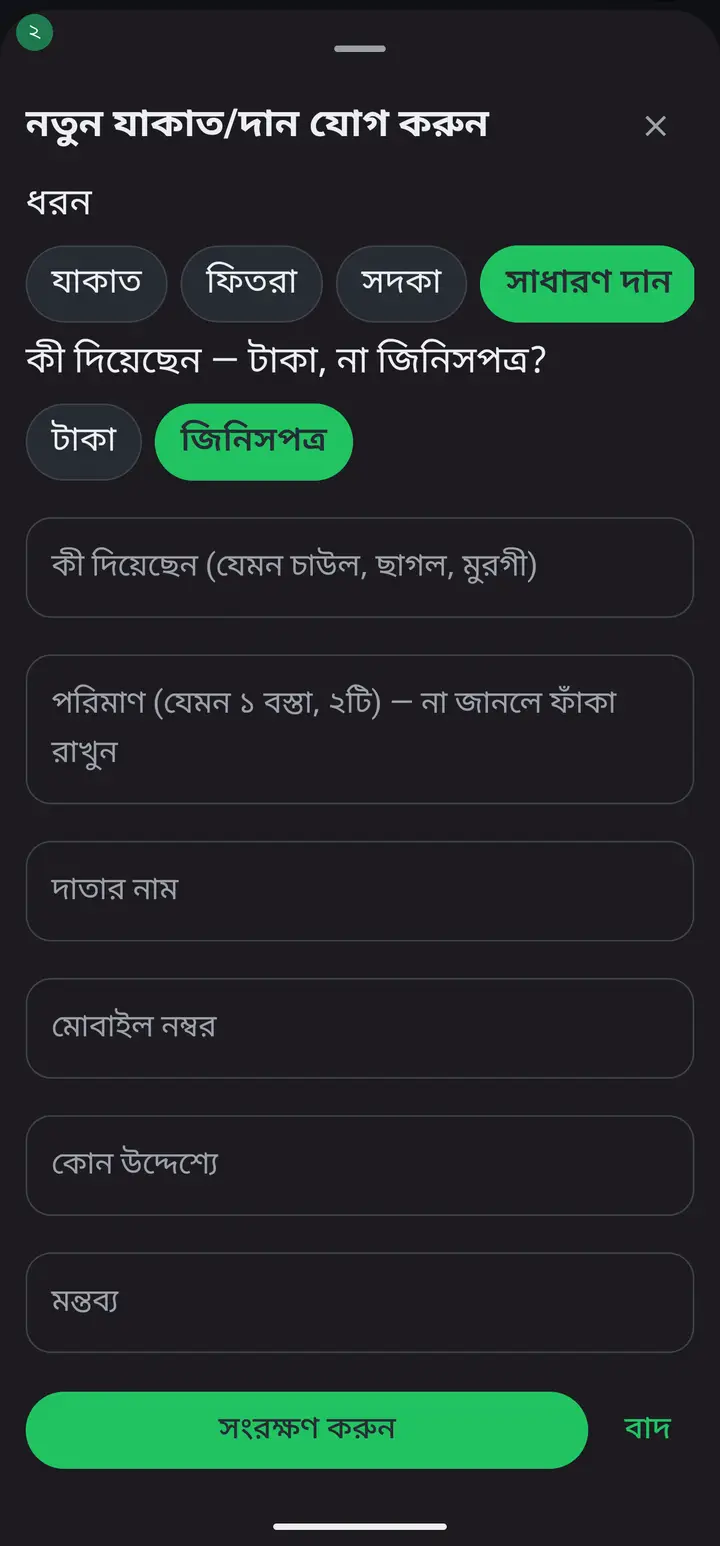
The "জিনিসপত্র" button arrives with the new update. If you do not see it you are on an older version — then do not enter goods as ৳0, the donor receipt would print ৳০.
-
Goods are never given a money value, so they are not added to the total collected or the balance. The dashboard lists them separately under "জিনিসপত্র দান" (Goods donated), and the receipt prints the item and quantity — no taka figure.
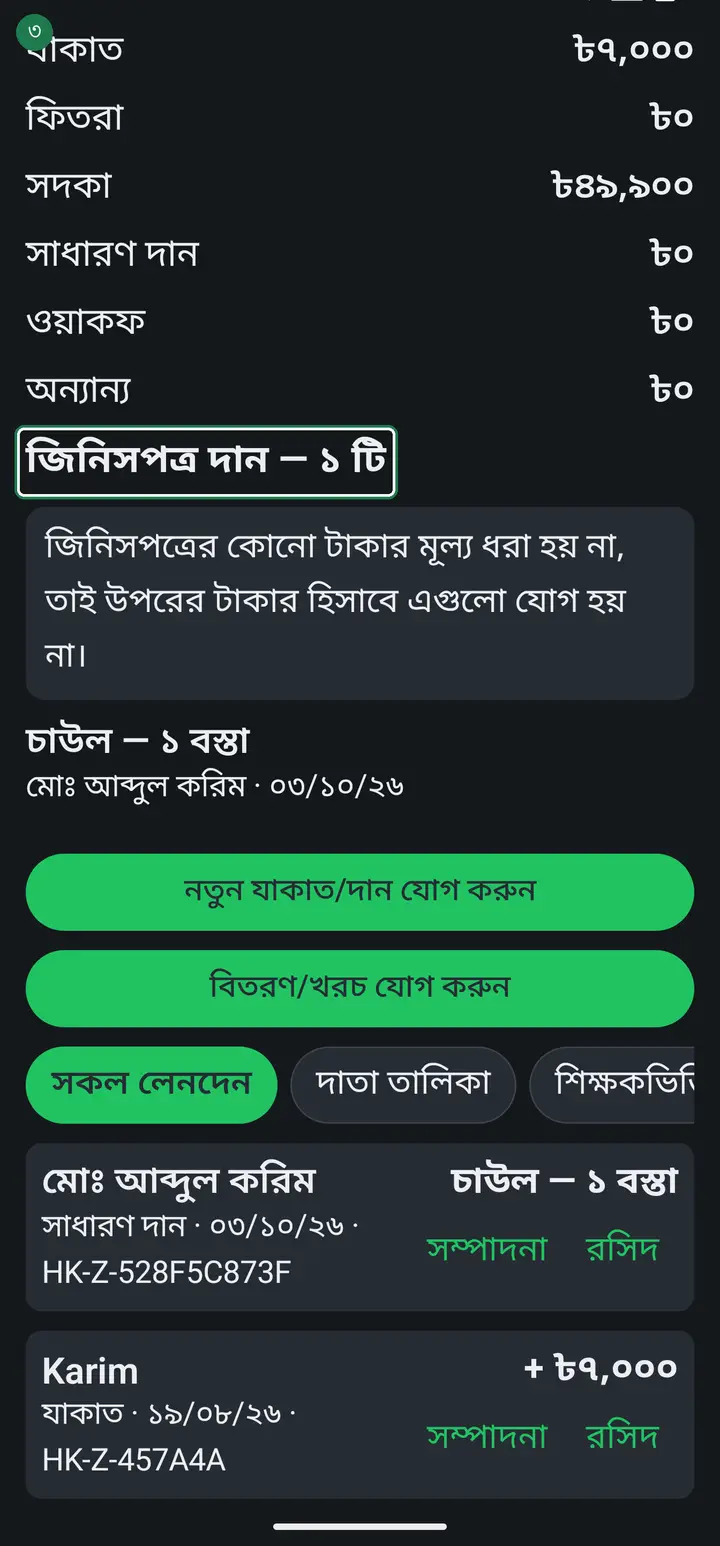
-
When you give money out, tap "বিতরণ/খরচ যোগ করুন" (Add a distribution). Choose which fund it comes from, then the recipient name and the amount.
You cannot pay out of a fund that has no money in it, even if another fund is full. Zakat is counted on its own, sadaqah on its own. The app will refuse it.
-
The three buttons below give you three views — all transactions, the donor list, and how much each teacher collected.
-
Tap "শিক্ষকভিত্তিক সংগ্রহ" to see how much each teacher has collected in total, largest first.
-
Tap "দাতা তালিকা" to see what each donor has given in total. When the same donor gives again, it adds to their earlier total.
Always record the mobile number if two donors share a name. The number is how the app tells people apart — without it, two men with the same name can end up sharing one total.
-
Every transaction has a "রসিদ" (Receipt) link beside it. Tap it and the receipt is generated and offered for sharing — WhatsApp or anywhere else.
Any teacher can print a receipt, not only an admin — the person who took the money is the one standing in front of the donor, and that is when the receipt is needed.
-
The receipt carries the madrasa name, a receipt number, the donor name, the type, the amount and who collected it. Every receipt has its own number so it can be checked later.
-
If the receipt text is too small or too large, tap "রসিদের লেখার আকার ও ফন্ট" at the bottom to adjust the size and font.
-
To correct or remove an entry, tap the transaction in the list. The whole row is tappable, not just the "রসিদ" link. It reopens with what you typed before — change it and tap save, or tap the delete button at the bottom to remove it entirely.
The delete button is shown only to an admin or head master. An ordinary teacher can reopen and correct an entry they recorded themselves, but not delete it. If you entered anything just to try the feature out, this is how you remove it.
Common questions
Someone donated rice, a goat or chickens instead of money — how do I record that?
In the new update, yes. Tap "নতুন যাকাত/দান যোগ করুন" and two buttons appear at the top — "টাকা" (money) and "জিনিসপত্র" (goods). Choose goods and the taka field disappears; write what was given (e.g. rice) and how much (e.g. 1 sack) — the quantity can stay blank. The receipt prints the item and quantity and no money figure. Goods are never given a money value, so they are not added to any money total — the dashboard lists them separately under "জিনিসপত্র দান". Goods can only be recorded as received, not as distributed. If you do not see the "জিনিসপত্র" button you are on an older version. Then do not enter it as ৳0 — the donor receipt would print ৳০. Until the update reaches you, keep goods in a separate book.
Does zakat money flow into the institution's income and expenses?
No, never. The two books are kept completely separate and there is no button to merge them. Zakat may only be spent on its permitted recipients, and once it mixes into a general balance nobody can say which taka went where. If you need to move money, write the income row in আয়-ব্যয় by hand.
Can every teacher record a collection?
Yes. Every teacher collects money in different places, so anyone can add a new collection. Only an admin or head master can change or delete an entry.
My sadaqah fund is full, so why is the app refusing a zakat distribution?
Because each fund is counted on its own. Sadaqah money cannot pay a zakat distribution — you can only give out as much zakat as the zakat fund actually holds. This is deliberate: the two kinds of money have different rules about how they may be spent.
Can I record money with no internet?
Yes. Save the entry and it uploads itself when the network comes back. Collecting in a village or at a mosque with no signal is not a problem.
Why is there no due or waiver line on the receipt?
Because neither exists for a donation or zakat. The madrasa does not charge anyone a donation, so giving less creates no due, and there is nothing to waive. The receipt records only what was actually received — which is the whole truth of the transaction.
Can waqf money go here too?
Yes, "ওয়াকফ" is one of the types. But remember that a waqf's capital is normally preserved and only its benefit is spent — the app cannot enforce that rule, so you must watch it yourself. What the app does is keep waqf apart so it never mixes with general donations.
Ask AI about this page
Ask an AI app to explain this page in simple language.
Copied — now paste it
Get Hazira Khata free on Google Play
More tutorials
- How to set up your institution Once your institution profile exists you can add other teachers, and everyone sees the same classes and students.
- Inviting and approving teachers Adding a teacher to your institution — share the code, then approve the request with one tap.
- Assign a teacher to a class (make them a class teacher) Teacher joined the institution but sees nothing? This one job fixes it — 2 minutes.
- Who can see what — designations and permissions How your other teachers sign in, how much power to give each one through designations — and now, more precisely for one person, through permissions too.
- A teacher has left — removing a member Somebody has resigned, or you approved the wrong person. Take the name off in one tap without losing any of the attendance or fees they recorded — and how to leave an institution yourself.
- Record a teacher's salary and send the receipt After paying a teacher, send them a receipt right from the app — instantly if they use WhatsApp, and as a shareable picture even if they don't.
- Taking admissions online Make one link and share it. Guardians fill the form from home, the applications land in your app, and approving one adds the student straight into a class.
- Join a school as a teacher Use the 6-character code your school gave you to join by yourself.